Startup Design Framework contains components and complex blocks which can easily be integrated into almost any design. All of these components are made in the same style, and can easily be integrated into projects, allowing you to create hundreds of solutions for your future projects.
All components are responsive design with full mobile support. It works fine on devices supporting Retina Display as well. Best of all, each component is already coded for you with HTML5, CSS and LESS. The only thing you need to do is to pick your favorite components and then build them like Lego blocks. It’s fun and super easy.
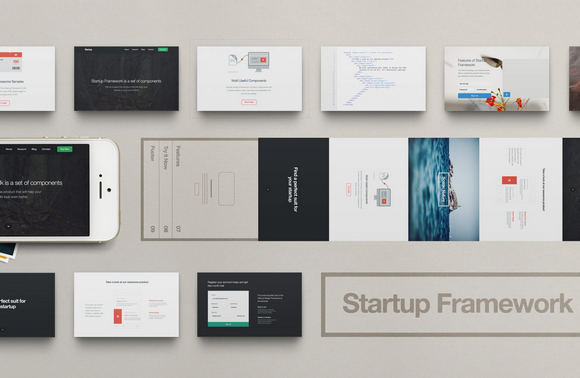
You can check out their demo version with some great examples of how you can build your website easily with Startup Design Framework. Read the rest of this entry »
The Pattern Library is an on going project compiles patterns shared by the most talented designers out there for you to use freely in your designs. I really like the design of the site, which is user-friendly and responsive. You can pick your favorite pattern easily to download as you wish.

Requirements: –
Demo: http://thepatternlibrary.com/
License: License Free
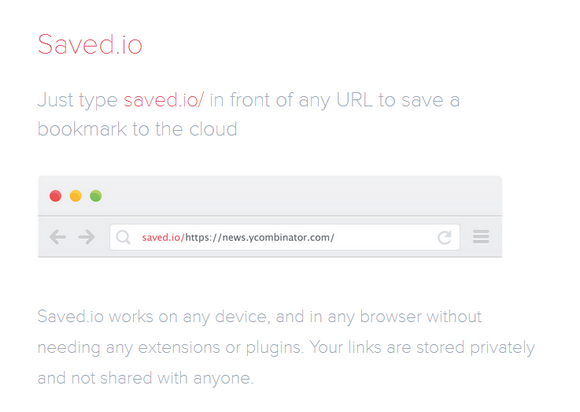
We were often losing bookmarks or simply not saving them because there was no easy way to do it across devices. To solve this problem we have Saved.io. It’s a solution that is super fast and easy to use, requires no extensions, and is future proof – it will work in any browser.
Saved.io is ridiculously simple to use – just type “saved.io/” in front of any URL in your address bar, hit enter and you’ve just saved a bookmark. Anthony Feint has purposefully left out Tags, Folders, Descriptions, Notes etc. from this app. Saving a bookmark should be fast.
Requirements: –
Demo: http://saved.io/
License: License Free
The Float Label Pattern found his success after Brad Frost wrote a blog post about Float Label Patterns. The idea is based on a Dribbble Shot by Matt D Smith. The Pattern is easy to explain. On User Interaction with an input field the placeholder value moves up, and is displayed above the typed text. Float Labels jQuery Plugin offers you the possibility to upgrade your forms with this famous pattern.

Requirements: jQuery Framework
Demo: http://clubdesign.github.io/floatlabels.js/
License: License Free
A Best-Of list is just like a football team. You shouldn’t only take into account the best players as individuals, but the best team; the players that harmonize best. In the list of The Best Fonts of 2013, Typefacts have taken this into stride and tried to compile a well-balanced, harmonic yet diversified overview.

Source: http://typefacts.com/news/die-besten-fonts-2013
Hugo is a static site generator written in GoLang. It is optimized for speed, easy use and configurability. Hugo takes a directory with content and templates and renders them into a full html website.
Hugo makes use of markdown files with front matter for meta data. A typical website of moderate size can be rendered in a fraction of a second. A good rule of thumb is that Hugo takes around 1 millisecond for each piece of content. It is written to work well with any kind of website including blogs, tumbles and docs.

Requirements: –
Demo: http://hugo.spf13.com/
License: Simple Public License
Sculpt is a lightweight, mobile first, responsive HTML, CSS and SASS framework. It has been written to cater for devices with small screen sizes first, with more complexity being added through media queries as screen real-estate increases. With three grid sizes (732px, 960px and 1140px) built in and active depending on your device’s screen size you can be sure your content will be well presented no matter the conditions.
Users with Internet Explorer 8 and no Javascript support will see the mobile version of your website, and so there will always be a degree of usability ensured. Internet Explorer 8 is the oldest browser Sculpt supports. Sculpt has been built from the ground up using SASS (.scss) and is at its most flexible and powerful when using the included .scss stylesheets and variables.

Requirements: –
Demo: http://www.heartinternet.co.uk/sculpt
License: Creative Commons License
CodePen is a playground for the front end side of the web. It’s all about inspiration, education, and sharing. Need to build a reduced test case to demonstrate and figure out a bug? CodePen is great for that. Want to show off your latest creation and get feedback from your peers? CodePen is great for that.
These are The Most Popular Pens of 2013, as decided by their super fancy algorithm modified without the age penalty. All of them are very impressive, and I am sure you can learn something from them.

Source: http://codepen.io/2013/popular/
Magnifier.js is a Javascript library enabling magnifying glass effect on an images. There are zoom in / out functionality using mouse wheel. Magnified image can be displayed in the lens itself or outside of it in a wrapper. Magnifier.js uses Event.js as a cross-browser event handling wrapper. It works in Chrome, Firefox, Safari, IE 7, 8, 9 & 10.

Requirements: JavaScript Framework
Demo: http://mark-rolich.github.io/Magnifier.js/
License: MIT License
Advertising refers wide announcement. It is used to stimulate or even create demand or perception to some certain products, services or ideas. Most consumers have already evaded ads, and even employed technical means to pick them out. Thus advertising makers are obliged to look for newest originality and to achieve best ads. Good advertising is for real consumer.
Creative Ad Awards is one of the best advertising archive, serving all the advertising fan and others who need it. They are keeping to providing you with the world’s most creative and sophisticated ads. All the collected ads follow the concept of SIMPLE (Simple, Involving, Memorable, Purchase Intention, Linkage with brand, Enjoyable), so that they will, absolutely, intoxicate rather than revolt you.

Source: http://www.creativeadawards.com/







