Tooltip is a splendid invention. Small detail in web design that plays a big role when it comes to user experience. Usually, tooltips are used to present a tiny amount of hidden content, that pops up when user moves a cursor over or clicks on a special target.
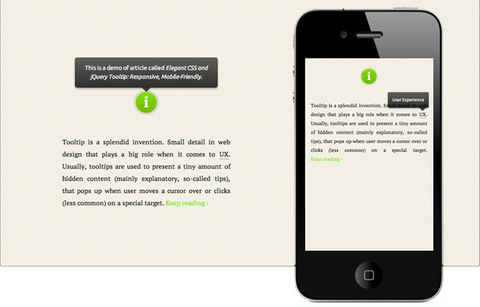
Osvaldas Valutis built a Responsive and Mobile-Friendly Tooltip using CSS and jQuery. It relies on a maximum width value when viewed on large screens, adopts to narrow environments and picks the best viewable position relatively to the target. It’s mobile-friendly. It pops up when a call-to-action button is tapped and disappears when tapped on the tooltip itself.
Requirements: jQuery Framework
Demo: http://osvaldas.info/blog/elegant-css-and-jquery-tooltip…
License: License Free
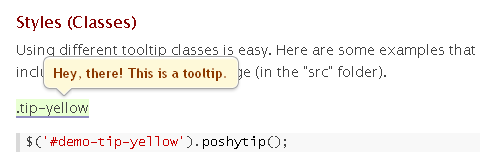
Poshy Tip jQuery Plugin is a tooltip plugin that allows easily creating stylish tooltips. With Poshy Tip you can position the tips relative to the mouse cursor or to the target element and align them in every possible way horizontally and vertically.
Poshy Tip supports using a function for returning the tooltip content and the script also passes an update callback function as an argument to this function. By using this callback, you can easily update asynchronously the content of the tooltip after it has been displayed.
Requirements: jQuery Framework
Demo: http://vadikom.com/demos/poshytip/
License: MIT, GPL License
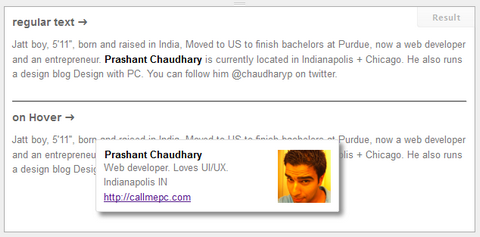
Hovercard is a free light weight jQuery plugin that enables you to display related information with the hovered label, link, or any html element of your choice. It comes with built in Twitter and Facebook hovercard.
A hovercard comes handy when displaying Person bio, Book author and price, Loading related information with Ajax and Editing in place. You may also add your own custom data source and display the profile data using existing card format. It supports callback functions on hover in and hover out.
Requirements: jQuery Framework
Demo: http://designwithpc.com/Plugins/Hovercard
License: License Free
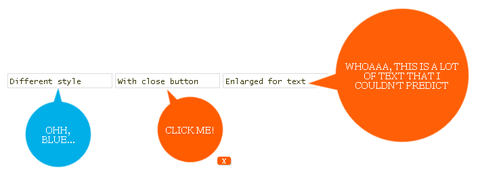
Grumble.js provides special tooltips without the usual limitations of north/east/south/west positioning. A grumble can be rotated around a given element at any angle, all 360 degrees. Any distance can be specified.
Any CSS style can be applied. There’s auto-magic size adjustment for use with localised text. FX queues for animating multiple grumbles. And it works in IE6+, and modern browsers. Image spriting is used for actual bubble image, you can change this as you want – it’s just CSS.
Requirements: jQuery Framework
Demo: http://jamescryer.github.com/grumble.js/
License: License Free
Mosaic jQuery Plugin automatically generates sliding boxes & captions. It allows slide & fade animations with custom directions. It preloads images within boxes. It is very lightweight at ~2kb (minified).
Implementation is fairly easy, they have provided a number of sample configurations in the downloadable file. It operates with two panels – an overlay and a backdrop. The content in the overlay gets repositioned according to the options that you provide.

Requirements: jQuery Framework
Demo: http://buildinternet.com/project/mosaic/
License: MIT, GPL License
Zoomy is a quick and easy plugin that will zoom into a picture. You only need two images; the display image and the zoomed in image. Just link the zoomed in picture on the display picture, and tell the plugin to use that link when zooming.
Zoomy is easy to implement and customize. There are a few options that allow you to change the appearance and usability of Zoomy. Plug it in, and even the most boring pictures can turn heads. Get a extra level of detail without boging down your page with gaint images. Take it for a test drive, and let Zoomy magnify you website.

Requirements: jQuery Framework
Demo: http://redeyeoperations.com/plugins/zoomy/
License: MIT, GPL License
Easy Image Zoom is a jQuery plugin that allows users to see large details of the product while moving cursor over medium sized image. The script is very lightweight and it is is customizable with several options and simple CSS definitions. It is suitable for projects required product image magnification.

Requirements: jQuery Framework
Demo: http://cssglobe.com/lab/easyzoom/easyzoom.html
License: MIT, GPL License
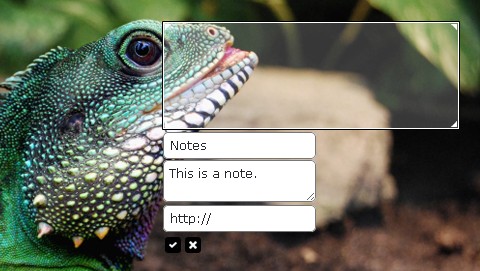
jQuery-Notes is a simple and easy to use jQuery-Plugin that allows you to add notes to any image on your website or blog. The default folder jquery-notes_notes, where the notes will be saved, must be writable.
The notes will be saved as a JSON-string under the data-name [prefix]md5([image]).note. Query-Notes is under the Attribution-Noncommercial-Share Alike 3.0 Unported License.
Requirements: jQuery Framework
Demo: http://jquery-notes.rydygel.de/samples.php
License: Attribution-Noncommercial-Share Alike 3.0 Unported License
Tutorialzine has written a simple jQuery tooltip plugin called Colortip. It converts the title attributes of elements within your page, into a series of colorful tooltips. Six color themes are available, so you can easily match it with the rest of your design.
You can also easily create your own tooltip designs by just including three additional style classes to your stylesheet and adding an element to the supported colors array in colortip-1.0-jquery.js.

Requirements: jQuery Framework
Demo: http://demo.tutorialzine.com/2010/07/colortips-jquery-tooltip…
License: License Free
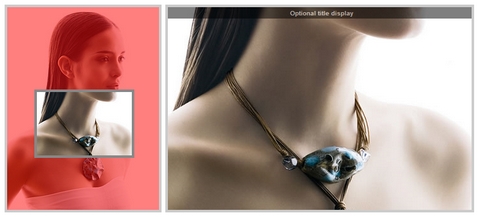
Cloud Zoom is a jQuery plugin comparable to commercial image zoom products such as Magic Zoom. Compared to the popular jQZoom plugin, Cloud Zoom is smaller, has more features and more robust compatability across browsers. It has been tested on IE6+, Firefox, Chrome, Opera, Safari.
You can add a tint of any colour to the small image. The intensity of tint is fully customisable. Zoom position can be inside the smaller image, useful if you would rather not obscure any other content. You can also apply a subtle soft-focus effect to the small image. Best of all, Cloud Zoom is completely free.
Requirements: jQuery Framework
Demo: http://www.professorcloud.com/mainsite/cloud-zoom.htm
License: MIT License







