A while ago, we have introduced 220+ Glossy Flag Icons in PNG format, Bartelme Design Flag Button Devkit. If you are looking for mini flag icons, you should visit FAMFAM Flag Icons as well. Many websites / web applications have different versions for different countries, and some of them support different languages as well. I am sure a set of flag icons / pictures can help us so much.
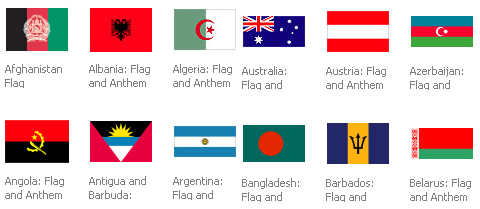
Now we can create our own set of flag icons for our websites / web applications, because MSN Multimedia Center provides us a set of flags, including 192 Countries, Canadian Provinces & Cities, Islands and U.S. States, Territories, & Regions.
Requirements: –
Demo: http://encarta.msn.com/mediacenter_2.0.1/Countries.html
License: License Free

ShiftSpace is an open source layer above any website. It seeks to expand the creative possibilities currently provided through the web. ShiftSpace provides tools for artists, designers, architects, activists, developers, students, researchers, and hobbyists to create online contexts built in and on top of websites.
By pressing the [shift] + [space] keys, a ShiftSpace user can invoke a new meta layer above any web page to browse and create additional interpretations, contextualizations and interventions – which we call Shifts. Users can choose between several authoring tools we’re working to develop – which we call Spaces. Some are utilitarian (like Notes and Highlights) and some are more interventionist (like ImageSwap and SourceShift). Users will be invited to map these shifts into Trails. These trails can be used for collaborative research, curating netart exhibitions or as platforms for context-based public debates.
Notes is a Space that allows a ShiftSpace user to leave post-it annotations on websites. Highlights is one we’re still developing, which would allow a user to highlight text on the page. Some Spaces lead more naturally to an interventionist usage. Two such Spaces that we have implemented are ImageSwap, which allows a user to grab any image on the web and swap it in place of other image, and SourceShift, which allows users to freely edit a page’s HTML code.
When a user visits a modified (’Shifted’) webpage, the small ShiftSpace icon (§) pops up in the bottom left side of the screen. Pressing the [shift] + [space] keys reveals the ShiftSpace console. From the console, the user can browse through existing Shifts, choosing to enable those that might be of interest. Holding down the [shift] key shows a small contextual menu, allowing the user to create Shifts of her own. The user can then choose whether to share her Shifts or to keep them private.

Source: http://www.shiftspace.org/
Apple has sold over one million iPhone 3Gs in first weekend. iPhone 3G looks stunning and runs a lot faster. I am sure most of us would like to have one too. Have you got yours yet? Have you ever think of developing an iPhone Application / iPhone Web App for it? However, how can we get started? Where can we get all the best iPhone Application development resources? You should take a look at the article: Hand Picked iPhone Application Development Resources by iPhone Toolbox.
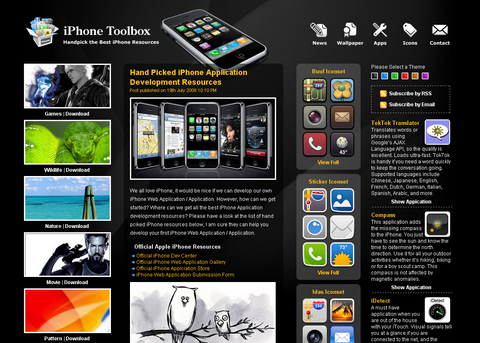
If you have an iPhone, you can download free iPhone Wallpapers, iPhone Icons from iPhone Toolbox. Also, you can check out the iPhone news and hand picked iPhone Web Apps as well.
Source: Hand Picked iPhone Application Development Resources
Nick La has made another great great tutorial for us. Nick La shows us how to decorate our images and photo galleries without editing the source images. The trick is very simple. All you need is an extra tag and apply a background image to create the overlaying effect. It is very easy and flexible with over 20 styles, from a simple image icon to a rounded corner to a masked layer (both decorative and complex). To change the look and feel, simply edit the CSS specifications of the span element. To show how flexible it is, Nick La has created 15 different styles as examples for us (notice the HTML markup is same).

Source: CSS Decorative Gallery
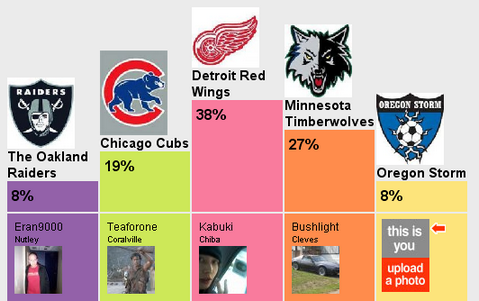
Polls Boutique is one of the polls resources on the web, offering a wide selection of polls on every topic. In Polls Boutique, anyone can vote on existing polls, and post new polls. It’s simple, quick and free. The polls can include pictures, embedded video, audio, hyperlinks and text.
After voting, users get to see their buddy icon represented near the poll option of their choice, and see what others are voting. It’s a fun way to meet new people with the same opinions (or not) as yours. The results page offers a great statistical playing field with cute pie charts and graphs showing all kinds of different statistical data harvested from the votes.
Requirements: –
Demo: http://www.pollsb.com/
License: License Free
Designing websites could be a real headache for some of the webmasters. Sometimes, we just want to relax and let some of the professional designers do the website design for us. However, it could be really expensive to hire some of the best designers out there at the moment. DreamTemplate is designed for people who do not want to spend big money on designers and do not have a lot of time to spend on designing their own websites. Unlike similar website templates company which is charging $35 – $70 per website template.
Instead, with less than $60/yr , you can have instant access to 3,000+ Premium Web Templates, CSS / Flash Templates or even Corporate ID Kits, Powerpoint, Word Templates, PDF Templates, Vector Icons and Joomla / WordPress Templates. DreamTemplate tries to add new products on a weekly basis, so that you can keep having some fresh website templates as well.

After Signing Up, you can download unlimited products by clicking the “Download†button under it. You may also decide to “Add†items to your cart and then download them all at once. You can have unlimited use of your downloaded templates for both of your personal and commercial sites as well.
DreamTemplate is very kind to offer WebAppers Readers 20 of Full Year Memberships (Total: $1199) for Free. If you would like to gain unlimited access to over 3,000 templates for free, all you have to do is leaving a comment under this post and tell us what feature you would like to see the most in a template site. And DreamTemplate will pick 20 winners with the best comments on 21st April. What are you waiting for? Participate now!
jQuery File Tree is a configurable, AJAX file browser plugin for jQuery. You can create a customized, fully-interactive, valid and semantic XHTML file tree with as little as one line of JavaScript code. jQuery File Tree is fully customizeable via CSS with the ability to style icons based on file extension. It also supports custom connector scripts for extended functionality. The expand and collapse event are customizable as well. jQuery File Tree works in all browsers supported by jQuery. It has been fully tested in Internet Explorer 6 & 7, Firefox 2, Safari 3 and Opera 9.

The author has stated that the connector scripts provided with jQuery File Tree are only designed to read information from a specified root folder. Although this is typically harmless, there exists a potential for malicious individuals to be able to view your entire directory structure by spoofing the root parameter. It is highly recommended that you add some form of check to your connector script to verify the path being scanned is a path that you want to allow visitors to see.
Requirements: jQuery
Demo: http://labs.abeautifulsite.net/projects/js/jquery/fileTree/demo/
License: Creative Commons License
Remember the time when I introduced Nice List of Open Source Fish Eye Menu? The dock’s ‘fish-eye’ effect, whereby icons expand and contract as the mouse moves over them. Now, we have another solution for it, MacStyleDock function allows this feature to be implemented easily.

Safalra has pointed out some usability issues when using dock as well. Anyone considering using the dock should be aware of the usability issues it raises. Firstly, the dock is generated entirely using JavaScript. If no alternative navigation is available then the site will be impossible to navigate for those without JavaScript. Secondly, the dock item magnification itself harms usability. Because the dock icons expand dynamically, they move on screen. The user has to correct for this movement, and this slows down their use of the dock.
Requirements: Any Modern Browsers with Javscript Enabled
Demo: http://www.safalra.com/web-design/javascript/mac-style-dock/
License: License Free
LogoTemplater is creating free blank logos templates and free vector art images in Adobe Illustrator EPS files for free download. Use their graphics designs for your website icon graphics. All logo templates are vector illustrations. It’s easy to change colors, add text or transform each of the free vector logo template design. Many of these logo templates look very nice, you can create your own logo easily with them. It can save you lots of money for hiring logo designers.

Requirements: –
Demo: http://www.logotemplater.com/
License: License Free
Design is a suite of web-design and development assistive tools which can be utilised on any web-page. Encompassing utilities for grid layout, measurement and alignment, Design is a uniquely powerful JavaScript bookmarklet. Click on the bookmarklet to run it and then you can load each individual component by simply clicking on the icon representing that component in the Design control panel.
Design features the following components:
- Grid – overlays a highly configurable layout grid over a web-page. Grid can be set to match any set of dimensions, allowing easy development of CSS layouts in the web-browser.
- Rule – displays rulers on a page, with all the expected features of the rulers found in a desktop design application, including guides which snap to block display elements and origin location control.
- Unit – allows measurements to be made between any two points on a web-page, giving basic information about each of the points clicked on, and drawing a line on the page for the measurement.
- Crosshair – draws a crosshair cursor on the page to assist in layout alignment. Cursor information is also presented in a tooltip.

Requirements: IE 7, Firefox 2+, Safari 2.0.4+, Opera 9.2+
Demo: http://www.sprymedia.co.uk/article/Design
License: License Free







