Web design trends don’t just appear out of the blue. They arise in response to people’s thinking in terms of their needs and comfort zones.
We tend to welcome change, as long as its for the better and doesn’t create chaos during a transition from one condition to the next.
The digital world has provided numerous good examples
of this balancing act, with the web design trends of 2022 being the latest.
In this post we will take a close-up look at 5 of these trends. We’ll include BeTheme pre-built sites you can use for inspiration or implement them directly to create or redesign sites for your clients.
5 Web Design Trends to Use in 2022
Designing or redesigning your clients’ websites with these new web design trends in mind will go a long way in helping them better engage their customers and capture their attention in their search for cutting-edge brands.
One of life’s pleasures is discovering when
some small action taken yields a highly positive, or even a game-changing
outcome. A web designer could spend many hours creating a modern website with
old tools. A single new tool or a single new service could cut the time
required to do so dramatically and produce an even better result.
There’s no shortage of tools or services
that could make a difference. The problem is that there are many hundreds of
them. There are far too many to devote the amount time it could take find one
that might make your day or prove to be a game changer.
One or more of these 15 top tools and
services could easily make your day; which is why we suggest you give each one a
good close look.
That said, may your shopping experience be a
happy and profitable one.
UXPin
provides designers with a set of advanced prototyping features perfect when
designing for all screen sizes. UXPin has also been built for great
collaboration, making it possible for everyone on the team to jump into one
design and work together in context and in real-time.
These features include:
Easily accessible built-in
libraries for Material Design, iOS, and Bootstrap
Hundreds of useful icons,
interactive elements, and animated states
Vector drawing tools that
enable designers to effectively draw and combine vector shapes to create icons
or illustrations
The ability to save code
components; thereby eliminating the necessity to redraw patterns over and over
HTML import, in which a web
page or page section can be imported to UXPin to support the prototyping effort
Team members have ready access to these and
other features in addition to being able to exchange design-related information
and feedback with team members and project stakeholders in real time.
Click on the banner to learn more about
this powerful labor-saving tool.
If you’re a professional wanting to showcase your products, what better way is there to do so than with a personal portfolio? Maybe one that’s presented in a way that invites close study?
A portfolio used to be a folder of papers you would carry around with you when visiting one potential customer after another. Today, you can get not only the same results, but far better ones. You can do it by using a website builder to create a portfolio website.
A portfolio website is perfect for displaying your work to existing clients and attracting potential ones.
There are plenty of platforms to choose from to build a stunning portfolio website. You’ll find six of the very best ones right here. They’re all easy to work with, flexible, and you can try and test most of them at no cost.
Portfoliobox is a highly-suitable online website building tool for photographers, artists, designers, and other creative types. It’s not theme-based, it’s super easy to use, and it’s extremely flexible; plus, you don’t need to know anything about code to use it.
As its name implies, it gives you all the tools needed to create a stunning, professional-looking portfolio, the type that not only keeps visitors engaged but encourages them to spread the word.
While you naturally will spend as much time as you feel you can afford to create a next-to-perfect portfolio, you could easily create a very attractive one within a few hours.
Portfoliobox offers two plans, including a free one that includes hosting of 10 pages, 30 images, and 10 products – plenty for you to see if it’s the right choice for you.
The pro plan includes web hosting for 1,000 images and an unlimited number of pages, blog posts, and products. Portfoliobox has more than 1 million users. Version 4 is in the works and scheduled for release within a few months.
You can use Wix to promote your business, set up and online shop, or test out new ideas. Or, to create a portfolio website to showcase your art. That’s this website builder’s strong suit. With this innovative drag and drop tool you can start from scratch, work from any of the 500 designer-made templates, customize to your heart’s content, and create the most stunning portfolio you could imagine, and any other type of website for that matter.
Your portfolio doesn’t have to consist of static displays either since you can make it come to life using clever scroll effects, animations, and even video backgrounds.
If creating an award-winning portfolio is your objective, and you want to have total design freedom to be able to obtain that objective, the Wix website builder and Wix editor is for you.
You’ve decided over your morning cup of coffee that today’s the day to start building an online portfolio to showcase your wares, you make Weebly your portfolio website builder of choice, and before day’s end your website is up and running.
It’s that easy with Weebly. You have access to a host of customizable webpage designs, useful tools, custom fonts, video backgrounds, site search, and last but not least, a powerful website builder that’s free.
Weebly even hosts your portfolio website free of charge and you can either purchase a domain or easily transfer one you already have. If you have a product line to display in your portfolio the folks at Weebly will gladly take professional-class photos for you if you ship them the products. Otherwise, there are plenty of tools to help you display products, photos, and works of art in all their glory.
With the global market expanding without limits, clients are more demanding than ever before. They understand that the highly competitive business realm requires creative websites. That’s good news: as competition increases, web development projects become more challenging. That’s good news for Be Theme too as it is the largest and extremely versatile.
It’s important to realize that the high level of competition demands creative websites for the most demanding eyes. They clearly understand the need for websites that are flexible and conversion-optimized. That’s more good news: This is your opportunity to wow these clients by building great creative websites for them.
Bonus GREAT news: Below you can find the 5 simple steps to creating a website that’s both eye-catching and built to convert visitors into users.
5 steps to building astonishing creative websites
Step 1: Choose a mesmerizing color palette
When it comes to creativity, choosing a color palette needs to follow a few simple rules:
it needs to attract attention instantly
it needs to be on-brand
it needs to visually support the messages
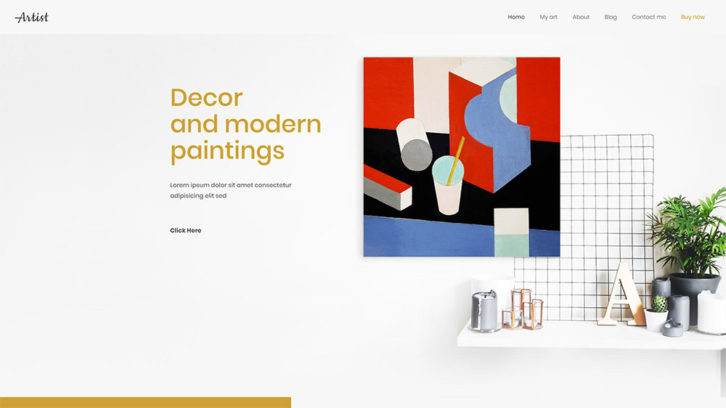
Artist has BOLD color touches that instantly attract attention.
You can find another great example of the eye-grabbing color palette on this pre-built website included in Be Theme.
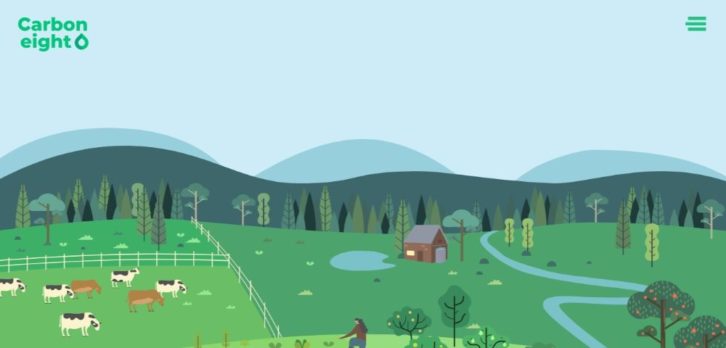
Carbon8 does a great job at aligning the color palette with its brand – deep green and shades are abundant (and makes for a visually memorable website).
BeInsurance uses a subtle, crisp color palette. It is perfect for reinforcing their message: Give crisp, clear images to gain the clients you need.
And if you’re looking for a color palette that appeals to a larger audience, BeFestival can be a perfect example.
With roughly 55,000 WordPress Plugins and Services to choose from, you shouldn’t have any trouble finding one or more that can take your business to the next level
Right?
The answer is “Noâ€.
Sifting through all 55,000 tools and services will not only take up a huge amount of your valuable time, but after a while, everything will begin to look alike. You could pass by something that could really help you, and even end up with nothing to show for your td trouble.
In this article, we’ve shared our expert pick of “must-have†WordPress tools and services for websites in 2019. You should have no problem finding a game-changing tool or service in hardly anytime at all.
If you’re in dire need of improving your design workflow and speeding up your production time Elementor, the most advanced WordPress page builder on the market can provide a solution to those problems and several others that could be getting in your way.
Are you spending too much time coding, or finding yourself limited as to what you can accomplish because of a lack of coding skills? Elementor’s powerful drag and drop page builder lets you create professional WordPress pages and sites without having to produce a line of code.
Furthermore, since Elementor works with any theme and any WordPress plugin you can avoid a couple of other common problems. More than a few themes place design constraints on you and many plugins have a nasty habit of slowing your sites down. Not so with Elementor. When this amazing tool helps you avoid problems like these, it can pay big dividends in time saved.
You also have the option of working with super-useful widgets if you prefer to start a project from scratch or select among hundreds of pre-designed templates and special effects to build your pages.
Page and website-building tools can be intimidating. The Brizy WordPress website builder is exactly the opposite. If you’ve been yearning for an easy-to-use drag and drop website building experience, Brizy delivers it in spades. No coding is required, nor do you need any design or special skills to work with this exceptional tool.
Since you get 150 layouts, 16 popups, and 240 pre-made building blocks right out of the box, you’ll have no problem figuring out your page structure and putting together a website in mere minutes. 4,000 icons are also included with the package and working with colors and fonts is super easy; With Brizy it’s easy to control how your site will display on tablets or mobile devices.
Since Brizy is free to download you can start using it right now and create websites for free with no strings attached. Read the rest of this entry »
Keeping up with the latest design trends is a challenge. It’s always been that way. But these days, changes come more frequently. This is thanks to the rapid pace of digital design technological advancements.
If it weren’t for the tools that allow us to keep pace, it would probably be a hopeless situation. The problem is, you still have to find those tools. The fact that they’re constantly flooding the market doesn’t make it easy. Most web designers don’t have the time or inclination to test out every new tool that appears over the horizon.
We’ve found 15 we consider the tops in their respective classes, and we’d like to share our findings with you. One or two of these top tools and resources should help you keep pace. You can also deliver better products than you ever thought possible.
Elementor is the industry’s best website builder. Simple, Powerful & Flexible. Now you can customize every detail without code. With over 2 million active installs and over 4,500 5-star reviews on WordPress, it is by far the most popular page editor out there. What Elementor does for you is to give you a solid website-building foundation on which you can create virtually anything, and do so  without complications, limitations, or constraints thanks to its super-clean code.
Elementor works with any theme and with any plugin. As such it gives you virtually unlimited design flexibility. It won’t slow down your site – a characteristic of all too many page builders. And, it’s powerful drag and drop editor enables you to quickly create pages and websites without ever having to resort to code.
You can dig into Elementor’s library of super useful widgets to build pages from scratch, or if you prefer, start with one of the 100+ pre-designed Elementor templates.
You’ll find a few nice surprises as well; like the Pop Up Builder, the Advanced Forms feature, and Scroll and Hover animations.
In short, with Elementor you can create pages and websites easily and in ways you never could before.
There are many software applications you can use for creating invoices, but few if any do as much of the work for you as AND CO from Fiverr. AND CO creates invoices for you automatically based on your project terms, contracts, and time tracking—all of which are available in the one app.
AND CO’s invoicing feature integrates perfectly with your project management workflow, enabling it to automatically create invoices when a project is completed or a milestone has been reached.
You’ll be alerted when clients view your invoices and when they’re paid, or when the system thinks it’s time for you to invoice again. Plus, you can set up an online ‘PayMe’ page to allow clients to pay you via credit card, ACH, and PayPal, and deposit the payments into your bank account. You can also set up recurring invoices so that clients who are on a subscription plan have their credit card charged automatically on a recurring basis.
AND CO is an invoicing software that lets you spend less time on invoicing and more time on doing the work you love. Read the rest of this entry »
Software companies have long worked to produce products that are as bug-free as possible. They knew that doing so will save them money in the long run, and create greater user satisfaction as well.
These same companies have been slower to recognize one crucial thing. It is that working to prevent usability issues from the outset can bring similar results. After all, design changes are almost always quicker, easier, and far less expensive to make. This is when compared to the development or post-deployment changes.
Let’s take a look at some UX and UI tools and resources that can save you a ton of time and expense.
You’ll find Mason of great value any time you’re responsible for maintaining post-deployment software. It’s also a great tool to have whenever there’s a need for a quick design change or adding a new feature whether you’re in the design, development, or post-development phase.
Mason’s approach may seem radically different in some respects; but it makes good, common sense.
This UI/UX tool provides teams with a visual front-end feature building capability that enables them to quickly and economically create app features without having to rely on wireframing, prototyping, or coding. The features can then be seamlessly integrated into existing product codebases.
What you’ll experience are drastically shortened development and deployment cycles. Clients are pleased to get quick responses to their needs rather than having to wait for the next deployment cycle, while teams are able to keep their development activities focused on larger or more complex projects, since Mason takes care of most of what a developer would normally be charged with doing.
There are many facets to a good design, and one of the challenges web designers face is keeping everything organized. This is where UXPin shines. UXPin is a cloud-based design and collaboration app with which teams and individuals can perform visual, interactive design tasks, create simple or complex wireframes, and design a prototype that perfectly mimics the real thing.
Everything, including team collaboration, is done from a single platform. Teams can collect feedback, share information, get approvals, and check specifications transparently and in real time. UXPin stores and secures all your design assets, components, and documentation in the cloud.
What’s more is that UXPin reduces both design and development time while ensuring consistency of design from one product to the next. This “must-have†tool is powerful in efficiently managing multiple projects at once. Read the rest of this entry »
Website building tools have been around for quite a while. Their functionality and ease of use have improved year by year. Their features have continually been added or enhanced.
The latest generation of these tools has witnessed significant improvements in their capabilities. These include visual frontend design technologies. The ability to incorporate features in websites that required coding is also there.
Professional web designers seek out the best and brightest of these newer tools. They know that they will save time, effort, and money by doing so. Beginners will profit as well, but often face the problem of not knowing what to look for or where to look for it.
6 popular and top-rated website and page-building tools are highlighted in this article. They should make the search much easier for beginners and professionals alike.
Elementor is the #1 WordPress website builder, Elementor will give you complete control over every page on your website using a beautiful front-end visual editor.
If you want to design any WordPress site without a developer than Elementor is the perfect choice, with over 2 million active installs worldwide there’s very little Elementor can’t handle.
Elementor is packed with powerful features built to supercharge your workflow: Theme Builder, Marketing Widget, Visual Form Builder, Header & Footer builder are just of the features, that set Elementor above other builders.
Other features include a Countdown Timer, Star Ratings, Reviews, WordPress Custom Fields Integration, a WooCommerce Builder, and with Version 2.4, the Elementor Popup Builder.
There’s undoubtedly more to come.
Now you can do the development, marketing and design simultaneously, save production cost and time and design better looking websites faster than ever before.  Read the rest of this entry »
WordPress is seen as the ultimate website building platform for a reason. Its design team was determined to create a perfect website builder. They wanted to create a builder that allows web designers to tweak and adjust their sites any way they want. Thanks to WordPress, users do not have to work around restrictions or limitations.
It’s not simply the WordPress building platform that can make life easy for a typical designer. It’s also the tools and services that are either compatible with WordPress. Some of them have been specifically created for use with it.
It’s the growing number of these tools and services that makes life exciting for designers. It does so by giving them the ability to continually advance the art of building a better website.
This article presents 10 of the top WordPress tools and services.
Elementor is an excellent example of the thinking that led to the creation of WordPress: open source, developer oriented and created with the best coding standards in mind. Its creators’ goal was to produce a tool that would let you build anything you want, without restrictions and without coding.
The degree to which they’ve succeeded can be measured in terms of its popularity. Starting with a handful of users when first released two years ago, this free, open source page builder now boasts a user base of over 1 million active installs – a major milestone that has never been achieved. The Elementor live frontend editor enables its users to create stunning websites, while offering a super-fast experience and workflow. It also works with any theme or template. You can build a website from scratch, use one of the 130 designer-made templates in Elementor’s library, use your own template, or import a template.
Elementors recently introduced series of advanced features and integrations takes website building to a new level. At the same time, its user’s favorite features have either been retained or enhanced.
Brizy is another free website builder that will enable you to visually build websites with a minimum of effort. No designer or developer skills are needed to use Brizy, nor is there any need for code.
What its users seem to like most is its ease of use combined with its friendly UX. Despite the wealth of tools and options available to designers and developers, Brizy’s user interface is clutter free and free of distractions as well. All the options are right there where you need them.
Designers have a library of more than 4,000 icons and both designers and developers will appreciate the 150-premade blocks that help to get a project underway. Developers can even create a page on Brizy’s website and save and use the HTML for any purpose, for free. Read the rest of this entry »
Trying to keep up with new technologies is a never-ending story for web designers. One would think that in doing so many if not most of those designers would eventually give up the chase.
That seldom happens, however, and for a good reason. There are plenty of amazing tools to cope with these challenges. They are created by other designers out there devoting their time and efforts. to this.
If you’re feeling the pressure, it might be time to take stock of your computer tools. Throw out any that appear to have lost their effectiveness!
You need to see where any gaps in your ability to take new challenges head-on may be. Then, invest in some of the latest best tools and resources.
The tools and resources presented here are designed to streamline your workflow. They can definitely add additional creative spark to your projects.
This open source WordPress page builder is lightning fast, developer friendly and works on any theme. Its live frontend editing feature allows you to create stunning websites without any need for coding.
Elementor has been a hit from the beginning, amassing a user base of more than 900,000 in less than two year. Elementor 2.0 is the newest version and includes exciting new features like the theme builder. You can use Elementor for free.
This page-builder is extremely easy to work with. While its features include a comprehensive library of pre-designed templates, Elementor will work with your own saved templates. You’ll be able to use them again and again and share with others.
Form Integrations, the visual form builder, a menu builder and custom CSS are among the most popular features.
With most WordPress themes the ability to create mobile-friendly devices is treated as an option, albeit a necessary one, or just another feature. Creating mobile-friendly websites is Mobirise’s specialty. You can build awesome device-friendly websites, small websites, landing pages, or portfolios, all without coding, and without any cost to you. Mobirise is free.
There’s a wealth of features and tools to work with too. You’ll find 1,200+ trendy blocks and templates in the package, along with nearly 8,000 fonts and icons and 500,000 free images.
Mobirise’s drag and drop functionality is easy to work with, and since it’s an offline builder, you’ll have total control over your design, how you build your website, and how and where you host it. Mobirise can be used for both personal and commercial reasons without restrictions. Read the rest of this entry »