Attention web designers and developers. Black Friday is upon us, and it’s your turn to participate in the fun and excitement.
We’ve put together nine attractive deals just for you. In fact, there is one or more you’re certain to want to take advantage of while they’re available. You’ll have to hurry though, as Black Friday only makes an appearance around this time of the year.
It’s not simply a matter of discount prices either. These top products will increase your productivity and the quality of your deliverables. Moreover, they will make it easier than ever to meet the most stringent deadlines.
What are you waiting for? Hop on board!
1. wpDataTables
wpDataTables is an absolute whiz at creating responsive tables and charts. This #1 WordPress plugin is so fast, efficient, and easy to use, that some users have switched over to the WordPress platform to use it. In fact,wpDataTables has over 13.000 paying users, with an average customer rating of 4.6.
No coding is required on your part. You can create your tables and/or charts with just a few clicks. wpDataTables not only works efficiently with large MySQL tables, and can in fact, easily work with huge amounts of data; we’re counting millions, not hundreds of words.
Since frontend editing is allowed, it’s easy to make changes to a chart or table as you proceed, or update one that has already been published. You can sum, average, show minimums or maximums, and perform other calculations; and if you want to highlight a few things, you can highlight rows, columns, or individual cells, based on the content type.
wpDataTables is a handy tool to have when you’re working on price lists, price comparisons, inventories, and most other collections of data.
On Black Friday, this plugin is yours at a 50% discount, from Tuesday, 21st till Wednesday, 29th November 2017 (2pm AEDT).
2. Webflow Templates

Whether you’re a Webflow user or not, the company is offering its HTML5/CSS3 responsive websites at a 75% discount on Black Friday only. There are more than 100 templates to choose from, including templates for blogs and portfolios.
This is a great opportunity to learn more about Webflow if you are currently using another design platform. 380,000+ designers and developers, along with other creative types, currently use Webflow – and for a good reason.
Since Webflow allows you to design and develop at the same time, you can build a website in half the time you’ve become used to, and probably less. Better yet, no coding is required on your part.
The 100+ templates give you plenty of design options, but if you prefer, you can also start from a blank canvas. Read the rest of this entry »
Have you been putting off a website project for some time right now? Do you feel like you don’t have the necessary tools or resources to do it well? Now it is high time to get that site designed and up and running,
It doesn’t matter what it is you may have been lacking. The options on the following list of tools and resources will satisfy your needs. At least one of the offerings should be just what you need. More than likely, several will prove to be helpful.
The same applies if you have the tools you need, but you’re simply looking for new ways to build better websites. Here you’ll find tools and resources that can be fast, efficient, and user-friendly. All can be used by beginners and experts alike – so, no more procrastinating!
Proto.io
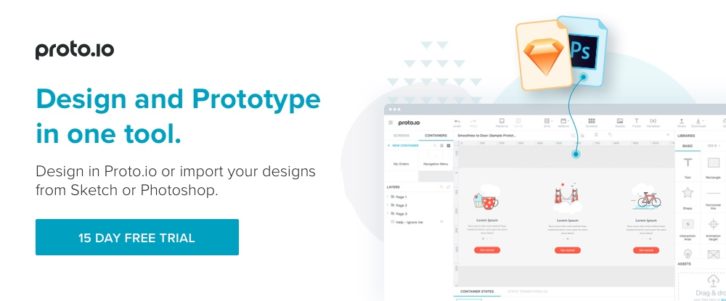
If you need to create a low-fidelity prototype to share yourthoughts as to the direction you’re headingwith teammates or clients,Proto.io is just the prototyping tool for you.
If what you needto create is a high-to-ultra-high prototype that features the look and feel of the real thing on any PC or mobile device, the solution is the same – Proto.io.
Designers, entrepreneurs, developers, and project managers can all benefit by having this excellent prototyping tool. The latest version, Proto.io 6, has been redesigned to make it more intuitive and easier to use.
This latest version features such niceties as single-click sharing, new state transitions, interactive design patterns, and a new app for iOS and Android that offers enhanced experiences of previewing your prototypes on mobile apps.
Gestures supported include tap and double tap, tap hold and tap hold release, touch, swipe (left or right, up or down), pan, right click, and mouse over. Proto.io also gives you the options of uploading information from Sketch, Photoshop, or Dropbox.
SITE123

SITE123 has all the web-building features you’d expect to see in a premier WordPress theme, such a rich choice of responsive designs, a WYSIWYG editor that displays changes as you make them, and an intuitive interface that enables you to arrange and customize design modules in the dashboard.
There’s a pair of useful features that you won’t find in many of the popular website building tools that might prompt you to give SITE123 a closer look.
One is a built-in app market that allows your customers to integrate external applications in to their websites, thus boosting their usability. These external applications could consist of analytics tools, live support chat, booking, and more.
The second feature is a multilingual tool that allows you to create a website in the language, or languages, or your choice – a great idea for a client who serves a global market.
Xfive

Designers who turn to Xfive.co for web development services eventually conclude that this company not only provides quality service and support, but must be a fun place to work as well. Xfive.co, formerly XHTML, has been up and running for just over 10 years. They are an Australian-based company, with offices in Melbourne, San Francisco, and Krakow.
The Xfive brand is typified by high fives all around for a job well done, which is all the time. That’s the company culture. They care about you as a customer, and they prefer to work with you as a partner. Microsoft, Twitter, and eBay are among the many thousands of clients, which also include startups and small business, and individual and freelance web designers.
Their services include PSD, Sketch, and AI to HTML conversion, custom PHP and Ruby on Rails applications, Email, JavaScript applications, and more. Read the rest of this entry »
WordPress has many pluses, but it’s not necessarily the most glamorous platform to work with. Still customize it with themes and plugins to fit a designer’s needs has made it the most popular CMS.
Plugins are great to have access to when you need to embed certain functions into your websites. There are a great many to choose from, and you can even have one developed that is customized to fit a particular need.
The main problem with plugins is the sheer number that are available. When you look for one to fill a special need, you may come across several that seem to fill the bill. Finding the best of the lot can be a challenge. To make life a little easier, we’ve chosen some of the best WordPress plugins out there that you can use to add key functionality to your websites.
9 Top WordPress Plugins
wpDataTables
wpDataTables provides a host of data management functionalities. For instance, tables you create with it can be made editable. Editing in wpDataTables is no more difficult than editing in Excel, and the tables can be very large. wpDataTables can work quickly when confronted with large amounts of data. All the data management functions associated with a given table are handled by the MySQL server.
The tables you create will be natively responsive, so you needn’t be concerned as to how they will display on various device types. Furthermore, the tables you create can be used as sources for creating charts. Just as the tables themselves are editable, the charts can be changed in real time to reflect up-to-date data and results.
A truly beneficial feature of wpDataTables is the ability to highlight cells, rows, and columns of data, in relationship to their content. By visiting the website, you can view the full range of this plugin’s features and capabilities.
Content Timeline
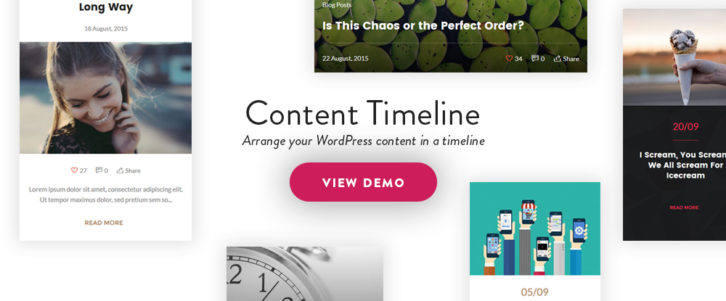
Content Timeline is a handy WordPress plugin to have if you want to display content in a sliding timeline. Content Timeline is responsive, and since it’s fully customizable, you can drag and drop to sort, add, or delete items of content as you like.
Should you need to edit an item in a timeline, you can edit it in its own window. 12 customizable Card Layouts are included to add a cool look to your timelines, or you can create a card from scratch.
Features you can easily incorporate into your timelines, include Swipe functionality, sorting by year, month or category (great for timelines of your posts), and dynamic loading of new posts. Content Timeline even makes it possible to display your posts in a slider. Users have given this plugin nearly solid 5-star ratings. Read the rest of this entry »
First of all, how exactly do you intend to present your design, or elements of it, to others, or test the UX? With a prototype of course, but there are also wireframes and mockups to consider. All three serve a purpose, but they are not one and the same. The problem is, the names are used often incorrectly.
So, let’s set things straight so you’ll know what to try and buy.
- A wireframe is a low-fidelity depiction of a design. A wireframe can say a lot about a design, but it is a static model. A wireframe cannot simulate a product’s look and feel.
- A mockup is one step up. A mockup typically provides much more information than a wireframe. Although interactive elements can be embedded in a mockup, it is a static representation. As such, a mockup is suitable for seeking feedback, but not for UI testing.
- A prototype is dynamic. A prototype will not only simulate the proposed end product, or certain functions of it. It will simulate the look and feel of the proposed design, and serve as a platform for usability testing.
Most designers create their prototypes in a three-step process.
1) They sketch out page flows. These show how a user might navigate the site or application.
2) They produce low-fidelity versions of each page which are individually tested for usability.
3) From lessons learned from testing, the high-fidelity, interactive prototype is created.
One of the following prototyping aids should be just the right solution for you.
Prototyping Tools that can Streamline Your Design Activity
InVision

InVision enables designers, developers and their teams to produce high-fidelity prototypes to review, refine, and user test their web and mobile product designs, all without requiring a single line of code.
This prototyping and collaboration platform is highly recommended by Forbes, who has designated InVision as one of the premier cloud companies in the world. InVision’s always-on platform turns static designs into interactive prototypes, speeding up the collaboration and feedback process, saving you valuable time and money.
The project management tools you need to share information while maintaining version control are there as well. Pixel-perfect prototypes, that have the look and feel of the final app or website you’re envisioning, can be built with ease. You can also conduct an unlimited number of usability tests with real users at no charge.
Sign up for a free trial today, and you’ll discover why over 2 million users have adopted this platform. InVision is driving design for some of the world’s smartest companies, including Twitter, Shopify, and LinkedIn. Now is your chance to design better, smarter products more quickly.
Pidoco

Pidoco is easy to learn and easy to use. It’s a nice solution for a team that wants to get rolling quickly. If click-through wireframes are what you need, or even a sketch, or a low-fi prototype, this tool gets it done, but where it really shines lies in the creation of fully-interactive UX prototypes.
Pidoco’s smart template feature offers a building block approach that allows your prototyping activity to move along at a rapid rate. Exports and specs is another useful feature. You can create specification documents to give to your team, or to your client for signoff, with the click of a button, and you can export your prototypes as PNG or vector files, or even as HTML.
Whether it’s for a website or an app, Pidoco can definitely speed up your design process and workflow, and deliver better designs at the same time. Read the rest of this entry »
There are various ways to build a prototype, and a prototype can be used as a measure of design progress or to test final result. In most instances, a web designer goal is to create a high-fidelity prototype has the look and feel of the end product, and is also capable of supporting team collaboration and usability testing activities.
If working with a top-of-the-line UX/IU tool is your objective, you’ll find what you need right here. Before you make a choice however, ask yourself the following questions:
- What features are most important to you?
- Is the end product a website, a mobile or web app, or all of the above?
- Is an interactive feature of interest or importance? If you plan to conduct meaningful usability tests, the answer must be a definite “yesâ€.
- How large is your team or project? Size can determine the right tool for the job.
InVision

InVision is an ideal choice if you are an individual designer or belong to a small team. It is the leading product design and collaboration platform on the market, and its usability testing capabilities are without peer.
For large or interdepartmental teams, the Enterprise Edition of this product design and collaboration platform is the answer to their prototyping, collaboration, and usability testing needs. Within the platform, gathering and acting on user feedback is intuitive.
Prototypes can be tested directly on users’ devices, and their reactions—including hearing their voices and seeing their faces—makes the feedback you receive more meaningful and useful.
You don’t need coding skills to build prototypes using InVision, and the first prototype you build with it is free. InVision is a solid choice if you are looking for a platform that can produce a high-fidelity, clickable, interactive prototype with all the usability testing capabilities you could need.
Proto.io

With Proto.io, you can build a high-fidelity, interactive, and animated prototype in no time at all, without any need for coding. This UX/UI tool’s collaboration features makes it an excellent choice if you are a project team member, or you need to share design and testing information with your client for purposes of receiving feedback or approval. Read the rest of this entry »
There are times, when you are suddenly faced with the necessity of working with a huge amount of data in WordPress. To make things even more difficult, your client is looking for a solution involving a MySQL table, and he would like to have the results fairly quickly.
Creating graphs or tables from large quantities of data is not one of your strong points. Even if a plugin type tool were available, there will still be a steep learning curve to contend with; or so you think.
Whenever you find yourself in such dire straits, you hope a superhero might suddenly appear to free you from your dilemma; a superhero that is faster than a speeding bullet, has x-ray vision, and can move and manipulate huge stacks of data, as if they were feather-light.
wpDataTables is such a superhero.
wpDataTables is a WordPress plugin that can solve virtually any graph- or table-building issue you are likely to encounter; and you can depend on it to arrive on the scene in your time of need.
wpDataTables’ Amazing Superpowers

In the past, you may have tried to become proficient at MySQL This would only make sense if you had a continual need for it. That would only justify the huge amount of time necessary to learn the ways MySQL works.
There is of course a better way, and one that doesn’t require you to take time away from your design activities. All you need to do is learn how to put this WordPress table and charts plugin to use. That will take you no time at all, and you can then bring your superhero’s superpowers to bear. Read the rest of this entry »
You can now create stunning map visuals in just minutes with AmCharts new tool – Pixel Map Generator. Integrate the result into your website, drop into a presentation, or even use them in print brochure. Regardless of how you use it, jaw-dropping effect is guaranteed.

Requirements: –
Demo: http://pixelmap.amcharts.com/
License: License Free
HTML Color Codes is a powerful set of free color tools, including a color picker, color charts and names, tutorials, and resources. You can easily find that perfect color with our color picker and discover beautiful color harmonies, tints, shades and tones; input Hex color codes, RGB and HSL values, and generate HTML, CSS and SCSS styles. Can’t remember all 140 HTML color names? They’ve got you covered, check out our guide for a quick reference of all the HTML color names grouped by color as well.

Requirements: –
Demo: http://htmlcolorcodes.com/
License: License Free

Whether you are tech-savvy or just a newbie, you’ll definitely be glad to have a universal theme providing all the essentials in one pack. Well, it appears that such a solution has finally been released for WordPress users. As its name suggests, “Monstroid†is a monstrously powerful WP theme suitable for any type of site, from blogs and news portals to personal & corporate portfolios and e-stores. It is equipped with a rich array of options for the design of your website. They include 145 predefined pages, 120+ PSD files, 50+ licensed images, 500+ fonts, multiple interface elements, styles, skins, child themes – you name it. This is just a modest beginning to the list of features, so read our review to learn about Monstroid in detail.
Get Multiple Child Themes for Free

Monstroid does not only have unlimited design possibilities but also comes with 4 child themes. They embrace the topics enjoying the widest popularity in the web design community, particularly finance & IT for businessmen, art & photography for creative individuals and studios, education for instructors and schools, as well as interior & furniture for decorators and architects. What’s more, the scope of topics will be broadened eventually, and you will receive up to 15 child themes monthly. It means you pay for one theme, but obtain multiple themes for the same amount of money. As you can see, Monstroid allows you to save for a rainy day. Read the rest of this entry »
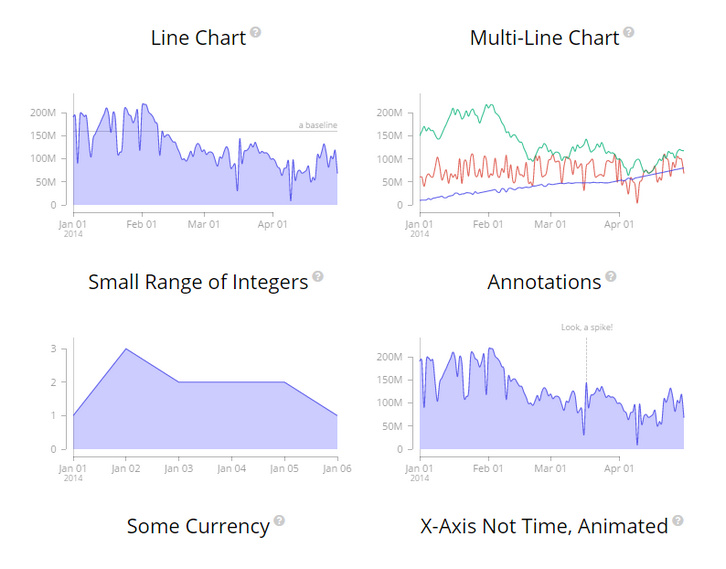
MetricsGraphics.js is a library built on top of D3 that is optimized for visualizing and laying out time-series data. It provides a simple way to produce common types of graphics in a principled, consistent and responsive way. The library currently supports line charts, scatterplots and histograms as well as features like rug plots and basic linear regression.
The API is simple. All that’s needed to create a graphic is to specify a few default parameters and then, if desired, override one or more of the optional parameters on offer. The library is data-source agnostic. While it provides a number of convenience functions and options that allow for graphics to better handle things like missing observations, it doesn’t care where the data comes from.
Requirements: D3 Framework
Demo: http://metricsgraphicsjs.org/examples.htm
License: Mozilla Public License v2.0







