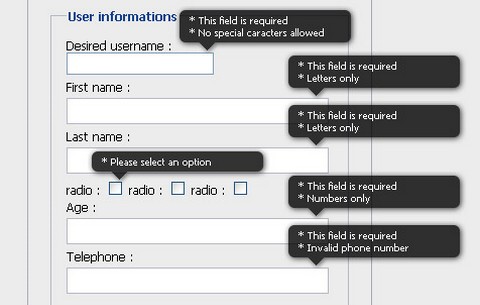
When it comes to form validation, it’s hard to have a versatile solution that works with every form. Figuring out how to display errors is not a simple task. Cedric Dugas has created a jQuery Validation Engine in order to solve this problem.
When an error needs to be displayed, the script creates a div and positions it in the top right corner of the input. This way you don’t have to worry about your HTML form structure. The rounded corner and shadow are done with CSS3 and degrade well in non compliant browsers. There is no images needed.
When you submit a form, it will look for inputs with predefined class selectors, and validate them accordingly to their type. It also does on the fly validation when you click outside of the input. Localisation language is also available. It has been tested on Internet Exploder 6 & 7, Firefox 3+, Safari 4 and Chrome 1+.
UNIQLO has just released a Calendar Blog Parts, which displays a beatiful Flash calendar with the weather forcast. You can select the country appears on the calendar. You can also set the Background Music On/Off. There are Small and Large size available at the moment.
UNIQLO Calendar Blog Parts has been tested on Internet Explorer 6+, Firefox 1.5+ and Safari 1.3.2+. You can easily integrate the calendar on your blog, Myspace, Facebook, iGoogle and etc… Simply paste the generated code on your site, you will get a pretty calendar as follow.
Currently, there are two commonly used techniques on displaying columns, the fixed columns and the liquid columns. With fixed columns, there will be certain viewport resolutions, where it leaves excess white space where a column was just not able to squeeze in. The downside of liquid columns is that we are restricted to having a fixed number of columns per row.
SohTanaka has thought of a solution: Smart Columns with CSS & jQuery would be able to benefit the situations is to take the good of both scenarios and mash it into one. Allow as many fixed columns to line up across the viewport. Take excess white space and evenly distribute them to each of the columns to complete the full row. This way the columns will always fit perfectly.
And also, It keeps a default fixed width as the base, so that the columns are reasonably within the intended columns sizes while maintaining enough flexibility to accommodate for the expandable viewport.
UIzard is an in-browser web application development tool built on various Javascript Framework. You can add and arrange UI components easily by using Drag & Drop in-browser environment. You can also edit JavaScript Code or Html Code on the in-browser environment without operating other editors. You can preview the result of your works immediately.
UIzard is an open source project, following GPL v2 License. However, it is only a beta version so it can be a little unstable at the moment. You can always see UIzard in action here.
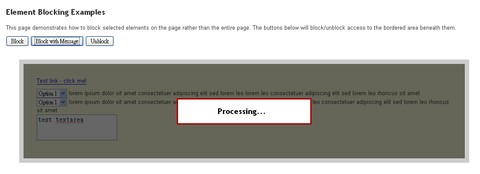
The jQuery BlockUI Plugin lets you simulate synchronous behavior when using AJAX, without locking the browser. When activated, it will prevent user activity with the page (or part of the page) until it is deactivated.
BlockUI adds elements to the DOM to give it both the appearance and behavior of blocking user interaction. It is particular useful for creating loading screen for web application. BlockUI is compatible with jQuery v1.2.3 and later.
PatternCooler is a a free Seamless Pattern Background Design Resource. You can add your own colors to contemporary and retro pattern designs, or browse from thousands of pre-colored patterns in the seamless pattern background library.
All artworks on this site can be used freely for blogs, MySpace profiles, Twitter, mobile phone wallpapers, scrapbooking, personal artwork, and non-commercial web projects.
jQuery Tools is a collection of the most important user-interface components for today’s websites. This single JavaScript file weighs only 5.8 Kb. This library contains some useful JavaScript tools like tabs, tooltips, accordions, overlays, smooth navigation, great visual effects and all those “web 2.0” goodies that you have seen on your favourite websites.
You don’t need to be a programmer to use these tools. They have lots of Demos you can explore and you can copy their source code to your site and things will work. Each tool is used in a similar manner and by learning one tool you can easily learn the other tools.
And above all, the library is constantly maintained and updated. Expect to see new releases coming out on a regular basis. This library is dual licensed under MIT and GPL 2+ licenses.
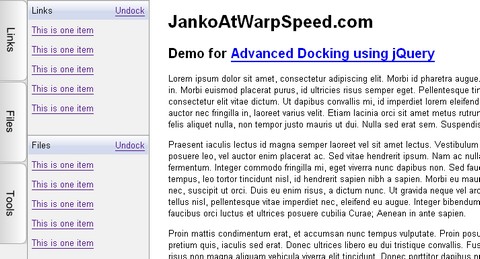
Janko shows you how to implement Advanced Docking using jQuery. He taught us how to create multiple docking and undocking functionality with jQuery and unordered lists.
When user hovers an item on vertical menu, its submenu will slide in from left to right and overlay the content. When user move the mouse pointer outside the panel, it will slide back. If user clicks on “Dock” link, panel will fix in the current position while content moves to the right of the panel in order to be seen. Lastly, if users “undock” the panel, it will slide back.
But that is not all. Multiple panes are able to dock in the same time. If one panel only is docked it should be 100% height. With each new panel docked, height will be recalculated so that all panels have the same height value. If there are docked panels and user wants to slide in another panel temporarily, it will overlay docked panels.
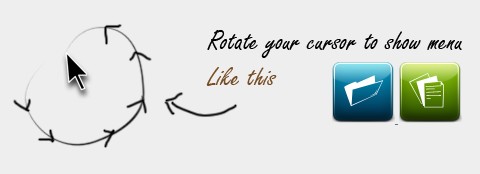
Moousture is a mouse gesture library with power and flexiblity to mould itself for you. Implemented on Mootools following the Object Oriented standards. Library is aimed to set out a future framework for mouse guesters for any browser including modern mobile devices.
Its based on three major concepts. A probe, which probes the pointing device. A monitor, which tests the stability of probed device on given intervals and accordingly notifies Moousture events (onStable, onUnstable, onMove). And a Moousture recorder class that records the mouse movements and invoke the guesture object passed to it. Each class allows you to tune the way gestures for yourself.
The Dock is a set of iconic images that expand when rolled over with the cursor, and usually perform some action when clicked. jqDock is a jQuery plugin that mimics that behaviour by transforming a contiguous set of HTML images into an expanding Dock, vertical or horizontal, with or without labels.
Basically, jqDock expands a reduced size image towards its full size when the cursor is on or near it. You can specify a vertical or horizontal orientation for the Dock, and select the direction in which the image should expand and whether to show labels or not. The styling and positioning of the Dock is (almost) entirely down to you.
You should also check out other Fish Eye Menus we mentioned earlier.