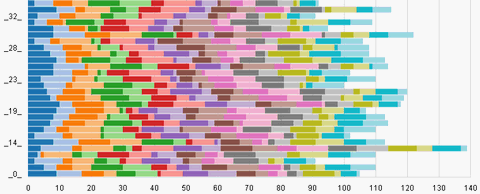
Flare is a collection of ActionScript 3 classes for building a wide variety of interactive visualizations. For example, flare can be used to build basic charts, complex animations, network diagrams, treemaps, and more. Flare is written in the ActionScript 3 programming language and can be used to build visualizations that run on the web in the Adobe Flash Player.
Flare applications can be built using the free Adobe Flex SDK or Adobe’s Flex Builder IDE. Flare is based on prefuse, a full-featured visualization toolkit written in Java. Flare is open source software licensed under the terms of the BSD license, and can be freely used for both commercial and non-commercial purposes.
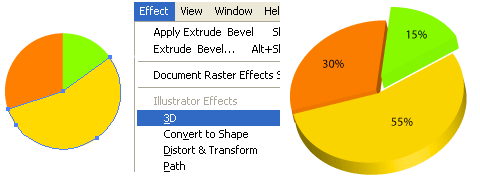
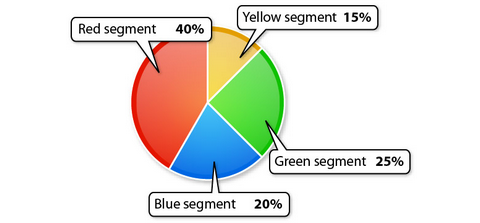
Are you still using the traditional 2D graph for your reports and presentations? N.Design Studio taught us how to create 3D Pie Charts with Illustrator CS2 at ease. The Pie Charts looks so real and professional.
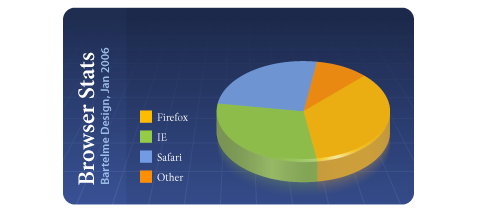
As a freelancer, we may come into the situation that you have to present some sort of statistical data to your client. Of course you may use Excel’s graph tool to easily create a bunch of charts, but more or less all of those predefined designs suck. Bartelme Design show us how to create visually appealing Pie charts using Adobe Illustrator’s graph tool.
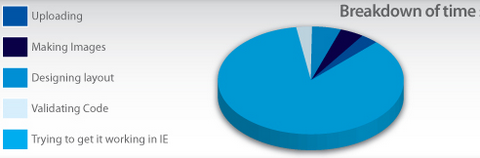
GoSquared showed us how to create beautiful Pie Charts in Illustrator. Just follow a few simple steps, and you’ll view pie charts in a whole new light.
IMmodernLife created a comprehensive tutorial of how to make overwhelming niceness of the Pie Charts. He is using Adobe Illustrator CS2, but the tips should apply to most of the more recent versions.
FusionCharts Free is a flash charting component that can be used to render data-driven & animated charts for your web applications and presentations. It is a cross-browser and cross-platform solution that can be used with ASP.NET, ASP, PHP, JSP, ColdFusion, Ruby on Rails, simple HTML pages or even PowerPoint Presentations to deliver interactive and powerful flash charts. You do NOT need to know anything about Flash to use FusionCharts. All you need to know is the language you’re programming in.
The free version offers you most of the features that you would normally need. If the features in free version does not satiate your requirements, you might consider a paid version. In contrast, offers a lot more advanced options like gradients, 3D Lightings (shadow, blur effect, glow effect and bevel), custom animations, in-built debuggers, more chart types, enhanced AJAX support, data-driven flash maps, loading into other Flash movies, personalized implementation support etc.
PHP/SWF Charts is a simple, yet powerful PHP tool to create attractive web charts and graphs from dynamic data. Use PHP scripts to generate or gather the data from databases, then pass it to this tool to generate Flash (swf) charts and graphs. PHP/SWF Charts makes the best of both the PHP and SWF worlds. PHP scripts provide integration, and Flash provides the best graphic quality. It supports many charts types, Line, Column, Stacked column, Floating column, 3D column, Stacked 3D column, Parallel 3D column, Pie, 3D Pie, Bar, Stacked bar, Floating bar, Area, Stacked area, Candlestick, Scatter, Polar, Mixed, Composite and Joined. Can you ask for more? They have the following main features.
Web charts and graphs from dynamic data
Live and interactive chart updates without reloading the web page
Clickable charts, and drill-down
Animated transitions
Printable charts
Simple and flexible chart generation
PHP/SWF Charts is free to download and use. The free, unregistered version contains all the features except for:
Clicking a chart takes the user to the PHP/SWF Charts web site
No displaying charts inside another flash file
No technical support, and no product updates by e-mail
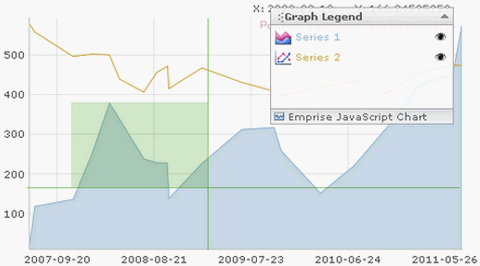
A set of Emprise Javascript Charts ( Line, Area, Scatter, Pie, Bar and Function series ) with zooming, scaling and scrolling ablity. Built with compatibility in mind and tested on all major browsers, you can be assured your charts will function consistently for the broadest range of end users. Every aspect of the charting display can be configured and customized through well-documented properties and methods. It is free for everyone unless you want extra features.
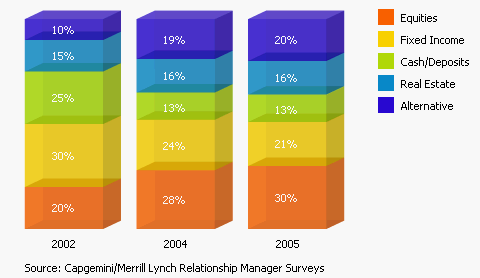
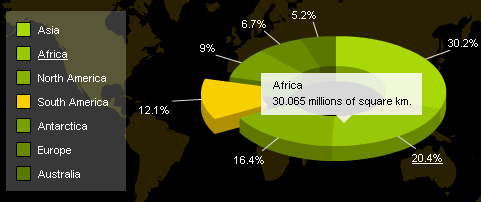
AmCharts provides us three type of charts, Pie Charts, Line Charts and Bar/Column Charts. They are all animated and interactive Flash Charts. Users can pull out a slice of pie chart by clicking on it. Users can zoom in/out by highlighting a specific area of the line chart. The bar/column can be 100 stacked, mouseover to view more details. All Charts are free to download, the only limitation of free version is that a small link to AmCharts will be displayed in top left corner of your charts.
Requirements: Any Modern with Flash 8.0+
Demo: http://www.amcharts.com
License: License Free
If you are
building a website from scratch you have to rely heavily on your own creativity
to achieve any measure of success. In truth, building a great website lies in
the underpinning the tools you use are able to create. Drag and drop alone may
not be sufficient because it is the creativity of the developers or development
team that design specialized website-building tools that are most apt to lead
the way to your success.
This is
especially true as we enter 2025 in that the bar is raised as far as what
constitutes an award-winning, competitive website. What constitutes an
award-winning, competitive website is no longer a simple matter of aesthetics.
It’s primarily about a website’s responsiveness, efficiency, and adaptability.
From Trafft White Label to XStore and everything in between, the tools and resources described below offer the unparalleled customization, collaboration, and efficiency that you need to build an award-winning competitive website.
Even those feature-rich
WordPress themes that offer virtually unlimited flexibility can’t necessarily handle
every possible demand a designer or developer may throw at them, leaving the
website builder with the choice of relying on coding to resolve the issue or seek
another solution. That other solution
often takes the form of a WordPress plugin.
Plugins bring a
variety of helpful features to the table. They can provide added flexibility
and functionality or serve to improve the performance of both a theme and a
website. Some qualify as game changers, either in terms of how they impact method
and workflow associated with building a website, or to the characteristics of
the finished product itself.
Amelia, Slider Revolution, and the other top WordPress plugins addressed in this article have redefined what’s possible in website design and performance.
When you select
a WordPress theme, you will naturally familiarize yourself with the design
tools, aids, and other features the theme has to offer. The greater the number
of features, it the more a theme should be able to do for you. “More” sometimes
means “better” but you still have to ask if “better” will be enough?
Assuming a
given theme appears to offer everything you believe you are going to need, there
remain a couple of things you want to make sure the theme can enable you to
accomplish.
First,
does the theme have what it takes to enable you to build a website that will
create an outstanding first impression?
Second,
does the theme have what it takes to make your website future-ready?
Does the theme enable
you to create eye-popping content and is it constantly being improved and updated?
If the answer is “Yes” to you should be good to go.
We have chosen the following 9 top 2025 WordPress themes for your inspection. Every one of which is capable of helping you create a stunning, future-ready website.
It’s 2024 and the number of web design resources and tools on the market seems overwhelming. That’s good news since you need the right tools and resources to come up with competitive designs.
The bad news is, rather than sifting through
thousands of products to get the ones that best meet your needs you might decide
to retire.
That’s an exaggeration, but you probably would
prefer the following approach.
We’ve tested a ton of free and premium web
design tools & resources and narrowed it all down to 15 essential ones in
the following categories:
WordPress themes for building larger, more complex websites and
online stores.
website builders to help you build landing pages and multiple page
websites quickly and easily.
WordPress plugins for extending the functionality or improving the
appearance of a website.
Vector illustrations for adding a little zip or humor to your
products.
-font identifiers for identifying “must have” fonts to use in your
website projects.
They look top quality.
There is something about each one of them that makes it stand out. That “something”
most likely has to do with how easy and enjoyable it is to work with.
They are intuitive. Whether
you are installing, using, downloading, or cancelling, everything you need is right
where it should be.
They add real value. They
help you deliver web products faster or make them more attractive, and help you
get better paid work.
15 great Tools & Resources
for Designers and Agencies
Key information included to assist you in deciding what would serve you best addresses top and best features, product rating on non-biased platforms such as Trustpilot, Capterra, or WordPress.org, and client testimonials.