Startup Launch List is contains all a​rticles you need to read before launching a startup. They are written by​ ​founders, designers, investors and thought leaders.
“Make sure you read all of Paul Graham’s essays.” This little app sort of follows that thought. It’s a place where you can read essential articles from respected folks like Jason Fried, Derek Sivers, Brad Feld, Mark Suster, Sam Altman, Fred Wilson etc.

Requirements: –
Demo: http://startuplaunchlist.com/
License: License Free
Bounce is a script that allows you to publish beautiful banner bars on your site with no coding required. Target bars to users based on where they came from, what page they’re on and whether they’re blocking your ads.
You can show a bar to users who have an AdBlocker installed. Ask users to turn off AdBlock or promote alternative ways to support your site. These bars won’t be shown to users who don’t have an active AdBlocker. You can also display different bars based on which site a user was referred from. These bars display your custom message by checking the referrer that visitor came from to help convert users.

Requirements: –
Demo: http://bounce.bar/
License: License Free
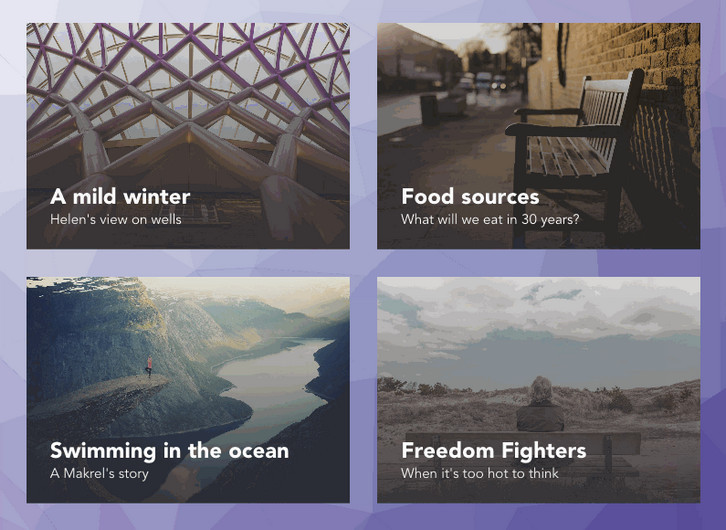
Codrops has created a experimental grid layout with “Card Expansion Effect” where they have animated the card expansion with a morphing effect on the cover image and follow its motion with a delightful animation of a low-poly pattern used as the background of the page.
They are using Trianglify by Quinn Rohlf to generate the background pattern, SVG’s clipPath to morph the card image, and GSAP to animate and control the whole sequence. They could have used the CSS clip-path property to clip and morph the image but since the support is currently quite limited and inconsistent across browsers, they are using SVG clipPath instead. This way they can make the demo work across all browsers, including IE9.
Requirements: –
Demo: http://tympanus.net/Development/CardExpansion/
License: License Free
Coverr was built as a joint initiative between two startups “Veed.Me” & “CodersClan”. Since they experienced the need of homepage background videos from both sides; Video & Code, they decided to build something that will give these, for free – to the community.
Basically, Coverr lets you download any video that you want (mp4+webm+image) AND it also gives you code snippets to help you implement them (html,css,javascript). It’s copyright free and always will be. They will upload 7 new videos of 12-15 seconds each every Monday.

Requirements: –
Demo: http://www.coverr.co/
License: License Free
JavaScript.com is a resource built by the Code School team for the JavaScript community. It is now and will always be free. Because JavaScript is a great language for coding beginners, They have gathered some of the best free learning resources around and built a JavaScript course to help new developers get up and running.
With the help of community members contributing content to the site, JavaScript.com aims to also keep more advanced developers up to date on news, frameworks, and libraries.

Requirements: –
Demo: https://www.javascript.com/
License: License Free
Codyhouse has put together a set of Page Scroll Effects, they are some fancy effects that take place while the user is surfing through the sections of a web page. Some of the effects are quite extreme, but they can prove very useful if your goal is to create an immersive user experience. All animations have been created using Velocity.js.
Please note that these effects are not visible on small devices, where the user can simply scroll through the list of sections. They have tested the effects on mobile and performance was poor, therefore they decided to limit them to bigger and more powerful devices.

Requirements: JavaScript Framework
Demo: http://codyhouse.co/demo/page-scroll-effects/scaledown.html
License: License Free
CamanJS is (ca)nvas (man)ipulation in Javascript. It’s a combination of a simple-to-use interface with advanced and efficient image/canvas editing techniques. CamanJS is very easy to extend with new filters and plugins, and it comes with a wide array of image editing functionality, which continues to grow.
It’s completely library independent and works both in NodeJS and the browser. Both CamanJS and this website are fully open-source and accepting pull requests. To contribute: fork either project, create a new branch for your changes, and send a pull request when ready.

Requirements: Meteor Framework
Demo: http://camanjs.com/
License: License Free
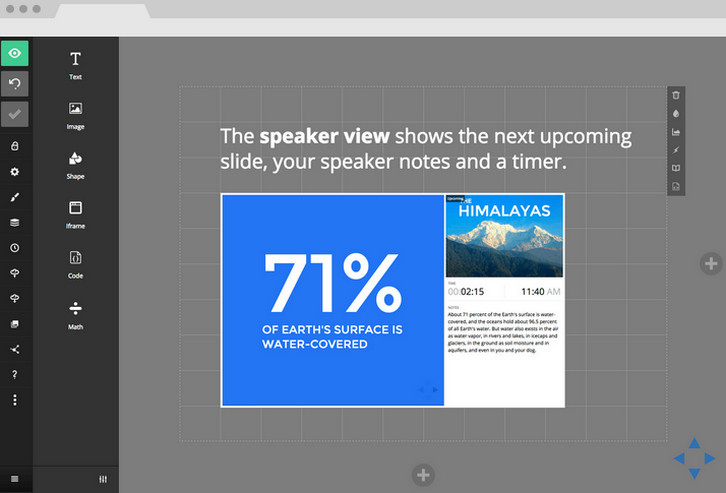
The Slides editor is available online, right in your browser. Unlike traditional presentation software, like PowerPoint, there’s no need to download anything. All of your work is stored securely on our servers, accessible wherever you are. Whether you speak at a conference, host a meeting, or just send your deck out by email, your story is conveyed in the beauty in which it was crafted. You can also export a PDF and share or print it for your audience.
Decks are freely viewable anywhere on desktop, tablets and phones. They can be embedded inside of your site or blog and downloaded for full offline access. Slides is great for sharing anything from a photo album with family to a business plan with your colleagues. It’s free to sign up, you don’t even need a credit card.
Requirements: –
Demo: http://slides.com/
License: License Free
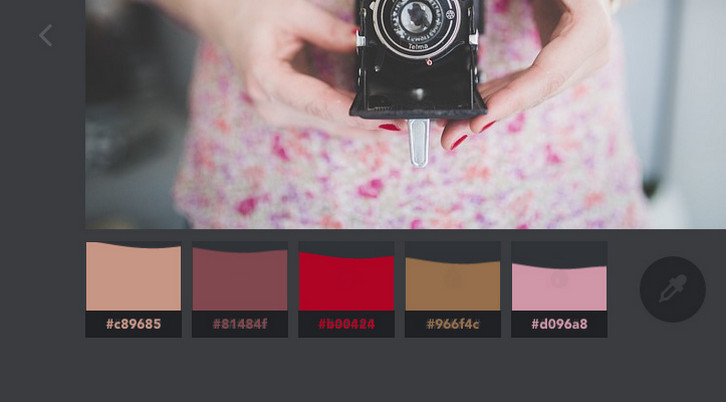
Codrops has shared a fun little color extraction experiment with us. The idea is to create a color palette from an image with a subtle effect on the image itself and some fanciness on the palette.
They are using Vibrant.js by Jari Zwarts to extract the colors from the images, and CSS Filters to transition the image to a black and white version. They also implemented a simple slider with a special “curtain†effect. Please note that this experiment uses some CSS properties that might not work in older browsers (CSS Animations, CSS Filters) though.
Requirements: –
Demo: http://tympanus.net/Development/ColorExtraction/
License: License Free
The DO UI kit is now available for free for Photoshop & Sketch! It’s got over 130 stunning screens, 10 complete themes, and 250+ components to mix and match to create stunning apps. They are all remixable and retina ready. Best of all, they look very clean and colorful, which makes it perfect fit for today’s flat aesthetic.

Requirements: –
Demo: http://www.invisionapp.com/do
License: License Free







