Cleave.js has a simple purpose: to help you format input text content automatically. The idea is to provide an easy way to increase input field readability by formatting your typed data. By using this library, you won’t need to write any mind-blowing regular expressions or mask patterns to format input text. However, this isn’t meant to replace any validation or mask library, you should still sanitize and validate your data in backend. It supports Credit card number formatting, Phone number formatting (i18n js lib separated for each country to reduce size), Date formatting, Numeral formatting, Custom delimiter, prefix and blocks pattern, CommonJS / AMD mode, ReactJS component port.

Requirements: –
Demo: http://nosir.github.io/cleave.js/
License: Apache License
For anyone who administers a blog or manages a website, understanding the importance of interacting with readers has not escaped your attention. And if you have your company’s profile or blogs on WordPress, that interaction at times requires informing readers or customers of upcoming events.
Even if you manage a couple of blogs that have acquired a large group of loyal readers, there are times when you want to announce a special event or topic. Aside from using the “Comment†section, there is a great way to contact, interact and allow visitors to register for more interactive communication or to register for special events.
It’s surprisingly simple to create a registration form in WordPress, in fact it is as easy as simply installing and activating a plug-in. This is a much easier option than having to code forms or hire someone else to take care of it for you. CaptainForm has a great WordPress event registration plug-in that I have found out that not only saves time, but it also provides features that automate the invitation and registration process.
You won’t need any programming or technical expertise to get a customized form up and running on your website. Let’s face it, not everyone is technologically talented. That’s one of the best things about using event registration forms from CaptainForm: they work smoothly and seamlessly without any add-ons. It’s a wonderful way to collect and analyze the data on your target audiences, which is key to having a successful readership and or business. Read the rest of this entry »
SuperPlaceholder.js is a library to bring your input placeholders to life by cycling multiple instructions in a single input placeholder. It is less than 1KB minified & gzipped. Superplaceholder.js supports AMD and commonJS module pattern out of the box. It works best on latest versions of Google Chrome, Firefox and Safari and Chrome mobile. For all non-supported browsers, the library will graceful degradate without any explicit handling in your code.

Requirements: –
Demo: http://kushagragour.in/lab/superplaceholderjs/
License: Creative Commons License
Medium Editor is a clone of medium.com inline editor toolbar. It uses contenteditable API to implement a rich text solution. MediumEditor has been written using vanilla JavaScript, no additional frameworks required. View the MediumEditor Options documentation on all the various options for MediumEditor.

Requirements: –
Demo: https://yabwe.github.io/medium-editor/
License: MIT License
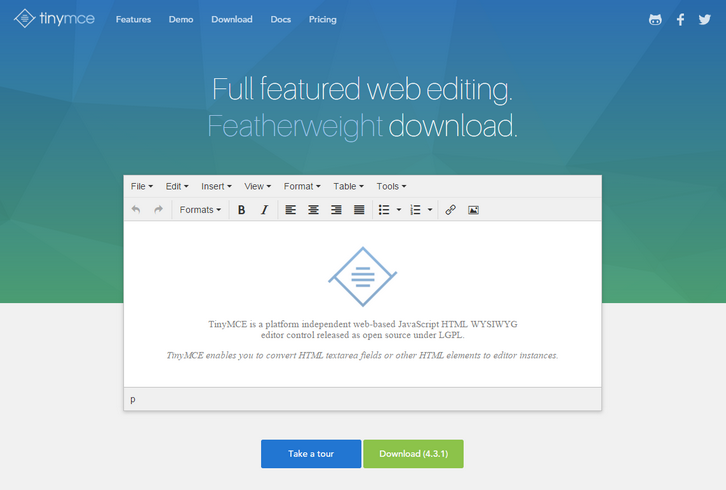
After many months in development, TinyMCE are also proud to unveil a brand new website and logo for TinyMCE! Most importantly they have developed a whole new documentation section of the website with hundreds of improvements to the content, examples and navigation.
TinyMCE 4.3 includes important improvements to the stability and usability of read-only content in TinyMCE. These improvements to the editor core have enabled us to bring you a new code snippet plugin, new live media previews as well as enhancements to image and table functionality. The updates in 4.3 should also help developers building new plugins for TinyMCE.
Requirements: –
Demo: https://www.tinymce.com/
License: LGPL License
InstantSearch.js is a library of UI widgets to help you build the best instant-search experience with Algolia’s Hosted Search API. Your code is easy to write and maintain. instantsearch.js provides the glue between the different parts of your search page.
Everything is packaged in one library. Every website is different. The modular design of instantsearch.js allows you to configure, rearrange and combine the widgets to build your own experience. Sometimes you want to build a custom feature. You can do that by forking a pre-built widget or coding your own.

Requirements: JavaScript
Demo: https://community.algolia.com/instantsearch.js/
License: License Free
Trix is a Rich Text Editor for Everyday Writing. You can compose beautifully formatted text in your web application. Trix is a WYSIWYG editor for writing messages, comments, articles, and lists—the simple documents most web apps are made of. It features a sophisticated document model, support for embedded attachments, and outputs terse and consistent HTML.
Trix is an open-source project from Basecamp, the creators of Ruby on Rails. Millions of people trust their text to Basecamp, and we built Trix to give them the best possible editing experience.

Requirements: –
Demo: http://trix-editor.org/
License: License Free
Content Tools is a JS library for building WYSIWYG editors for HTML content. The ContentTools WYSIWYG editor can be added to any HTML page in a few simple steps. There are step-by-step guides for common use scenarios as well as more advanced topics for those rolling their own editors. Full API documentation and examples for the ContentTools family of libraries. The ContentTools family of libraries is free and open-source. The libraries are hosted, developed and maintained on GitHub.

Requirements: JavaScript Library
Demo: http://getcontenttools.com/
License: MIT License
Awesomplete is an ultra lightweight, customizable, simple autocomplete widget with zero dependencies, built with modern standards for modern browsers. You can simply add awesomplete for it to be automatically processed (you can still specify many options via HTML attributes) Otherwise you can instantiate with a few lines of JS code, which allow for more customization. Awesomplete is released under the MIT License.

Requirements: JavaScript Framework
Demo: http://leaverou.github.io/awesomplete/
License: MIT License
Codyhouse has just shared a minimal and customizable snippet to throw a semantic form into your web projects on the fly. There are some optional features (i.e. floating labels) that can be easily removed in case you want the form to be simpler. We included all common form elements like radio buttons, checkboxes, select, error messages etc.

Requirements: CSS and JavaScript
Demo: http://codyhouse.co/demo/contact-form/index.html
License: License Free







