Timedropper is a jQuery UI timepicker. Manage time input fields in a standard form. Focus on the input to open an small interactive timepicker. You can set time in 12-hour clock in which the 24 hours of the day are divided into two periods. You can also enables time change using mousewheel. Animation Style to use when init timedropper. There are three available animation values: fadeIn(default), dropDown.

Requirements: jQuery Framework
Demo: http://felicegattuso.com/projects/timedropper/
License: MIT License
Vertical timeline is so far one of the most popular resources on CodyHouse. Many people have asked them to include a Horizontal Timeline as well. Here it is! Building a horizontal timeline was a bit tricky, because you can’t rely on the vertical (more intuitive) scrolling behaviour. They decided to separate timeline and events, with the first one working like a slider, while the second one occupying the full width and showing a single event at a time.
About the timeline: the position of each date along the timeline is set using jQuery. Dates are not equally distributed along the timeline, but the distance between a date and the next one is proportional to the difference between these dates.

Requirements: jQuery Framework
Demo: https://codyhouse.co/demo/horizontal-timeline/index.html
License: License Free
Datedropper is a plugin that provides a quick and easy way to manage dates for input fields. You can easily edit the CSS located into datedropper folder. Datedropper works properly from 9 to current version of IE. Datedropper works properly from jQuery 1.7 to current version. And it is licensed under MIT and Creative Commons License.

Requirements: jQuery Framework
Demo: http://felicegattuso.com/projects/datedropper/
License: MIT, Creative Commons License
FormatJS is a modular collection of JavaScript libraries for internationalization that are focused on formatting numbers, dates, and strings for displaying to people. It includes a set of core libraries that build on the JavaScript Intl built-ins and industry-wide i18n standards, plus a set of integrations for common template and component libraries.
FormatJS has been tested in all the major browsers on both desktop and mobile devices. Careful attention has been applied to make sure the libraries work in ES3 browsers all the way down to IE 6. For many web apps rendering happens on the server, so they made sure FormatJS works perfectly in Node.js. This allows developers to use FormatJS on both the server and client-side of their apps.
Requirements: JavaScript Framework
Demo: http://formatjs.io/
License: License Free
ClockPicker is a clock-style timepicker for Bootstrap or jQuery. All major browsers are supported, including IE 9+. Both desktop and mobile device are supported. It also works great in touch screen device. ClockPicker was designed for Bootstrap in the beginning. So Bootstrap and jQuery is the only dependency(s). It is licensed under MIT License.

Requirements: Bootstrap or jQuery Framework
Demo: http://weareoutman.github.io/clockpicker/
License: MIT License
Timesheet.js is a simple JavaScript library to create HTML time sheets. You can visualize your data and events with sexy HTML5 and CSS3. Create simple time sheets with sneaky JavaScript.
Just include Timesheet.js and configure your data. No external dependencies, no jQuery needed and of course no Angular.JS! Just a few lines JavaScript to generate a beautiful HTML5 layout and some really delicious CSS to be customized by mighty you.

Requirements: JavaScript Framework
Demo: http://semu.github.io/timesheet.js/
License: MIT License
There are wonderful and feature-rich calendar modules out there and they all suffer the same problem: they give you markup (and often a good heap of JS) that you have to work with and style. This leads to a lot of hacking, pushing, pulling, and annoying why-can’t-it-do-what-I-want scenarios.
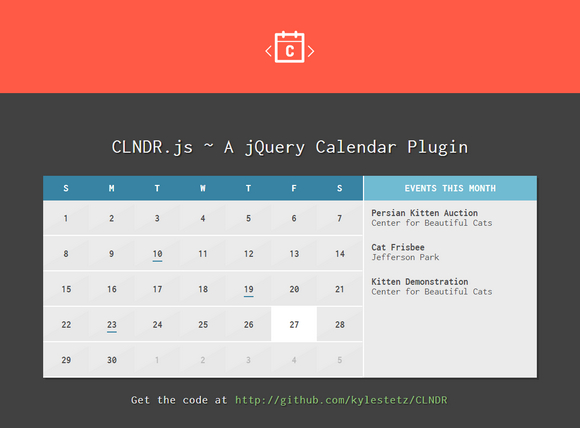
CLNDR is a jQuery calendar plugin. Unlike most calendar plugins, CLNDR doesn’t generate markup. Instead, CLNDR asks you to create a template and in return it supplies your template with a great set of objects that will get you up and running in a few lines.
Requirements: jQuery Framework
Demo: http://kylestetz.github.io/CLNDR/
License: MIT License
TidyTime.js is a jQuery plugin, that provides a more friendly way of displaying time updates to users. It takes any regular time and changes it into more human friendly dialogue such as “It’s just gone noon. It’s quarter past 8 in the evening, it’s nearly half past 4 in the afternoon, it’s just gone 25 to 6” and more.
By adding additional text before and after the time you are able to create powerful friendly interaction with users. TidyTime.js works best with dynamic websites and apps and can be used as a stand alone clock as well.

Requirements: jQuery Framework
Demo: https://github.com/aarondo/tidyTime.js
License: License Free
Cal-Heatmap is a javascript module to create a calendar heatmap. This module will help you to create a calendar, like the contribution calendar appearing on each github user’s page, but with navigation and more controls on the data formatting.
Cal-Heatmap works on most modern browsers supporting SVG, and was tested on Internet Explorer 9+, Firefox 4+, Chrome 14+, Safari 5.0+, Opera 10+. Calendar can be customized by setting various options as well. Cal-HeatMap is licenced under the MIT Licence.

Requirements: JavaScript enabled
Demo: http://kamisama.github.io/cal-heatmap/
License: MIT License
FlipClock.js was created because the other solutions weren’t abstract enough to provide a deep level of customization without rewriting the code. Some libraries have a huge cascade of conditionals, while others simply hard-code too much into their scripts.
After reviewing as many of the existing solutions as possible, it was determined a proper extendible API needed to be written to create any kind of clock or counter (and the flip effect is just cool). You can use FlipClick.js as a clock, timer or countdown.

Requirements: jQuery Framework
Demo: http://flipclockjs.com/
License: MIT License







