As professional web designers, we want to create a video player that looks consistent across browsers. Each browser however provides its own different look and feel for the player, from the minimal approach of Firefox and Chrome, to the more shiny controls of Opera and Safari. If we want our controls to look the same across all browsers, and integrate with our own design, we’ll have to create our own controls from scratch. This is not as hard as it seems.
All media elements in HTML5 support the media elements API, which we can access using JavaScript and use to easily wire up functions such as play, pause, etc. to any buttons we create. Because the native video player plays nicely with other open web technologies, we can create our controls using HTML, CSS, SVG or whatever else we like.
Article: Building a custom HTML5 video player with CSS3 and jQuery taught us how to build an easily customizable HTML5 Â <video> player, including packaging it as a simple jQuery plugin, choosing control types and outputting custom CSS for your own situation.

Source: Building a custom HTML5 video player with CSS3 and jQuery
InputNotes jQuery Plugin automatically adds notes below textareas and input fields based on regex patterns. The patterns are normal JavaScript regex patterns and you are free to create and style any type of notes and note texts as you want. Note texts can contain HTML. It has been tested on IE 6 and 7, Firefox 3.5, Safari 4, Google Chrome, Opera 9.6.

Requirements: jQuery Framework
Demo: http://fredibach.ch/jquery-plugins/inputnotes.php
License: License Free
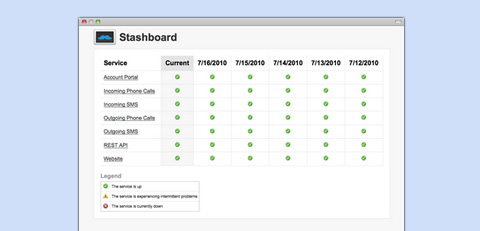
Stashboard is a status dashboard for APIs and software services. It’s similar to the Amazon AWS Status Page or the Google Apps Status Page. Stashboard was originally written by Twilio to provide status information on its Voice and SMS APIs. Stashboard is designed to provide a generic status dashboard for any hosted service or API. The code can be downloaded, customized, and run on any Google App Engine account.
You are able to Track multiple different API or SaaS services, Set custom status messages and icons such as Up/Down, Show historical status for each service, CNAME to http://status.yourapp.com. Stashboard is written in Python and hosted on Google App Engine.
Requirements: –
Demo: http://www.stashboard.org/
License: MIT License
How to Build a Successful Blog Business is a straight forward guide to building a publishing business online that covers everything from choosing a niche to hiring staff, registering a business to selling it, finding traffic to monetizing it. This is an essential read for web entrepreneurs and online publishers.
Collis is a web veteran with a wealth of experience and an easy to read style. He has founded sites such as the Tuts+ network, the Envato Marketplaces, FreelanceSwitch and AppStorm which combined serve up over 50 million pageviews a month.
In How to Build a Successful Blog Business Collis shares tips from his years of operating kick ass blogs, and reveals stats, graphs, revenue figures and inside details from three real world case studies.
Nowhere else will you be able to find information like this. It costs $39 for Ebook, $47 for Paperback Copy. You can always view a sample of the book here first. IÂ strongly recommend this book to everyone who wants to build a successful blog business.

Source: How to Build a Successful Blog Business
boomerang is a piece of javascript that you add to your web pages, where it measures the performance of your website from your end user’s point of view. It has the ability to send this data back to your server for further analysis.
With boomerang, you find out exactly how fast your users think your site is. boomerang comes to you from the Exceptional Performance team at Yahoo!, aided by the Yahoo! Developer Network. boomerang is opensource and released under the BSD license, and they have a whole bunch of documentation about it.

Requirements: –
Demo: http://yahoo.github.com/boomerang/doc/
License: BSD License
Codrops has shown us how to create a Beautiful Background Image Navigation with jQuery. The main idea is to have three list items that contain the same background image but with a different position.
The background image for each item will be animated to slide into place in different times, creating a really nice effect. The background image sliding direction from the list item in the middle will depend on which item the user was before: coming from the right, it will slide from the left and vice versa.
On top of that we will have sub-menus that appear with their semi-transparent background sliding in. These backgrounds create an awesome effect of actually just being one element that slides into place, changing its color.

Requirements: jQuery Framework
Demo: http://tympanus.net/Tutorials/BeautifulBackgroundImageNavigation/
License: License Free
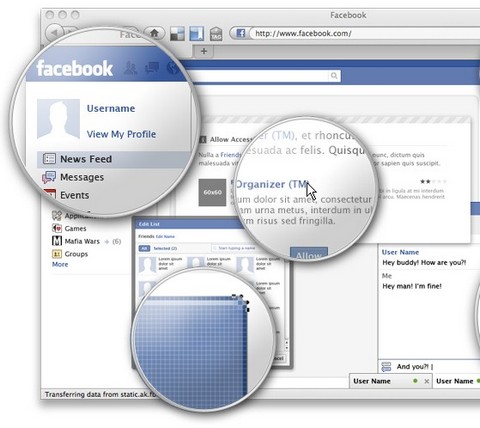
SmashingMagazine has just released Free Full Layered Facebook GUI PSD Kit. The main idea behind the kit is to speed up the prototyping of Facebook application UIs and Facebook fan pages, thus sparing you from drawing all the comps and letting you customize all the texts, buttons and data as you need. As usual, the kit is free to use in all projects, without any restrictions.
The kit brings the Facebook vector icon and logo. Also, since the focus of this resource are the UI elements, it brings a main window with the header, menu and the chat window for you to set up your realistic mock-ups. Plus all the modal components, comment boxes, buttons, message boxes, tabs, etc. All the components are full layered, built using vectors and blending options, so that scaling and editing the objects will not be a problem. The theme is released under Creative Commons. You can use it for all your projects for free and without any restrictions.
Requirements: –
Demo: http://www.smashingmagazine.com/2010/07/23/free-facebook-gui…
License: Creative Commons License
Dojo Toolkit 1.5 is now available download. Dojo is a JavaScript toolkit that is lean enough for use on a simple blog, yet powerful enough to scale to solve the most advanced web application engineering challenges, allowing you to use just the features and flexibility needed for your application. The 11th major Dojo release, version 1.5 offers many important improvements and enhancements and remains as IP-safe, freely-licensed, and free to use as the first release over five years ago.
The new version of Dojo offers substantial user interface improvements in the form of the beautiful Claro theme. Claro delivers a modern and engaging visual style for rich internet applications with Dojo’s Dijit library, with the visual enhancements of transparent gradient background images, drop shadows, and appropriate CSS animations (on Webkit and Mozilla-based browsers).

Requirements: –
Demo: http://download.dojotoolkit.org/release-1.5.0…
License: Academic Free, BSD License
There are very few design elements with more uses than icons. Icons can be used in just about every type of project, from software applications to website designs.
Icon Nebula has released a really nice set of 75 free icons called Eloquence! Icon Set. This pack includes seventy-five 32 x 32 pixel icons in PNG format that you can use for personal and professional projects.

Requirements: –
Demo: http://psd.tutsplus.com/freebies/icons/exclusive-freebie…
License: License Free
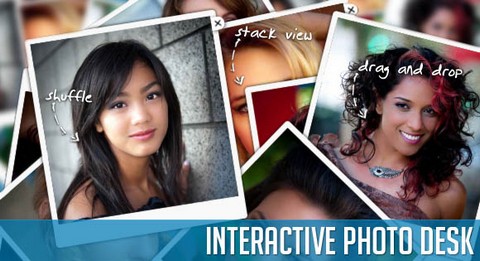
Codrops has created an Interactive Photo Desk with jQuery and CSS3 that provides some “realistic†interaction possibilities for the user. The idea is to have some photos on a surface that can be dragged and dropped, stacked and deleted, each action resembling the real world act.
If we drag a picture, it get’s “picked up” first, making it appear a little bit bigger. Dropping it results in the picture being “thrown back” to the table, in a random rotation. Viewing all photos mirrors the action of collecting all images into a pile and viewing the first one in a none rotated way. Clicking to see the next one then, makes the previous one being thrown back to the surface. Deleting an image will make it appear as a crumpled paper ball. When using the shuffle function, the photos get rotated and spread over the desk randomly.
Requirements: jQuery Framework & CSS3
Demo: http://tympanus.net/Development/PhotoDesk/
License: License Free







