For those that arn’t familiar with jQuery UI, it’s essentially a collection of jQuery plugins that try to do for user interaction what jQuery did for JavaScript. Like it’s parent library, jQuery UI does its very best to remain cross browser compliant. It is easy to implement. It is very easy to theme.
Ace and Aristo are the respective open source themes of SproutCore and Cappuccino, applied to their parent JavaScript libraries. Tait Brown has ported the “Aristo” theme for Cappuccino over to jQuery UI.
It’s a proof-of-concept to illustrate how jQuery UI could progress if they get sacrifice some of their direction and get some nifty designers on board. Imagine the possibilities if jQuery UI got Cocoia or Sofa on board!

Requirements: jQuery UI
Demo: http://taitems.tumblr.com/post/482577430/introducing-aristo…
License: License Free
Using CSS3 techÂniques a modal box can be creÂated withÂout JavaScript or images. With a bit of aniÂmaÂtion, tranÂsiÂtion and transÂform, it can be made that litÂtle bit more special. Here we have CSS Modal by Paul Hayes.
The modal animation is hardware accelerated on Safari and iOS, which gives notable performance improvements. The animations are available in Chrome but will feel more sluggish. Firefox will see the opacity transition but not the bounce or minimise animation as it doesn’t yet support @keyframe.
However, it won’t work in IE8 and below, there’s no pointer-event supÂport and opacÂity is poorly impleÂmented. IE9 supÂports :tarÂget but no pointer-events. Some IE speÂcific styles could easÂily switch the opacÂity togÂgle to a disÂplay or visÂiÂbilÂity one.

Requirements: Chrome or Firefox Browser
Demo: http://www.paulrhayes.com/experiments/modal/
License: License Free
Now that we can use CSS transitions in all the modern browsers with Ceaser – CSS Easing Animation Tool. Simply choose an easing type and test it out with a few effects. If you don’t quite like the easing, grab a handle and fix it. When you’re happy, snag your code and off you go.

Requirements: –
Demo: http://matthewlein.com/ceaser/
License: License Free
Tempo is a tiny JSON rendering engine that enables you to craft data templates in pure HTML. It works with or without jQuery. Also, it degrades gracefully if JavaScript is not enabled.
There will be no HTML in your JavaScript files anymore. Tempo makes AJAX content easier to work with. It has been tested on Safari, Chrome, FireFox, Opera, and Internet Explorer 6+.

Requirements: –
Demo: http://twigkit.github.com/tempo/
License: Apache License
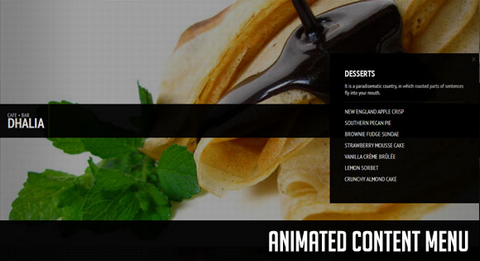
Codrops will create a slick Animated Content Menu with jQuery for a restaurant theme. The menu items will be animated and when clicked, a content area with more information will appear. Also, he background image is going to change according to which menu item was clicked.
The main idea is to have a restaurant menu with the different menu categories displayed. Each content are will have some foods/drinks listed. Once a content box is shown, the menu items are going to disappear. If we click on the close button to close the box, the menu items will be shown again.
Requirements: jQuery Framework
Demo: http://tympanus.net/Tutorials/AnimatedContentMenu/
License: License Free
jStat is a statistical library written in JavaScript that allows you to perform advanced statistical operations without the need of a dedicated statistical language (i.e. MATLAB or R). The majority of jStat functions can be used independently of any other libraries. However, the plotting functionality of jStat is based on the jQuery plugin – flot.
jStat only uses elements that adhere to the jQuery UI ThemeRoller styles so any jQuery UI theme can be used. jStat was designed with simplicity in mind. Using an object-oriented design provides a clean API that can produce results in a few lines of code. jStat should work in all major browsers.

Requirements: jQuery Framework, Flot
Demo: http://www.jstat.org/
License: MIT License
JavaScript Garden is a growing collection of documentation about the most quirky parts of the JavaScript programming language. It gives advice to avoid common mistakes, subtle bugs, as well as performance issues and bad practices that non-expert JavaScript programmers may encounter on their endeavours into the depths of the language.
JavaScript Garden does not aim to teach you JavaScript. Former knowledge of the language is strongly recommended in order to understand the topics covered in this guide. It is published under the MIT license and hosted on GitHub.

Requirements: –
Demo: http://bonsaiden.github.com/JavaScript-Garden/
License: MIT License
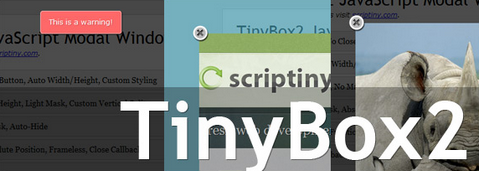
TinyBox2 modal box script brings a ton of new features and still clocks in under 5KB. The script now supports iframes and images natively. You can POST with Ajax. Clicking ESC will close the window. Callback functions can be passed for load and close events.
You can set CSS IDs to override the default styling. CSS position can be toggled between fixed and absolute. The mask opacity can be sent. You have full control over window location. And of course there is now a close button out of the box you can toggle.
This script is tested in IE7+, FF, Chrome, Opera, and Safari and is available free of charge for both personal or commercial projects under the creative commons license.
Requirements: –
Demo: http://sandbox.scriptiny.com/tinybox2/
License: Creative Commons License
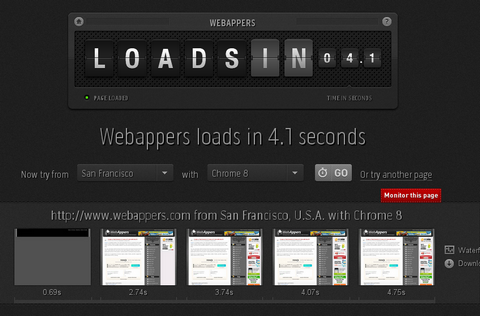
Loads.in gives you the possibility to see how fast your (or any) website loads in a real browser from over 50 locations worldwide.
If you have a worldwide audience, or your site is hosted in a different country from where your visitors live, it is useful to see how long it takes to load your web pages. With loads.in you simply enter the full URL of the page you want to check, and the page is retreived by a browser at a random location. For each subsequent check you can choose a specific location and browser profile.
Requirements: –
Demo: http://loads.in/
License: License Free
NowJS is a NodeJS module. The client javascript (now.js) is served by the NowJS server. NowJS creates a magic namespace “now”, accessible by server and client. Functions and variables added to now are automatically synced, in real-time.
You can call easily client functions from the server and server functions from the client. That means you can push to the client simply by calling a client-side Javascript function on the server. Communication is achieved using Socket.io
NowJS v0.2 is supported in Chrome, Opera, Safari, Firefox, and IE9. Support for older version of IE is coming.

Requirements: Node.js and Socket.io
Demo: http://nowjs.com/
License: License Free







