Codrops has published a tutorial of how to create an elastic SVG progress loader based on the Dribbble shot “Download” by xjw and implemented with SVG and TweenMax. The button starts as an icon with an arrow and once it’s clicked, it animates into a fun little wire and a label that indicates the download percentage. If you would like to use this loader in your project, go to the Github page and follow the instructions.

Requirements: –
Demo: http://tympanus.net/Development/ElasticProgress/
License: License Free
Infinit is a file storage and sharing company created in 2012 by two Frenchmen, Julien Quintard and Baptiste Fradin, with the vision of combining technology and design to allow anyone to send any file (photos, videos or else), of any size, to anyone, on any device.
Infinit is a file transfer application based on a point-to-point technology that connects both the sender’s and recipient’s computer directly. This deviates from cloud-based services like WeTransfer, YouSendIt (Hightail) and Dropbox that rely on a two-phase process through which the files must first be uploaded to the cloud before they can be downloaded by a recipient. The technology allows for transfers to be at least twice as fast, and up to 30 times faster, than cloud-based file sharing services.
The product also benefits from an intuitive user experience allowing anyone to send any file or folder, of any size in just a matter of seconds through a single drag & drop on desktop and just a few taps on mobile. Infinit completely removes the friction from selecting a tool that only support certain file formats or imposes arbitrary file size limits on the data you wish to send.
Requirements: –
Demo: https://infinit.io/
License: License Free
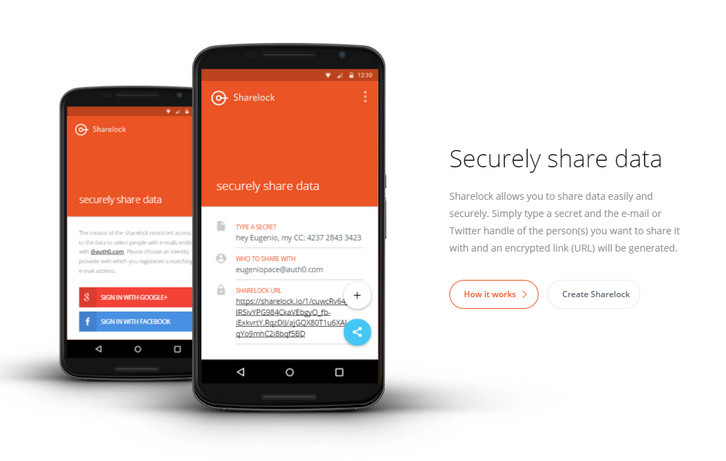
Sharelock is an open source web service hosted at https://sharelock.io. It lets you simply and securely share secret information with people you trust. You can also host your own version of Sharelock since the server and the apps are all open source.
The Sharelock service controls signing and encryption keys that protect your secret data. If you want to be in control of signing and encryption keys, you must host your own version of the Sharelock service. The apps have support to change the endpoint you hit.
Requirements: –
Demo: https://sharelock.io/
License: MIT License
If you are into designing for multiple resolutions, SVG is the best option to turn to as far as the use of graphics is concerned. These small vector files can be scaled up and down as you like it without sacrificing quality. SVG Loaders is a collection of simple SVG loaders and spinners created and released by Sam. No images used, pure svg/css and scaleable.

Requirements: SVG Support
Demo: http://samherbert.net/svg-loaders/
License: MIT License
ProgressBar.js is a beautiful and responsive progress bars with animated SVG paths. With ProgressBar.js, it’s easy to create arbitrary shaped progress bars. This library provides a few built‑in shapes like Line, Circle and Square but you can also create your own progress bars with Illustrator or any vector graphic editor.
ProgressBar.js is lightweight, MIT licensed and supports all major browsers including IE9+. You can change the color of progress bar smoothly with animation. You could also animate any property like stroke width, fill opacity, fill color etc.

Requirements: JavaScript Framework
Demo: http://kimmobrunfeldt.github.io/progressbar.js/
License: MIT License
Sometimes, when we are building websites and web applications, we need a percentage bar / progress bar to show the progress of a specific task. Therefore Kalasoohave has created a lovely Number Progress Bar inspired by daimajia. It is light-weight, easy to use, customizable, free and open-source.

Requirements: JavaScript Framework
Demo: http://kalasoo.github.io/NumberProgressBar/
License: MIT License
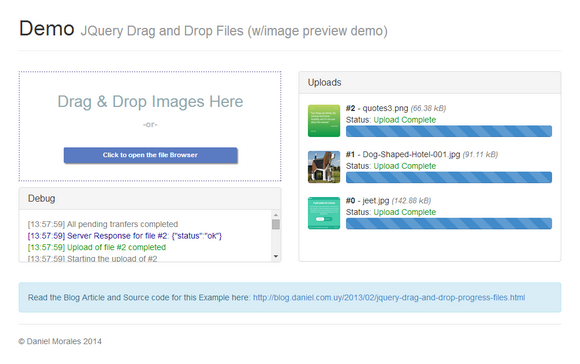
jQuery File Uploader is a jQuery plugin to drag and drop files, including ajax upload and progress bar. The idea for this plugin is to keep it very simple; unlike other options/plugins that mess up a lot with the markup and provide some really ‘hacky’ ways to make it available for prehistoric browsers.
The focus will be for modern browsers, but also providing a method to know when is the plugin is not supported; with an easy interface to use on any design you come up. Dual licensed under the MIT and GPL licenses.
Requirements: jQuery frameworks
Demo: http://danielm.herokuapp.com/demos/dnd/image-preview.php
License: MIT, GPL License
Resumable.js is a JavaScript library providing multiple simultaneous, stable and resumable uploads via the HTML5 File API. The library is designed to introduce fault-tolerance into the upload of large files through HTTP. This is done by splitting each file into small chunks. Then, whenever the upload of a chunk fails, uploading is retried until the procedure completes. This allows uploads to automatically resume uploading after a network connection is lost either locally or to the server. Additionally, it allows for users to pause, resume and even recover uploads without losing state because only the currently uploading chunks will be aborted, not the entire upload.
Resumable.js does not have any external dependencies other than the HTML5 File API. This is relied on for the ability to chunk files into smaller pieces. Currently, this means that support is limited to Firefox 4+, Chrome 11+ and Safari 6+.

Requirements: –
Demo: http://www.resumablejs.com/
License: MIT License
Progress bars have become quite popular lately, and there are lots of plugins that can help you add one to your site. But how do you make one yourself? The problem is that there are plenty of implementations already, so Tutorialzine has published a tutorial, teaching us how to code buttons that have built in progress meters.
They will be perfect for displaying progress while submitting forms or loading content via AJAX. They will also use CSS3 styles and transitions to make them easy to customize.

Requirements: –
Demo: http://demo.tutorialzine.com/2013/10/buttons-built-in-progress-meters/
License: License Free
Include Pace.js and the theme css of your choice, and you get a beautiful progress indicator for your page load and ajax navigation. No need to hook into any of your code, progress is detected automatically. You can choose the color, and the effects like Minimal, Flash, Barbar Shop, Mac OSX, Fill Left, Flat Top, Big Counter, Corner Indicator and Bounce.

Requirements: –
Demo: http://github.hubspot.com/pace/docs/welcome/
License: License Free







