

Open Source Resources for Web Application Developers

Shopify - Online Store Builder
Follow Us on Social Sites
Subscribe RSS Subscribe Newsletter Like us on Facebook Follow us on Twitter Follow us on Google+
  • Home
  • News
  • Plugins
  • Design
  • Others
  • Books
  • About
06 Jul

Preview Mobile Websites Easily with Mobilizer Desktop App

  • License Free, Tools
  • Leave a Comment

Mobilizer is a mobile preview desktop application. You can easily preview mobile websites, design mockups, and local HTML on Mac or PC. You can preview on iPhone 4, Palm Pre, HTC Evo, and Blackberry Storm, with more devices on the way.

Simply visit any URL or drag and drop local HTML, Flash, or image files. You are able to view the same site on multiple devices. At last, you can export PNGs of device views, which is perfect for portfolios.
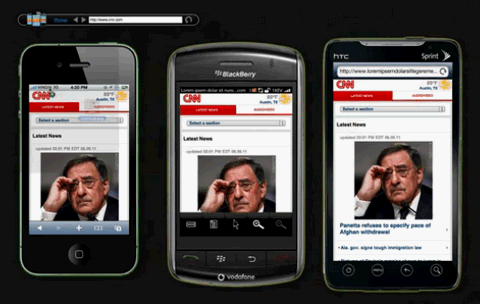
mobile-website-preview

Requirements: Adobe Air
Demo: http://www.springbox.com/mobilizer/
License: License Free

Share
Tweet
Sponsors
subscribe to our newsletter - weekly free resouces for web developers
follow us on social sites - rss, facebook, google+, Twitter
Subscribe RSS Like us on Facebook Follow us on Twitter Follow us on Google+
Related Resources
Preview & Inspect Web Designs with Adobe Edge Inspect

Preview & Inspect Web Designs with Adobe Edge Inspect

Preview URL on Many Mobile Devices Simultaneously

Preview URL on Many Mobile Devices Simultaneously

Preview Web pages Across Multiple Browsers and OS

Preview Web pages Across Multiple Browsers and OS

A Free Photoshop Plugin to Export Your Layers

A Free Photoshop Plugin to Export Your Layers

jQuery Mobile Alpha 1 Released

jQuery Mobile Alpha 1 Released

How to Build Application using jQuery Mobile & PhoneGap

How to Build Application using jQuery Mobile & PhoneGap

Comments
  • http://www.mobilepronto.org Pedro Rego

    Any idea how to disable the Flash on Mobilizer?

    Testing on the Iphone 4, websites with flash don’t behave the same way they do on the device… Just made a test using the product and comparing at the same time with my device…

    On the Iphone 4 (device) the flash content doesn’t show up, since Apple doesn’t have an agreement with Adobe.

    On the Iphone 4 (product) the flash content is loaded so it avoids the layout to stay fluid… :-(

    Besides that, a great addition to the collection. Works perfectly on the other devices from what I tested! :-)

    Best and thanks again for the tip.

  • http://www.pocketrevolution.com Markus Hartel

    unfortunately the browers are not accurate and won’t render CSS3 rounded corners

  • tonyb

    This is not a TRUE browser emulator, it uses Adobe AIR and the browser on your PC to render the pages.., it simply emulates screen size, which is pretty useless if FLASH shows up (on phones like iphone and blackberry) and takes up the screen.

    Use it only as a rough guide for how wide/narrow a page will apear on given device. It has nothing to do with the native rendering capabilities of that device.

Open Source Resources for You

What we need is a list of the top quality resources, so that we can spend more time on our web development. WebAppers only picks the top quality web development resources for you.

© Copyright 2012 WebAppers | About | Archives | Privacy Policy | Advertise | Contact

Sponsors
Advertise Here
Search
By Keywords
30 Days / All Time
  • 1
  • 2
  • 3
  • 4
  • 5
  • 6
  • 7
  • 8
  • 9
  • 10
  • Professional Business Cards Made By Designers
  • Best Free Chrome Extensions for Web Developers
  • All of the Best Free WordPress Themes You Need
  • How to Create a Web App Admin User Interface
  • Nice List of Open Source Fish Eye Menu
  • Best Web Admin Templates
  • 25 Useful Blogs for Web Design & Development
  • Simple Javascript Progress Bar with CSS
  • 10 Useful & Quality Design Resources
  • Free Web Application Icons
  • How to Create High-Performance Code
  • Easy to Use, Drag & Drop Bootstrap Interface Builder
  • Tiny Responsive jQuery Slider without Fancy Effects
  • How to Create Realtime Multi-player Games in HTML5
  • Create an Amazon-like Navigation Menu with jQuery
  • A True Responsive jQuery Lightbox Plugin for Free
  • Super Smooth CSS Transitions for jQuery
  • Pretty Neat jQuery Mobile Theme Based on Flat UI
  • How to Use Web Workers for Image Manipulation
  • How to Make FullScreen Page Transitions with CSS
Sponsors
Plugins
  • Advertisement15
  • Calendar47
  • Capture19
  • Charts55
  • Chat22
  • Demo Tour16
  • Gallery121
  • Maps30
  • Menu87
  • Polls9
  • Popup49
  • Tooltips42
  • Upload33
  • Video18
Desgin
  • Brushes11
  • Buttons25
  • Color Schemes24
  • Fonts47
  • Forms112
  • Icons108
  • Patterns24
  • PS Tutorials15
  • Stock Photos21
  • Tables25
Others
  • Announcement103
  • Best Collections6
  • Code55
  • eCommerce24
  • Framework215
  • Hosting13
  • Information240
  • Inspiration32
  • Legal Documents10
  • Reviews8
  • Security13
  • Social28
  • Sound16
  • Stats39
  • Tools293
  • Webmail14
Licesnes
  • BSD License67
  • CC License123
  • GPL License224
  • LGPL License40
  • License Free739
  • MIT License410
Sponsors
Advertise Here
Partners
MaxCDN



