

Open Source Resources for Web Application Developers

Shopify - Online Store Builder
Follow Us on Social Sites
Subscribe RSS Subscribe Newsletter Like us on Facebook Follow us on Twitter Follow us on Google+
  • Home
  • News
  • Plugins
  • Design
  • Others
  • Books
  • About
08 Jun

wdCalendar – jQuery Based Google Calendar Clone

  • Calendar, LGPL License
  • Leave a Comment

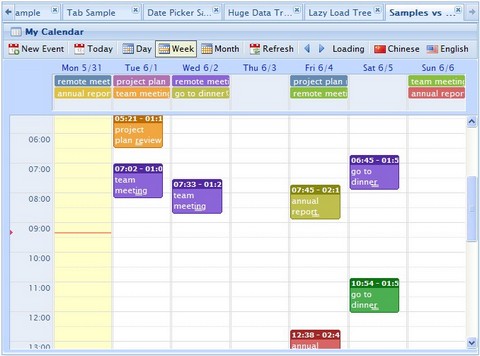
wdCalendar is a jquery based google calendar clone. It cover most google calendar features. User can choose to have a daily view, weekly view or monthly view. User can easily create, update or remove events by drag & drop. It is very simple to to integrate wdCalendar with a database.

wdCalendar is free (open source LGPL license), easy to use, and with great functionalities. You can check out the demo, and download it here.
jquery-calendar

Requirements: jQuery Framework
Demo: http://www.web-delicious.com/jquery-plugins-demo…
License: LGPL License

Share
Tweet
Sponsors
subscribe to our newsletter - weekly free resouces for web developers
follow us on social sites - rss, facebook, google+, Twitter
Subscribe RSS Like us on Facebook Follow us on Twitter Follow us on Google+
Related Resources
Mobile Ready Elegant jQuery Slideshow for Free

Mobile Ready Elegant jQuery Slideshow for Free

MooMonth – Full Javascript Calendar with MooTools

MooMonth – Full Javascript Calendar with MooTools

Fully Customizable jQuery Frontier Full Month Calendar

Fully Customizable jQuery Frontier Full Month Calendar

jQuery Weekly Calendar Plugin inspired by Google Calendar

jQuery Weekly Calendar Plugin inspired by Google Calendar

Calendar System Using MySQL and Script.aculo.us

Calendar System Using MySQL and Script.aculo.us

Piwik – Open Source Web Analytics

Piwik – Open Source Web Analytics

Comments
  • spelling-police

    Forgetting your plurals? Cmon Webappers…

  • lossy

    They have totally used the ExtJS design.

  • monn

    Definately, i thought they were using ExtJS when i saw the screenshot.

    That aside it seems to work well.

  • Dilbert

    I created my own jQuery calendar plugin that looks like Google Calendar. Give it a shot if you like.

    http://code.google.com/p/jquery-frontier-calendar/

  • http://www.web-resources.eu Web Resources.eu

    Is realy very cool work, and the person(s) who made that worked too hard, but the question is !

    Already we have the google Calendar with all the futures, why to use this one with limited functionality ?

    In any case ! Is a good job !

  • http://jumptree.com Liming

    Dilbert, your calendar is awesome. Great job!

  • Kuldip

    Awesome calendar tool, will this support localization, including double byte contents.

  • Kuldip

    What all data formats it support, does it supports to use iCal format to provide data.

  • Guido Glaser

    Great job! it looks very nice.
    But if i want to add a new event or if i want to edit an event i get the following error in the popup:
    >>This feature is disabled. Please download this plugin and install it in your machine for full features<<
    How can i solve this problem, and which plugin must be downloaded from where???
    Need helb ASAP, thanks…

  • Pingback: MOONGIFT: » jQueryで作るGoogleカレンダークローン「wdCalendar」:オープンソースを毎日紹介moongift.jp | PORTFOLIO -POST批評空間-

  • xuanye

    http://code.google.com/p/xgcalendar

    Looks like xgcalendar .
    hehe

  • Rayfcrols

    Show, I’m a few days playing with this plugin, since I got him on my system almost 100% functional with fully translated database, mult-user, etc.. More as I have little knowledge of PHP and even less when it comes to tinker with other applications, not to change the patterns of conse DATA mo standard for Sterling. MM / dd / yyyy someone could give me more information about or can help me?

    PS. Excuse the English, I’m using Google translator

  • Justin

    Thanks for the great calendar. I have been stuggling for years to get a decent looking calendar on my website. It sits in an iframe, and after some code edits, it will trigger a javescript function to load more detailed info about the event on the main page.

    Thanks!

  • Bram

    Does anyone using this Calendar with a database behind it? I use it, but when I have events in my DB and want to see that day with events, i get a loading error…

    SOMEBODY HELP!!

  • Felipe

    PHP HELP

    131 var param = [{ "name": "calendarId", value: 8}];

    How can I use the $id value instead of the 8 number that comes as default?

  • http://websitecenter.ca/clients Iouri Goussev

    I used this plug-in in a web application that I built for a small company. I had to customize it a little but it was reasonable easy to use and adjust.

  • J4v19

    Hi, I do not I work with databases. I changed the filenames datafeed.php and dbconfig.php edit.php and connection. Should we do more? I always says “Sorry, could not load your data, please try again later. ” I removed the try {catch ()} function
    getCalendarByRange function ($ id) {
    $ db = new DBConnection ();
    $ db-> getConnection ();
    $ sql = “select * from ` jqcalendar `WHERE` id `= “. $ id;
    $ handle = mysql_query ($ sql);
    / / echo $ sql;
    $ row = mysql_fetch_object ($ handle);
    return $ row;
    }

    And at least I no longer gives SQL syntax error.
    Have if someone can help me.
    Thanks

  • http://ofir.hr milan

    @J4v19 – you can use this:
    http://www.boutell.com/scripts/jsonwrapper.html
    include it in datafeed.php. It’s an error connected with PHP version which you are using. However including this solved my problem.

  • http://www.baboon.ir/ baboon-ir

    Great job! it looks very nice.

  • giorgio

    I am using in my application but I have a problem and I want to display events based on a box where you select the user and that the changes are shown only the events for that user, I can help do that?

  • Rocky

    Hi,

    I am using wdCalendar. I want to localize the calendar now. But I am seeing just these three files wdCalendar_lang_AU.js, wdCalendar_lang_HK.js and wdCalendar_lang_US.js in the installation folder. What about the files for other languages ? May I know from where I can download them ?

  • http://www.giorgionet.es giorgio

    Hello, you need not download any file, just copy the English language for example, (U.S.) and rename the termination of your language, for example Spanish, would wdCalendar_lang_ES.js, then edit the renamed file to translate all strings to that language.

  • Rocky

    Hi,
    I am using wdCalendar and it is working fine. But when I have the calendar design at the bottom or the middle of the page the DRAG feature is not working. To reproduce, you can put a lots of empty just above your calendar design and you will see the drag feature stops working. For example:

    With the above design the drag feature stops working…Is this a known issue, is this necessary that I have to keep the calendar design at extreme top, Can you let me know how can I fix this.

  • Rocky

    br br br br br br br br br br br br br br br b
    div
    div id=”calhead”
    div class=”cHead”
    div class=”ftitle”

    With the above design the drag feature stops working…Is this a known issue, is this necessary that I have to keep the calendar design at extreme top, Can you let me know how can I fix this.

  • Rocky

    Hi,

    It’s been 3 days since I have not received any reply for the bug which I have mentioned above. Can you please look into the issue ?

  • John

    Hi Rocky,

    Me too got this issue, I fixed it simply replacing document.documentElement.clientHeight with document.documentElement.scrollHeight every where in code.

    Mainly in jquery.calendar.js and where you implemented the calander code… just replace in every calendar file.

    Dont forget to take backup of the files before replacing.

    Hope this will solve your issue too.

    Great Codeing!!

    John

  • Alexandre

    Hello! Is it possible change datetime format to, i.e., dd/MM/yyyy (”pt-BR”)? Could you guys help me? Thanks anyway!

  • Dave

    Calendar works great…I noticed tooltip doesn’t display in firefox though even when I tried the demo page in firefox. Anyone else find this same issue? Thanks

  • http://www.giorgionet.es GIORGIO

    Alexandre I have the same problem, if I change the date format dd/MM/yyyy in the internationalization file ceases to show the input events.
    Anyone know how to change the date format?
    Greetings.

  • Louis

    I also can’t get the tooltip to show up in Firefox. Anybody know a fix?

  • please help

    Please how to change it to dd/MM/yyyy en-GB?

  • john

    i am using wdcalendar but i cant able to add event ..becoz its says “This feature is disabled. Please download this plugin and install it in your machine for full features” how can i resolve this issue ..please help me thanks

  • chamara

    Im trying to localize wdcalendar other languages,I want to set a setting where user can select HK,US or AU and depending on the selection only calendar should be localized.
    How can I achieve this?

  • Anju

    Hi John

    To add/edit events , you to follow the readme doc. ie;
    By default, events are created randomly. If you would like it work with database, please

    a. create a database, and execute setup.sql

    b. change php/dbconfig.php to fit yours

    c. rename edit.db.php to edit.php, php/datafeed.db.php to php/datafeed.php (you may backup edit.php/datafeed.php)

  • Nikhil Malhotra

    Hi,

    I too have just noticed that tooltips doesn’t display in firefox. The tooltips in the HTML header have also stopped working on the calendar page while they work perfectly on other pages.

    Please advise.

    –
    Thanks,
    Nikhil Malhotra

  • Ranjeet

    Hi,
    I am using wdCalendar and it is working fine localhost . But when I have the using on server it’s not work show msg’sory could not load your data, please try agan later….
    (I have changed my server username and password bot not work) plz tell me how to solve… thanks..

    Ranjeet

Open Source Resources for You

What we need is a list of the top quality resources, so that we can spend more time on our web development. WebAppers only picks the top quality web development resources for you.

© Copyright 2012 WebAppers | About | Archives | Privacy Policy | Advertise | Contact

Sponsors
Advertise Here
Search
By Keywords
30 Days / All Time
  • 1
  • 2
  • 3
  • 4
  • 5
  • 6
  • 7
  • 8
  • 9
  • 10
  • Professional Business Cards Made By Designers
  • Best Free Chrome Extensions for Web Developers
  • All of the Best Free WordPress Themes You Need
  • How to Create a Web App Admin User Interface
  • Nice List of Open Source Fish Eye Menu
  • Best Web Admin Templates
  • 25 Useful Blogs for Web Design & Development
  • Simple Javascript Progress Bar with CSS
  • 10 Useful & Quality Design Resources
  • Free Web Application Icons
  • How to Create High-Performance Code
  • Easy to Use, Drag & Drop Bootstrap Interface Builder
  • The Most Well-Made, Free & Open Source Fonts
  • Tiny Responsive jQuery Slider without Fancy Effects
  • How to Create Realtime Multi-player Games in HTML5
  • Create an Amazon-like Navigation Menu with jQuery
  • A True Responsive jQuery Lightbox Plugin for Free
  • How to Make FullScreen Page Transitions with CSS
  • How to Use Web Workers for Image Manipulation
  • Pretty Neat jQuery Mobile Theme Based on Flat UI
Sponsors
Plugins
  • Advertisement15
  • Calendar47
  • Capture19
  • Charts55
  • Chat22
  • Demo Tour16
  • Gallery121
  • Maps30
  • Menu86
  • Polls9
  • Popup49
  • Tooltips42
  • Upload33
  • Video18
Desgin
  • Brushes11
  • Buttons25
  • Color Schemes24
  • Fonts47
  • Forms112
  • Icons108
  • Patterns24
  • PS Tutorials15
  • Stock Photos21
  • Tables25
Others
  • Announcement103
  • Best Collections6
  • Code54
  • eCommerce24
  • Framework214
  • Hosting13
  • Information238
  • Inspiration32
  • Legal Documents10
  • Reviews8
  • Security13
  • Social28
  • Sound16
  • Stats39
  • Tools293
  • Webmail14
Licesnes
  • BSD License67
  • CC License122
  • GPL License224
  • LGPL License40
  • License Free738
  • MIT License408
Sponsors
Advertise Here
Partners
NetDNA



