

Open Source Resources for Web Application Developers

Shopify - Online Store Builder
Follow Us on Social Sites
Subscribe RSS Subscribe Newsletter Like us on Facebook Follow us on Twitter Follow us on Google+
  • Home
  • News
  • Plugins
  • Design
  • Others
  • Books
  • About
27 Oct

Notable – Easy Way to Provide Feedback on Websites

  • Tools
  • Leave a Comment

On the internet there are many applications and sites that help people to improve the way they work. Notable is an interesting result which is based on giving users an opening to use a feedback program which is created for teams that need to assist in improving many websites’ design, content, and code. Notable, designed by ZURB, makes sharing web page design and collecting feedback very simple.

You can give feedback quickly and easily on design, content and code of a website or application on any page. One of the finest things about this tool is that now it is easy to contribute with any page of a website. You can do it without leaving the browser.

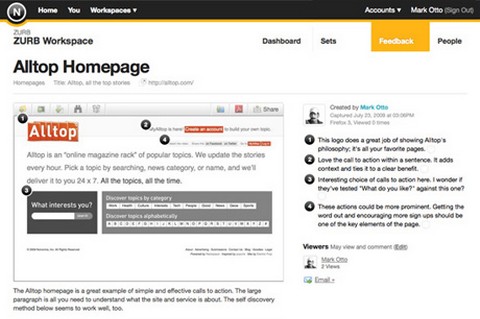
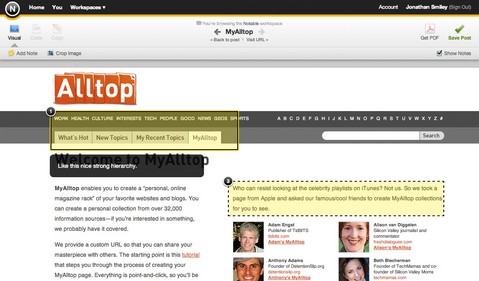
Using this product, your team will be able to participate through visual feedback on screenshots. It is a page capture utility. It has got strong annotation features which allow you pinpoint copy, design elements and even code which needs to be tweaked. Notable is the best comprehensive feedback tool on the Web.
website-feedback

Notable gives you the chance to express your opinion in a very simple way. It enables you to capture visual, code and copy notes on your browser or even with an iPhone app with the click of a button. You can also upload the capture to your account. You will be able to utilize this solution irrespective of where you are and what computer you are using without any bloated software.

The site is simple when it comes to answering the queries you might be having regarding the privacy of your pages or to know about the products you are interested in. All you have to do is install a Firefox extension or you can download the iPhone app. It will take only 10 seconds or less.

Permissions can be controlled easily and it is shared only with those you choose. You can take screenshot of a page and then annotate any part of that particular page with comments. For multiple projects you can create separate workspaces and share it with associated teams.
notable

There is a plan for Personal use, which is Free. It allows up to 3 users, with 3GB storage. You can have unlimited sets on 1 Private Workspace. And it supports iPhone Application as well.

Requirements: -
Demo: http://www.notableapp.com/
License: See Plans

Share
Tweet
Sponsors
subscribe to our newsletter - weekly free resouces for web developers
follow us on social sites - rss, facebook, google+, Twitter
Subscribe RSS Like us on Facebook Follow us on Twitter Follow us on Google+
Related Resources
Capture Any Webpage From Any Browser with Aviary

Capture Any Webpage From Any Browser with Aviary

Easy Cross-Browser Testing with SuperPreview

Easy Cross-Browser Testing with SuperPreview

iPhone GUI and Palm Pre GUI in PSD Format

iPhone GUI and Palm Pre GUI in PSD Format

Resources for Developing a Site for iPhone

Resources for Developing a Site for iPhone

iPhone Application / Web App Development Guide

iPhone Application / Web App Development Guide

Jing Screenshots and Screencasts for Your Web Application

Jing Screenshots and Screencasts for Your Web Application

Comments
  • http://task.fm Anthony Feint

    I love notable – my team uses it all the time to quickly get our ideas across to each other

Open Source Resources for You

What we need is a list of the top quality resources, so that we can spend more time on our web development. WebAppers only picks the top quality web development resources for you.

© Copyright 2012 WebAppers | About | Archives | Privacy Policy | Advertise | Contact

Sponsors
Advertise Here
Search
By Keywords
30 Days / All Time
  • 1
  • 2
  • 3
  • 4
  • 5
  • 6
  • 7
  • 8
  • 9
  • 10
  • Professional Business Cards Made By Designers
  • Best Free Chrome Extensions for Web Developers
  • All of the Best Free WordPress Themes You Need
  • How to Create a Web App Admin User Interface
  • Nice List of Open Source Fish Eye Menu
  • Best Web Admin Templates
  • 25 Useful Blogs for Web Design & Development
  • Simple Javascript Progress Bar with CSS
  • 10 Useful & Quality Design Resources
  • Free Web Application Icons
  • How to Create High-Performance Code
  • Easy to Use, Drag & Drop Bootstrap Interface Builder
  • The Most Well-Made, Free & Open Source Fonts
  • Tiny Responsive jQuery Slider without Fancy Effects
  • How to Create Realtime Multi-player Games in HTML5
  • Create an Amazon-like Navigation Menu with jQuery
  • A True Responsive jQuery Lightbox Plugin for Free
  • How to Make FullScreen Page Transitions with CSS
  • How to Use Web Workers for Image Manipulation
  • Pretty Neat jQuery Mobile Theme Based on Flat UI
Sponsors
Plugins
  • Advertisement15
  • Calendar47
  • Capture19
  • Charts55
  • Chat22
  • Demo Tour16
  • Gallery121
  • Maps30
  • Menu86
  • Polls9
  • Popup49
  • Tooltips42
  • Upload33
  • Video18
Desgin
  • Brushes11
  • Buttons25
  • Color Schemes24
  • Fonts47
  • Forms112
  • Icons108
  • Patterns24
  • PS Tutorials15
  • Stock Photos21
  • Tables25
Others
  • Announcement103
  • Best Collections6
  • Code54
  • eCommerce24
  • Framework214
  • Hosting13
  • Information238
  • Inspiration32
  • Legal Documents10
  • Reviews8
  • Security13
  • Social28
  • Sound16
  • Stats39
  • Tools293
  • Webmail14
Licesnes
  • BSD License67
  • CC License122
  • GPL License224
  • LGPL License40
  • License Free738
  • MIT License408
Sponsors
Advertise Here
Partners
NetDNA


