

When it comes to form validation, it’s hard to have a versatile solution that works with every form. Figuring out how to display errors is not a simple task. Cedric Dugas has created a jQuery Validation Engine in order to solve this problem.
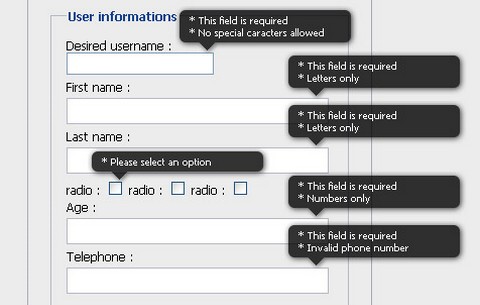
When an error needs to be displayed, the script creates a div and positions it in the top right corner of the input. This way you don’t have to worry about your HTML form structure. The rounded corner and shadow are done with CSS3 and degrade well in non compliant browsers. There is no images needed.
When you submit a form, it will look for inputs with predefined class selectors, and validate them accordingly to their type. It also does on the fly validation when you click outside of the input. Localisation language is also available. It has been tested on Internet Exploder 6 & 7, Firefox 3+, Safari 4 and Chrome 1+.
Requirements: jQuery Framework
Demo: http://www.position-relative.net/creation/formValidator/
License: MIT License





there is already a quite nice Validator Plugin with Inline support (ok no tooltips) – and very easy validation construction by class attrivute and even very easy to extend by own validation classes. probably this tooltip version could extend
http://docs.jquery.com/Plugins/Validation
extended example of JQuery/Plugins/Validation
http://devmill.com/dev/webapp/as1/form.php
[...] jQuery Inline Form Validation Engine | Web Resources | WebAppers cool jquery form validator (tags: webdev formularios javascript jquery forms form validation validate) [...]
Cedric’s done a great job on this. I’ve been using the standard Jquery validation plugin (which is great), but this looks even better. I’ll give it a shot!
Thank God. Please, avoid the tempatation to use this piece of crap validator: http://docs.jquery.com/Plugins/Validation
This looks like a nice alternative.
How does this validator deals with form elements which are hidden ? I mean those elements with style:display:none.
An example would be if user selects ‘other’ then only we will show her/him a input text box to add the custom text otherwise it remains hidden.
The official jquery validator does not handle this well.
This is what i want but not exactly the problem with this script is that its not W3C valid it pulls a lot of errors.
Nice tutorial for creating the inline validation.
How do set the black prompt? is there a tutorial or guide to set the black prompt on load of document.
Thanks
RSS feed for comments on this post · TrackBack URI