

Open Source Resources for Web Application Developers

Shopify - Online Store Builder
Follow Us on Social Sites
Subscribe RSS Subscribe Newsletter Like us on Facebook Follow us on Twitter Follow us on Google+
  • Home
  • News
  • Plugins
  • Design
  • Others
  • Books
  • About
01 Jun

jQuery Masonry – A Layout Plugin for jQuery

  • Framework, License Free
  • Leave a Comment

jQuery Masonry is a layout plugin for jQuery. Think of Masonry as the flip side of CSS floats. Where as floats arrange elements horizontally then vertically, Masonry arranges them vertically then horizontally. The result leaves no vertical gaps between elements of varying height, just like a mason fitting stones in a wall. Masonry will work with all structural elements: div’s, lists, p’s, spans.

There are no setting or options within in the plugin. Instead, all spacing properties can be set with CSS. The only property required for Masonry to work is for the width of the child elements. Child elements should be should have equal width in order to avoid any overlapping.
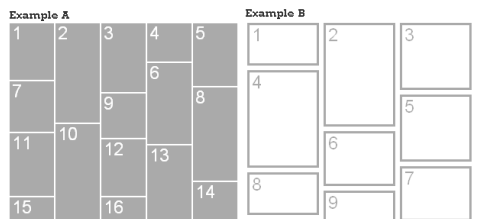
jQuery Layout

Requirements: jQuery Framework
Demo: http://desandro.com/resources/jquery-masonry
License: License Free


Share
Tweet
Sponsors
subscribe to our newsletter - weekly free resouces for web developers
follow us on social sites - rss, facebook, google+, Twitter
Subscribe RSS Like us on Facebook Follow us on Twitter Follow us on Google+
Related Resources
15 Great Examples of Websites using jQuery Masonry

15 Great Examples of Websites using jQuery Masonry

Dynamic Grid Layout Plugin for Pinterest-like Websites

Dynamic Grid Layout Plugin for Pinterest-like Websites

Create Spinning Progress Indicator with Spin.js

Create Spinning Progress Indicator with Spin.js

Pinterest-like Layout Plugin without Fixed Column Width

Pinterest-like Layout Plugin without Fixed Column Width

Another Stylish Tooltips jQuery Plugin

Another Stylish Tooltips jQuery Plugin

Scroll Your HTML Elements with jQuery Scrollable

Scroll Your HTML Elements with jQuery Scrollable

Comments
  • http://www.bitstorm.org/edwin/en/ Edwin Martin

    But what is the advantage over columns in css?

  • Nate

    Cool I guess but like Edwin said, I don’t really see the point

  • VonShakalon

    But, but… masons are Satan worshippers and baby eaters, aren’t they? :OOOOOOOOOOOOOOOO

  • http://converseallstar.org.uk Converse Fan

    The advantage of this script is that it’s dynamic. So you can arrange post excerpts on a page vertically withouting having to use complex php to float lefts and rights – which gets even harder when you try and arrange over 3 columns!

  • baste

    Have you ever noticed site like amazon.com (arrange) displays content based on screen size ?
    This one does exactly the same, it’s dynamic.

  • Pingback: Jquery animation | Mydons {Blog Growing Faster}

Open Source Resources for You

What we need is a list of the top quality resources, so that we can spend more time on our web development. WebAppers only picks the top quality web development resources for you.

© Copyright 2012 WebAppers | About | Archives | Privacy Policy | Advertise | Contact

Sponsors
Advertise Here
Search
By Keywords
30 Days / All Time
  • 1
  • 2
  • 3
  • 4
  • 5
  • 6
  • 7
  • 8
  • 9
  • 10
  • Professional Business Cards Made By Designers
  • Best Free Chrome Extensions for Web Developers
  • All of the Best Free WordPress Themes You Need
  • How to Create a Web App Admin User Interface
  • Nice List of Open Source Fish Eye Menu
  • Best Web Admin Templates
  • 25 Useful Blogs for Web Design & Development
  • Simple Javascript Progress Bar with CSS
  • 10 Useful & Quality Design Resources
  • Free Web Application Icons
  • How to Create High-Performance Code
  • Easy to Use, Drag & Drop Bootstrap Interface Builder
  • Tiny Responsive jQuery Slider without Fancy Effects
  • How to Create Realtime Multi-player Games in HTML5
  • A True Responsive jQuery Lightbox Plugin for Free
  • Create an Amazon-like Navigation Menu with jQuery
  • Super Smooth CSS Transitions for jQuery
  • Pretty Neat jQuery Mobile Theme Based on Flat UI
  • How to Use Web Workers for Image Manipulation
  • How to Make FullScreen Page Transitions with CSS
Sponsors
Plugins
  • Advertisement15
  • Calendar47
  • Capture19
  • Charts55
  • Chat22
  • Demo Tour16
  • Gallery121
  • Maps30
  • Menu87
  • Polls9
  • Popup49
  • Tooltips42
  • Upload33
  • Video18
Desgin
  • Brushes11
  • Buttons25
  • Color Schemes24
  • Fonts47
  • Forms112
  • Icons108
  • Patterns24
  • PS Tutorials15
  • Stock Photos21
  • Tables25
Others
  • Announcement103
  • Best Collections6
  • Code55
  • eCommerce24
  • Framework215
  • Hosting13
  • Information240
  • Inspiration32
  • Legal Documents10
  • Reviews8
  • Security13
  • Social28
  • Sound16
  • Stats39
  • Tools293
  • Webmail14
Licesnes
  • BSD License67
  • CC License123
  • GPL License224
  • LGPL License40
  • License Free739
  • MIT License410
Sponsors
Advertise Here
Partners
MaxCDN

