

29 Jan
Posted by Ray Cheung as GPL License, MIT License, Menu
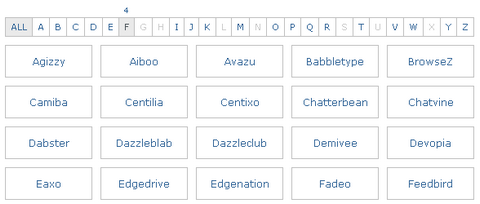
jQuery ListNav Plugin supplies an easy way to unobtrusively add a letter-based navigation widget to any UL or OL list. An easily stylable (via CSS) nav bar appears above the list, showing the user the letters A-through-Z.
Clicking one of the letters filters the list to show only the items in the list that start with that letter. Hovering over a letter (optionally) shows a count above the letter, indicating how many items will be displayed if that letter is clicked. Other options give you control over the basic functionality.
ListNav works great on long lists. It supports multiple lists on the same page. And it has been tested on IE6, IE7, Firefox 2 and 3 (Windows and Mac), Safari (Windows and Mac).
Requirements: jQuery Framework
Demo: http://www.ihwy.com/Labs/Demos/Current/jquery-listnav-plugin.aspx
License: MIT, GPL License




Does not work in MobileSafari aka iPhone.
Perfect timing. I’ve been fascinated with using Alphabetical navigation for large websites lately (see officemax.com) – I’m going to see if I can’t hack this to work as an alphabetical drop down navigation menu – that will save me a lot of time.
[...] jQuery Navigation Control to Manage Alphabetical Lists | Web Resources | WebAppers (tags: webdev javascript plugin jquery plugins navigation) [...]
thnx alot.
[...] | WebAppers posted under jQuery, javascript Post correlati: Alert Box con jQuery – Parte [...]
Simple, is not working for me
I had implemented it before on our site on
http://fedmich.com/anime/list/
Thanks a lot to iHwy group and WebAppers
@Asinox,
maybe you forgot to add jquery before using the listnav js.
or some plugins/file/js is conflicting it.
I’ll be glad to help if you need me to, let me know.
RSS feed for comments on this post · TrackBack URI