

Open Source Resources for Web Application Developers

Shopify - Online Store Builder
Follow Us on Social Sites
Subscribe RSS Subscribe Newsletter Like us on Facebook Follow us on Twitter Follow us on Google+
  • Home
  • News
  • Plugins
  • Design
  • Others
  • Books
  • About
02 Oct

Increase the Size of Click Targets And Get More Conversions

  • Information, License Free
  • Leave a Comment

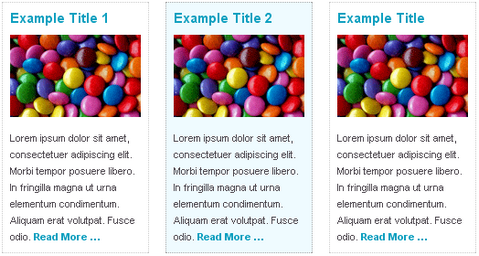
The main pattern used in nearly every site (grid and non grid) was the “title, thumbnail, short summary, more link” pattern. This pattern is generally used for indexing blog post summaries in sidebars, listing services, or creating small calls-to-action.

However, only those small bits of sporadic content were clickable. Sure it’s not that hard for the user to hover over one of the three links, but the user experience could be improved.

Leevi Graham felt that a user should be able to click anywhere in the content and navigate through to the target page — basically making the whole content block one big link. He came up with a jQuery Plugin called BigTarget.js with the following concept.

  • Attach the plugin to any link in the content block.
  • Pass through the click zone selector as a plugin option.
  • The plugin then attaches onclick and hover events to the click zone.
  • User clicks anywhere on the click zone.
  • The original link href is retrieved.
  • If the link has a rel attribute and it’s set to ‘external’, open the link target in a new window; otherwise open the link in the current browser window.
Requirements: jQuery Javascript Framework
Demo: http://newism.com.au/blog/post/58/bigtarget-js-increasing…
License: License Free


Share
Tweet
Sponsors
subscribe to our newsletter - weekly free resouces for web developers
follow us on social sites - rss, facebook, google+, Twitter
Subscribe RSS Like us on Facebook Follow us on Twitter Follow us on Google+
Related Resources
Sliding Content Aside to Reveal Secondary Content Pane

Sliding Content Aside to Reveal Secondary Content Pane

How to Build a Responsive and Mobile-Friendly Tooltip

How to Build a Responsive and Mobile-Friendly Tooltip

Fully Customizable Edit In Place jQuery Plugin

Fully Customizable Edit In Place jQuery Plugin

Grid Accordion Expands to Reasonable Width Automatically

Grid Accordion Expands to Reasonable Width Automatically

Detect Page Scrolling with MooTools ScrollSpy

Detect Page Scrolling with MooTools ScrollSpy

Easy Image or Content Slider for jQuery

Easy Image or Content Slider for jQuery

Comments
  • Thomas Winsnes

    It removed the users ability to control how the link is opened, and I believe that is more important then making the whole div clickable

  • Pingback: Webmaster Libre | Big Target, bloques de contenido como grandes enlaces

  • http://visualcafe.net Serge

    Great link! I could definitely use this for a project I just finished up.

  • http://visualcafe.net Serge

    Thomas: Are you sure? I can still right click on the link in both Firefox and IE and select “in new tab” or “in new window”. The areas inside the div that are not actual links (images and text) don’t have this functionality, but they never did to begin with.

  • Pingback: Fitt’s law jquery plugin

  • Pingback: Propiedad Privada » Blog Archive » BigTarget - Aumentar el área pulsable de nuestros enlaces con JS

Open Source Resources for You

What we need is a list of the top quality resources, so that we can spend more time on our web development. WebAppers only picks the top quality web development resources for you.

© Copyright 2012 WebAppers | About | Archives | Privacy Policy | Advertise | Contact

Sponsors
Advertise Here
Search
By Keywords
30 Days / All Time
  • 1
  • 2
  • 3
  • 4
  • 5
  • 6
  • 7
  • 8
  • 9
  • 10
  • Professional Business Cards Made By Designers
  • Best Free Chrome Extensions for Web Developers
  • All of the Best Free WordPress Themes You Need
  • How to Create a Web App Admin User Interface
  • Nice List of Open Source Fish Eye Menu
  • Best Web Admin Templates
  • 25 Useful Blogs for Web Design & Development
  • Simple Javascript Progress Bar with CSS
  • 10 Useful & Quality Design Resources
  • Free Web Application Icons
  • How to Create High-Performance Code
  • How to Create Realtime Multi-player Games in HTML5
  • A True Responsive jQuery Lightbox Plugin for Free
  • Create an Amazon-like Navigation Menu with jQuery
  • Super Smooth CSS Transitions for jQuery
  • Pretty Neat jQuery Mobile Theme Based on Flat UI
  • How to Use Web Workers for Image Manipulation
  • Free Responsive HTML5 + CSS3 Site Templates
  • How to Make FullScreen Page Transitions with CSS
  • Ghost: A Revolutionary Open Source Blogging Platform
Sponsors
Plugins
  • Advertisement15
  • Calendar47
  • Capture19
  • Charts55
  • Chat22
  • Demo Tour16
  • Gallery121
  • Maps30
  • Menu87
  • Polls9
  • Popup49
  • Tooltips42
  • Upload33
  • Video18
Desgin
  • Brushes11
  • Buttons25
  • Color Schemes25
  • Fonts47
  • Forms112
  • Icons108
  • Patterns24
  • PS Tutorials15
  • Stock Photos21
  • Tables25
Others
  • Announcement103
  • Best Collections6
  • Code55
  • eCommerce24
  • Framework215
  • Hosting13
  • Information240
  • Inspiration32
  • Legal Documents10
  • Reviews8
  • Security13
  • Social28
  • Sound16
  • Stats39
  • Tools294
  • Webmail14
Licesnes
  • BSD License67
  • CC License123
  • GPL License224
  • LGPL License40
  • License Free740
  • MIT License411
Sponsors
Advertise Here
Partners
MaxCDN

