

07 Jul
Posted by Ray Cheung as MIT License, Popup
We have mentioned Growl-like notification system for web a while ago, they are Send Notifications Instantly with Growl Mootools and Roar – Another Notification Widget with MooTools. Here is another Growl-like script for web which is written in jQuery called jGrowl.
jGrowl is a jQuery plugin that raises unobtrusive messages within the browser, similar to the way that OS X’s Growl Framework works. It has the ability to create multiple container instances, allowing a developer to raise and create various notifications in various location on the user’s screen.
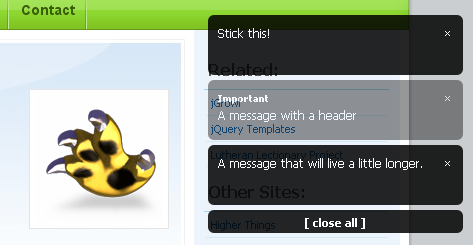
Requirements: jQuery Framework
Demo: http://stanlemon.net/projects/jgrowl.html
License: MIT License


Although I more like using jQuery, I think Mootools Window Growl looks nicer. But with a little tweaking you can look this one like that I think…
Cool, I like that. Thanks for the link.
[...] jGrowl – Unobtrusive Notification System for jQuery jGrowl is a jQuery plugin that raises unobtrusive messages within the browser, similar to the way that OS X’s Growl Framework works. (tags: jquery notification) [...]
Instead of these being activated by clicking a link can they be activated by inserting the cursor in form field? I’d like to work out how to use these to provide contextual help items.
Edwin: You should be able to customize this to look like just about anything via CSS. A little later I will look into mocking up a demo with some more creative styling.
Macca: Yes, as long as the proper DOM is built you can raise a notification at any point. Here at work we often use it in response to AJAX requests.
Ray: Thanks for posting about my plugin!
Edwin:
Take a look at:
http://stanlemon.net/jgrowl-1.1.0/jgrowl.html
This defines a theme using the same smoke.png that the MooTools Growl library uses and it additionally defines a theme to parallel jQuery UI’s Flora theme.
Little bit of CSS and you can really dress this up any way you want.
Pax,
- Stan
@Stan: Thank you!
I didn’t saw examples with jgrowl and images yet, like within the MooTools Grow, do you think it’s possible too? (didn’t had time to test it yet)
Edwin: Yes, that link I posted uses the same “Smoke.png” image as the mootools plugin for the bottom right quadrant. Very possible, anything is possible with CSS.
[...] jGrowl – Unobtrusive Notification System for jQuery | Web Resources | WebAppers (tags: jquery javascript notification growl script) [...]
How would one go about using jGrowl to provide a notification when a remote user makes an ajax form submission? Nothing fancy, just a “Someone has posted a new message” type of thing. Does jGrowl (or anything else) have the capability to remotely listen for this stuff?
Adam,
There are a number of ways you can accomplish this. One project I use has a generic notification pool located at a RESTful url, so after every AJAX request another AJAX request is fired off to that pool to get any “notifications” that have been raised. These then are raised in jGrowl by that request. That is though, perhaps a more complex model. Another option is simply to set the ’success’ property of $.ajax() options object to raise the notification for you. This assumes ajax request X will have response Y or Z, Y if it fails and Z if it is successful. Broader implementations will need to be more aware of the structure for notifications, ie. if the AJAX request always returns a JSON node with a message property, then you could write a global AJAX complete method that send that message property to jGrowl.
Hope that helps.
Pax,
SL
[...] jQrowl [...]
[...] jgrowl [...]
Hi guyz,
I’d like to ask idea on how to use this plugins as a notification message to let know all the online users that there is a new login users. Just like Yahoo messenger. It display a notification message if there is somebody new login users
RSS feed for comments on this post · TrackBack URI



