

Sometimes, when we are building websites and web applications, we need a percentage bar / progress bar to show the progress of a specific task. However, it is very difficult to find a working and easy solution without using Flash. Therefore WebAppers has created a simple Javascript based Percentage Bar / Progress Bar which is inspired by Bare Naked App. Bare Naked App taught us how to display Percentage Bar with 2 images only by using CSS. And then I used a little bit of Javascript to make it more interactivity. You can use it anywhere you can think of. Use your Imagination, I am sure you will find it useful somewhere.
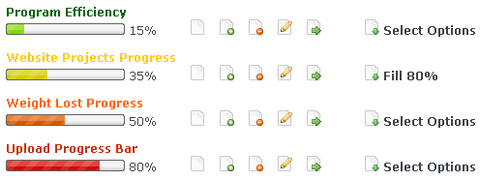
Click the image above to see the demo and documentation of Progress / Percentage Bar. And please feel free to grab the package below and test it on your machine.
Download Ajax Progress Bar
Bram.us has created a better version written in objects and unobtrusive, You can view the documentation and demo through Dynamic Unobtrusive Javascript Progress/Percentage Bar.
Download Ajax Progress Bar Version 0.33 by Bram.us
If you have any suggestions, please feel free to leave comments. I will update the script regularly.
Requirements: Prototype Framework
Demo: http://www.webappers.com/progressBar/
License: Creative Commons License





For now, if you does not have PHP on your local machine, you can change the “index.php” to “index.html”. It will run properly as well.
I will rename the index.php to index.html once I have access to a computer. Sorry for the inconvenience.
I’ve some serious problems in Safari 2, the bar graph doesnt update at all
This is so nice – well done!
Awesome! Really great job!
I’m sorry am I missing something? But as far as I can see this does not use any AJAX at all, I didn’t see a single XMLHttpRequest being used or any other form of client-server communication.
Sorry, you are right. I should use the word “DHTML/Javascript” rather than AJAX. I did not use any XMLHttpRequest at all.
Looks and functions very nice. It would be interesting to see some suggested uses for such a bar graph
Why have different images for different colors, and not use png transparency and css background-color property?
Evgeny, that is a great idea. I will implement it in the next update.
[...] Mas Información [...]
@Aaron – nice attitude.
Looking at your blog, it must feel good to be right all the time.
@Andrew – it must feel good to be a giraffe. What you’re not a giraffe? But you have a neck, legs, eyes, ears etc. So I might as well call you a giraffe right?
Look I didn’t mean to come across as harsh before but this kind of misnaming simply propagates the misconception that ANYTHING involving Javascript must be AJAX.
And as for your question, I’m not right all the time, just most of it
I encourage readers on my blog to point out flaws, express different ideas on how to do things and challenge what I have written. This should hopefully lead to a vibrant discussion everyone, readers & author alike can learn from.
But if you would prefer to only read nice fluffy “oh how pwetty” type comments and never learn anything, well thats your decision…..
Aaron, couldn’t agree more with you than ever. As a matter of fact, I’ve taken some action on my own and created a nifty Prototype.js Class which hooks itself to the page and achieves the same result, but then in a nicer way (and without AJAX
).
See http://www.bram.us/2007/08/02/my-javascript-non-ajax-progress-bar-class-jsprogressbarhandler/ for more details.
Bramus, thank you for pointing it out and created the great script for us! That is really awesome.
People who downloaded WebAppers Progress Bar v0.2, please download Bramus version instead.
Thank you Bramus!
Hi Ray, thanks for your comment and mail. Greatly appreciated!
Of course you can provide a link to this new version. After all, don’t we all want to make a better web?
Regards,
Bram.
[...] que es difícil encontrar un funcionamiento y una solución rápida sin usar flash. Los chicos de webappers han creado una simple barra de progreso basada en ajax e inspirada en displaying percentages. [...]
[...] web que nos hace más facil las cosas, así es webappers han hecho una barra de progreso basado en ajax, por lo que leo ha sido inspirada en displaying [...]
[...] Simple Javascript Progress Bar with CSS [...]
[...] Ajax Script zur Erstellung einer dynamischen Fortschrittsanzeige (Progressbar) findet sich hier bei [...]
Congrats with your work Ray. It realy looks nice
it doesn’t fill fully with opera last version when i check the demo…
so sad.
@Alex
Have you tried the latest version made by Bramus?
http://www.bram.us/demo/projects/jsprogressbarhandler/
[...] Mas Información [...]
[...] y luego Bram Van Damme (nicknam: Bramus!) mejoro el código. Aqui les paso los 2 enlaces tanto de WebAppers como de [...]
Where does the icons you have used come from. I have seen these icons at several sites.
These icons are from Famfamfam, have a look at
http://www.webappers.com/2007/06/08/famfamfam-most-pupular-silk-icons/
[...] Una solución sencilla, elegante y que nos puede servir independientemente del lenguaje de servidor con el que estemos trabajando. Tanto el acceso a la descarga, como a la documentación y a una demo las tenemos en WebAppers. [...]
[...] Una solución sencilla, elegante y que nos puede servir independientemente del lenguaje de servidor con el que estemos trabajando. Tanto el acceso a la descarga, como a la documentación y a una demo las tenemos en WebAppers. [...]
[...] WebAppers Simple Javascript Progress Bar with CSS by WebAppers – WebAppers has created a simple Ajax Javascript based Percentage Bar / Progress Bar which is inspired by Bare Naked App. Bare Naked App taught us how to display Percentage Bar with 2 images only by using CSS. [...]
Is there a way to reset AND restart the progress bar from a single click??? THANKS!!!
There is a built-in function to empty the progress bar. Please see documentation
i know, but i need to reset it on each click
i know , but i need it to reset the bar, and reload it from each click
call 2 functions from each on click
[...] WebAppers Simple Javascript Progress Bar with CSS. well done. [...]
Revue de presse…
La revue de presse hebdomadaire pour vous faire découvrir ce qui se passe ailleurs, dans d’autres blogs. Il s’agit d’articles en français ou en anglais que j’ai trouvé au cours de ma veille quotidienne et que j’aimerais…
[...] Döküman için [...]
Bug detected.
Is necessary change location of PERCENT IMAGE in jsProgressBarHandler.js.
My modification:
var progressBarCam = ‘../../lib/jsprogressbarhandler/’;
progressBar.update(’ 0%’);
Thank u
I’ve change the fillProgress method because it doesn’t fill until some numbers, 97% for example. I’ve only added the else statement, but by this way you can fill until any percent.
function fillProgress(id, endPercent)
{
var nowWidth = $(id).style.backgroundPosition.split(”px”);
startPercent = Math.ceil(100+(nowWidth[0]/eachPercent))+1;
var actualWidth = initial + (eachPercent * endPercent);
if (startPercent)
{…}
else{
setText(id,endPercent);
}
}
[...] Tradução do artigo em inglês: “Javascript Progress / Percentage Bar with CSS.” [...]
[...] Simple Javascript Progress Bar with CSS es una biblioteca en Javascript para implementar con CSS barras de progreso en páginas web. Es una solución ideal para evitar en estos casos el uso de Flash. [...]
[...] que es difícil encontrar un funcionamiento y una solución rápida sin usar flash. Los chicos de webappers han creado una simple barra de progreso basada en ajax e inspirada en displaying percentages. [...]
fot those who implement in php:
0%
Event.observe(window, ‘load’, function() {
manualPB = new JS_BRAMUS.jsProgressBar($(’element5′), ‘myManualProgressBar’, $x, {animate: true});
}, false);
“;
}
?>
Version 0.2 is out
Sorry for not-readable above posting.
to see complte code:
http://www.socon.nl/phpcode.html
regards.
[...] is a Javascript based Percentage Bar / Progress Bar, inspired upon JS-code by WebAppers and CSS-code by Bare Naked App. Next to a structural rewrite of the WebAppers code, this javascript [...]
[...] DEMO – Download Leave a Reply [...]
Hi,
How do I fix the place where this progress bar is displayed and what control should I use (like use an tag and use any of the progress bar images?)
Your answers would be appreciated
[...] ενός upload για παράδειγμα τότε ρίξτε μια ματιά στο WebAppers Simple Javascript Progress Bar with CSS. Σας το προτείνω [...]
[...] Fonte: http://www.webappers.com/2007/07/31/webappers-simple-ajax-progress-bar-with-css/ [...]
[...] is a Javascript based Percentage Bar / Progress Bar, inspired upon JS-code by WebAppers and CSS-code by Bare Naked App. Version 0.1 was a mere rewrite to PrototypeJS of the version by [...]
[...] is a Javascript based Percentage Bar / Progress Bar, inspired upon JS-code by WebAppers and CSS-code by Bare Naked App. Next to a structural rewrite of the WebAppers code, this javascript [...]
Hey everybody, i’m using the php ftp_put() function for file upload and the file is submitted to it from an html form in another page, how can i associate the progress bar to the upload, awaiting your reply people…??!!
when i set animate=false,, there are some errors ….
[...] is a Javascript based Percentage Bar / Progress Bar, inspired upon JS-code by WebAppers and CSS-code by Bare Naked App. Version 0.1 was a mere rewrite to PrototypeJS of the version by [...]
Hi,
Can anyone explain how do we change the progress bar image depending on each scenario?
if 100% then show green progress bar (green image)
likewise if less than 100% then show red progress bar (red image)
Lara, see http://www.bram.us/projects/js_bramus/jsprogressbarhandler/ for more details and howto
Hi i was wondering how i can add more progress to the progress bar using javascript. I create a manual progress bar as in the doc:
Event.observe(window, ‘load’, function() {
manualPB = new JS_BRAMUS.jsProgressBar(
$(’progressbar’),
45,
{
showText : true,
animate : true,
width : 154,
height : 11,
boxImage : ‘images/bramus/custom1_box.gif’,
barImage : ‘images/bramus/custom1_bar.gif’
}
);
}, false);
everything works and it loads it with 0%
But can i add progress to this bar using javascript?
like putting :
manualPB.setPercentage(’70′);
below the progress bar creation? i get a manualPB is undefined.
[...] http://www.webappers.com/2007/07/31/webappers-simple-ajax-progress-bar-with-css/ [...]
[...] ) WebAppers Simple Javascript Progress Bar with CSS- WebAppers has created a simple and brilliant Javascript based Percentage Bar / Progress Bar which [...]
[...] Simple Javascript Progress Bar with CSS (tags: javascript) [...]
[...] WebAppers Simple Javascript Progress Bar with CSS- WebAppers has created a simple and brilliant Javascript based Percentage Bar / Progress Bar which is inspired by Bare Naked App [...]
[...] Drop. Lock.- A nice tutorial for making quick drag and drop features in PHP. 演示 下载 12) WebAppers Simple Javascript Progress Bar with CSS- WebAppers has created a simple and brilliant Javascript based Percentage Bar / Progress Bar which [...]
[...] schon die Ausgabe abgegriffen werden kann oder auch erst die fertige Ausgabe gesendet wird. WebAppers Simple Javascript Progress Bar with CSS | Web Resources | WebAppers Das ist unter anderem eine hbsche Progressbar. JQuery.gui und Ext bieten auch welche, neben ihrem [...]
I’m disappointed, because it does not work when you change it a tiny bit. This is what i have changed:
instead of loading the script in the body like this:
I did it this way:
And in the function “load_javascripts();” I have written:
alert(”Welcome on my website”);
fillProgress (’element1′,’100′);
And this tiny change creates a error that stops all the javascripting on my website…
These are some might fine progress bars. I’ve used them for a long, long time now. A must have for any project that requires them. They just look so damn good!
This possible to can bring Wordpress Plugin empty?
[...] que es difícil encontrar un funcionamiento y una solución rápida sin usar flash. Los chicos de webappers han creado una simple barra de progreso basada en ajax e inspirada en displaying percentages. [...]
Thanks I was searching for it. They look too nice.

Ofcourse I have read the license agreement and if I use it for my website I will keep this in my mind ..
Thanks once again…its working fine for me
不错,我顶
[...] WebAppers Simple Javascript Progress Bar with CSS by WebAppers (tags: Ajax CSS javascript webdesign progressbar) [...]
[...] is a Javascript based Percentage Bar / Progress Bar, inspired upon JS-code by WebAppers and CSS-code by Bare Naked App. Next to a structural rewrite of the WebAppers code, this javascript [...]
[...] is a Javascript based Percentage Bar / Progress Bar, inspired upon JS-code by WebAppers and CSS-code by Bare Naked App. Next to a structural rewrite of the WebAppers code, this javascript [...]
Great idea but bram.us has gone awol!!
[...] is a Javascript based Percentage Bar / Progress Bar, inspired upon JS-code by WebAppers and CSS-code by Bare Naked App. Version 0.1 was a mere rewrite to PrototypeJS of the version by [...]
[...] is a Javascript based Percentage Bar / Progress Bar, inspired upon JS-code by WebAppers and CSS-code by Bare Naked App. Next to a structural rewrite of the WebAppers code, this javascript [...]
[...] is a Javascript based Percentage Bar / Progress Bar, inspired upon JS-code by WebAppers and CSS-code by Bare Naked App. Next to a structural rewrite of the WebAppers code, this javascript [...]
[...] WebAppers Simple Javascript Progress Bar with CSS- WebAppers has created a simple and brilliant Javascript based Percentage Bar / Progress Bar which [...]
[...] is a Javascript based Percentage Bar / Progress Bar, inspired upon JS-code by WebAppers and CSS-code by Bare Naked App. Next to a structural rewrite of the WebAppers code, this javascript [...]
Excellent post thanks for sharing, will come in very handy and looks cool too.
[...] the Live Demo 12) WebAppers Simple Javascript Progress Bar with CSS- 由 WebAppers 创建的一个醒目的进度条, 其灵感来源于 Bare Naked [...]
[...] que es difícil encontrar un funcionamiento y una solución rápida sin usar flash. Los chicos de webappers han creado una simple barra de progreso basada en ajax e inspirada en displaying percentages. [...]
Very nice script.
I miss one feature, though: the ability to use it as ‘progress unknown progressbar’ (progressbar which doesn’t actually show the progress, but just something moving).
I think this would be a very useful feature. Tell me what you think.
phoenix college university online course…
online college. online bible colleges. college courses online. 8 week term online colleges. online college elementary algebra courses. …
Nice work man….keep it up
thanx
[...] Más información: http://www.webappers.com/2007/07/31/webappers-simple-ajax-progress-bar-with-css/ [...]
Awesome post. We’re using this on our sites now thanks
Thank you very much this will help moving forward.
Great post, I wish you continued greatness and success!
I love progress bars, they really make the user stick around and wait because they know something is coming.
Great post, will definatly bookmark this website and check back for more posts thanks!
[...] Simple Javascript Progress Bar with CSS简单实用. [...]
@watch movies: i agreed you man. Great
@Bramus: thank u for sharing the new update. got the same name.
it doesn’t fill fully with opera last version when i check the demo…
so sad.
great link… i found some perfect results for me here… thanks a lot to share!
Great and useful for me. Thanks
Great idea to me. Love your progress bars.
Nice.. Code
Very good progres bar ! i love it!
Thanks dude
regards!
Nice work, it really helps me, thx!
Great idea! I love your progress bars.
Thanks for this post – I have aplied your solution for showing stock statuses in my shop.
fantastic idea kosmetiky, I also will add it modifying it a little
regards
Great stuff, cant wait to test it on my site.
It’ s great idea!
It works great. Thanks.
decent info easily explaind. thanks for that!
Thanks for this progressbar. Works fine for me!
I was looking for something like this all over the place, this is just great! I was just wondering if you guys could also have this converted into a plugin for wordpress, i bet it would be a hit! :] Thank You for this wonderful script!
Cool progressbar
Great and useful for me.
The link to download it is broken.
The first link entitled “Download Ajax Progress Bar” has no link at all.
The link entitled “Download Ajax Progress Bar Version 0.1 by Bram.us” is broken.
And the link in the middle is to a page that describes another much older version of the tool that is not very usable as there is no way to reset the progress bar back to zero.
I want to download the awesome version of the tool that is shown in the demo on this website. How can i do this? I tried taking the js files down from the site but I also need a bunch of images that they reference…..
@ Gareth,
The download link is now updated!
This is a great script!
Is it possible to have some downloads in a cron and display the status of this download with this script ?
I’m figuring out a way to do this…
Thanks for the quick response Ray, however what you have linked to is the adaption of the original tool made by Bram.us, not the original tool.
I have no idea why Bram.us made those changes to the tool, by removing the ability to reset the progress bar back to zero (he removed the method entitled “emptyProgress”), he has effectively made it useless for anyone who wants to be able to use the progres bar on a dynamic page that allows users to requery the page (on the second query/upload the progress bar will be stuck at 100%).
I have no idea why he choose to mess with a perfectly functioning tool, I have tested the demo here in IE, chrome, FF, and Opera and it has no issues. Don’t fix what isn’t broken!
I have worked out how to download the original version shown on the demo here, in case others are interested, this is how to do it:
1,Go here:
http://www.webappers.com/progressBar/lib/
and download all 3 files listed (including the css file)
2,Go here:
http://www.webappers.com/progressBar/images/
and download all 5 of the .png files listed
3, Make sure that you preserve the same file path structure as the demo does, or if you choose a different structure, then adjust the file paths in the code accordingly.
Gareth,
Calling setPercentage with a value of 0 looks the same as emptyProgress to me, hence I didn’t implement that method.
Be sure to give the (source of the) demo at http://www.bram.us/demo/projects/jsprogressbarhandler/ a proper look.
As you’ll see, that demo works fine (and has worked fine for the past 4 years ever since it’s been released) in any browser you’ve mentioned.
Regards,
Bram.
“Calling setPercentage with a value of 0 looks the same as emptyProgress to me, hence I didn’t implement that method.”
Nothing could be further from the truth, in your version, calling setPercentage with a value of 0 counts the progress bar backwards down to zero. So users will see the percentage figure dropping gradually back down to zero. Why would you want users to think that the progress is decreasing?
You can always set the animation property to false, or make use of the second parameter the setPercentage function accepts: myPB.setPercentage(0, true);
Ok, Thanks Bramus. What is the second parameter? It is called “clearQueue” which does not indicate that it is specifically to do with whether or not you want to animate the new percentage. I thought it meant to wipe out any pending animations that have not yet finished running.
I think I will just stick with the original version now that I have it working the way I need it. I played around with your version for hours yesterday and could not work out to dynamically set the animate property to false from the script within my html page.
Why is your version better? What are the improvements that you made? (forgive me for asking what may seem like a stupid question to you, but I cannot see any obvious improvements….)
@Gareth: Technically my version is constructed in a more advanced way (an object versus a bunch of functions), but that’s not per say better (featurewise). The version that fits you best and that does what you want it to do, that’s the best version
RSS feed for comments on this post · TrackBack URI