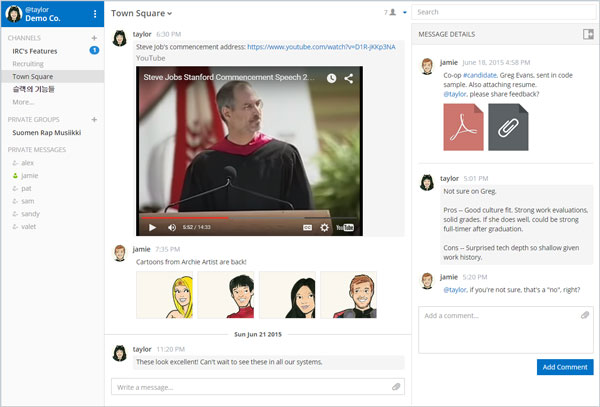
Mattermost is an open source, self-hosted Slack-alternative that offers modern communication from behind your firewall. We built it so users have a practical option for avoiding lock-in from proprietary SaaS services. Mattermost is designed to be Slack-compatible (but not Slack-limited). That means we help users move over from Slack, but without limiting Mattermost to another product’s feature set.
Mattermost infrastructure is built for IT admins who want to quickly stand up a self-hosted alternative to Slack that’s easy to install, deploy, manage and scale. Mattermost includes a web-based System Console for managing instance level configuration. To simplify licensing, they have responded to community feedback and the compiled version of Mattermost v1.0 is now under the MIT open source license (instead of Apache-AGPL).
Requirements: –
Demo: http://www.mattermost.org/
License: MIT License
Popmotion is a 12kb JavaScript motion engine. Make it pop with animation, physics, and input tracking. In the browser, on Node, anywhere. Native DOM support: CSS, SVG, SVG path and DOM attribute support, out of the box. Unlimited: Custom callbacks allow you output to any numerical property or API. Power anything: Use with jQuery, Canvas, Three.js, WebSockets, etc. Seamless interaction: Tracks velocity for hand-off between input, animation and physics. Node support: Run on a server or an Arduino to fuel the IoT. Open rAF loop: Run any Process on the core requestAnimationFrame loop.

Requirements: JavaScript Library
Demo: http://popmotion.io/
License: MIT License
Copying text to the clipboard shouldn’t be hard. It shouldn’t require dozens of steps to configure or hundreds of KBs to load. But most of all, it shouldn’t depend on Flash or any bloated framework. That’s why clipboard.js exists. This library relies on both Selection and execCommand APIs. The second one is supported in the following browsers: Chrome 42+, Firefox 41+, IE 9+, Opera 29+, Safari X.

Requirements: JavaScript Library
Demo: http://zenorocha.github.io/clipboard.js/
License: MIT License
CSSNano is a modular minifier that aims to utilise small modules from the PostCSS ecosystem, rather than being an all-encompassing module that may be difficult to contribute to. Because it is written on top of PostCSS, it is able to do more than simple whitespace transforms – including advanced optimisations such as custom identifier reduction, z-index rebasing, and adjacent selector merging.

Requirements: –
Demo: http://cssnano.co/
License: MIT License
Content Tools is a JS library for building WYSIWYG editors for HTML content. The ContentTools WYSIWYG editor can be added to any HTML page in a few simple steps. There are step-by-step guides for common use scenarios as well as more advanced topics for those rolling their own editors. Full API documentation and examples for the ContentTools family of libraries. The ContentTools family of libraries is free and open-source. The libraries are hosted, developed and maintained on GitHub.

Requirements: JavaScript Library
Demo: http://getcontenttools.com/
License: MIT License
Modernizr has redesigned and built the site from the ground up to give the website a refresh as well as make the builder a whole lot more powerful for beginners and advanced users. From just creating a simple build to grabbing a config, to implementing in your build process, through to a really cool solution of dynamically creating a custom package that can be installed via bower. The internal structure of Modernizr has been completely revamped, making it easier to contribute to and easier to customize/extend Modernizr’s licensing has changed: they have moved from a BSD license to MIT.

Requirements: –
Demo: https://modernizr.com/
License: MIT License
Imagine a situation – your HTML markup renders at backend side, it contains some list of data. At one point you need to implement search by this list. It can be easily achieved by using Jets.js with a browser’s native search speed.
The main idea is not to affect attributes of each tag in the list while filtering. Instead apply dynamic CSS rule in only <style> tag and browser will decide which item of list to show or hide. Since it’s just CSS – Jets.js may be applied to any tag, whether it’s a table or UL, OL, DIV… Jets.js is a native CSS Search Engine.

Requirements: JavaScript Framework
Demo: http://nexts.github.io/Jets.js/
License: MIT License
UpUp is a tiny javascript library that makes sure your users can always access your site’s content, even when they’re on a plane, in an elevator, or 20,000 leagues under the sea. Mobile-First has become the de-facto standard for building modern sites. But in a world where everyone is mobile, an always-on connection isn’t something we can rely on. It’s time to start thinking Offline First. With UpUp you control the content your users see, even when they are offline. And you can do it with just a single JavaScript command.

Requirements: –
Demo: https://www.talater.com/upup/
License: MIT License
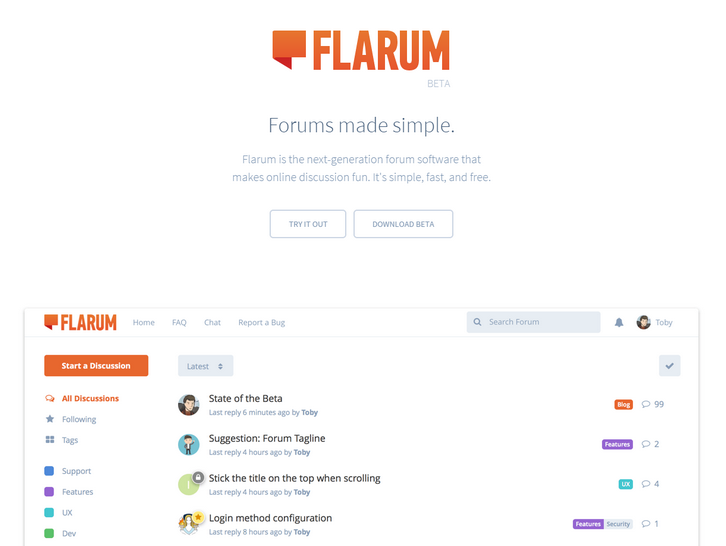
Flarum is free, open-source forum software with a focus on simplicity. You can use Flarum to easily set up a discussion forum for your website. It’s forum software reimagined. Flarum looks and feels great out of the box. The user interface is streamlined so you can spend less time clicking and more time talking. You can keep on scrolling, without having to wait for the next page of posts to load. Flarum lets you scrub anywhere in a discussion quickly and easily. It remembers your position if you come back after navigating away.
There is a Floating Composer, you can read while you write. Flarum’s reply form slides up from the bottom of the page, so you can scroll up to read posts – and even visit other discussions – while you draft your reply. Flarum is fully responsive by default, and not just as an afterthought. The interface has been optimized for touch, with big buttons, smooth animations, and gestures aplenty.
Requirements: –
Demo: http://flarum.org/
License: MIT License
Rucksack is a little bag of CSS superpowers. It makes CSS development fun again, with features the language should have come with out of the box. It’s built on PostCSS, it’s modular, it doesn’t add any bloat, and it’s lightening fast.
Integrating Rucksack into your workflow is easy. There are plugins for most build tools, and an npm module to integrate it manually or process your CSS directly on the command line. Since it’s built on the PostCSS ecosystem it plays nice with all other CSS pre and post processors, and can even integrate into Stylus directly.
Requirements: CSS
Demo: http://simplaio.github.io/rucksack/
License: MIT License







