Kong is for anyone who wants to sell online and we’ve made it free to use to make this a possibility for everyone. No monthly fees and no additional transaction fees, ever. There are no restrictions on Kong. Have as many products you like, use as much bandwidth and storage as you need and make use of our incredibly flexible, customisable default theme; all for free.
There are many companies in the eCommerce market that offer, on the face of it, pretty much the same product; with maybe a few standout features. They are different because Kong came from a design background. Kong has won awards for beautiful websites and software. They care about design. It’s a part of their DNA. They are designing Kong to be the most beautiful, simple and powerful product. From the experience you and your customers have, to the tools they build to make that experience great, you can be sure that we will have meticulously considered every detail and that they will continue to do so. After all, there is beauty in the detail.

Requirements: –
Demo: https://trykong.com/
License: License Free
Swift is a powerful and intuitive programming language. It’s increasingly popular because writing Swift code is interactive and fun, the syntax is concise yet expressive, and apps run lightning-fast. Swift.org is the open source community where developers may collaborate on the Swift programming language.
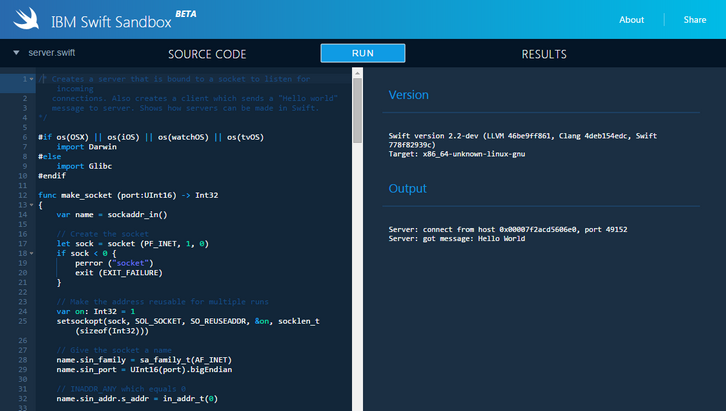
The IBM Swift Sandbox is an interactive website that lets you write Swift code and execute it in a server environment – on top of Linux! Each sandbox runs on IBM Cloud in a Docker container. Both the latest versions of Swift and its standard library are available for you to use. They’ve also provided a collection of sample programs for you to experiment with. Click Source Samples in the upper left corner to see the list of available samples.
Requirements: –
Demo: http://swiftlang.ng.bluemix.net/
License: License Free
Vertical timeline is so far one of the most popular resources on CodyHouse. Many people have asked them to include a Horizontal Timeline as well. Here it is! Building a horizontal timeline was a bit tricky, because you can’t rely on the vertical (more intuitive) scrolling behaviour. They decided to separate timeline and events, with the first one working like a slider, while the second one occupying the full width and showing a single event at a time.
About the timeline: the position of each date along the timeline is set using jQuery. Dates are not equally distributed along the timeline, but the distance between a date and the next one is proportional to the difference between these dates.

Requirements: jQuery Framework
Demo: https://codyhouse.co/demo/horizontal-timeline/index.html
License: License Free
jQuery.my is a lightweight jQuery plugin for complex two-way data binding in real time. It’s a plugin for real time two-way data binding. It mutates object given as data source, reflecting interactions between user and UI. jQuery.my recognizes both standard HTML controls and complex composites created using rich ui plugins. Controls built with jQuery UI, Select2, CodeMirror, Ace, Redactor, CLeditor, jQuery Mobile are supported out of the box.
jQuery.my provides comprehensive validation, conditional formatting, complex dependencies, runtime form structure manipulation. $.my forms can run nested, each jQuery.my instance can be a composite control for parent form. Syntax of $.my manifest is very simple, lean and unobtrusive. There exist specialized in-browser IDE for $.my apps authoring. This IDE is a built-in component of cloudwall.me system.

Requirements: jQuery Framework
Demo: http://jquerymy.com/
License: License Free
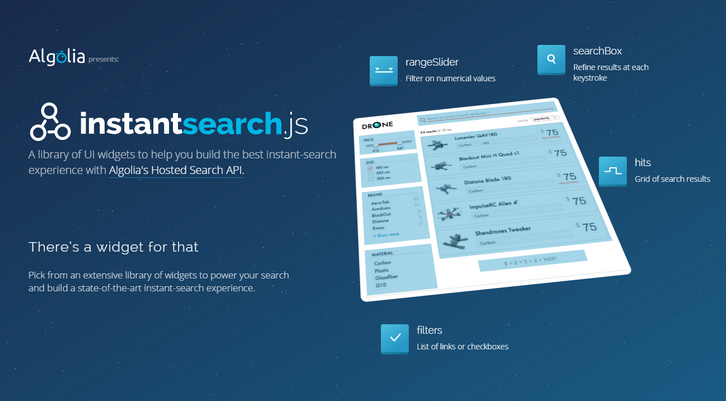
InstantSearch.js is a library of UI widgets to help you build the best instant-search experience with Algolia’s Hosted Search API. Your code is easy to write and maintain. instantsearch.js provides the glue between the different parts of your search page.
Everything is packaged in one library. Every website is different. The modular design of instantsearch.js allows you to configure, rearrange and combine the widgets to build your own experience. Sometimes you want to build a custom feature. You can do that by forking a pre-built widget or coding your own.
Requirements: JavaScript
Demo: https://community.algolia.com/instantsearch.js/
License: License Free
Would you like a Stretchy Navigation in CSS and jQuery? It’s a rounded navigation trigger that stretches on click/tap to reveal the navigation items. There are 3 different user cases where this snippet would be useful: 1) fixed navigation, 2) add content button and 3) edit content button. The HTML structure is pretty basic: a div is used to wrap an unordered list (containing the navigation items) and an trigger (for the menu icon). An additional span element is used to create the stretchy background.

Requirements: –
Demo: https://codyhouse.co/demo/stretchy-navigation/index.html
License: License Free
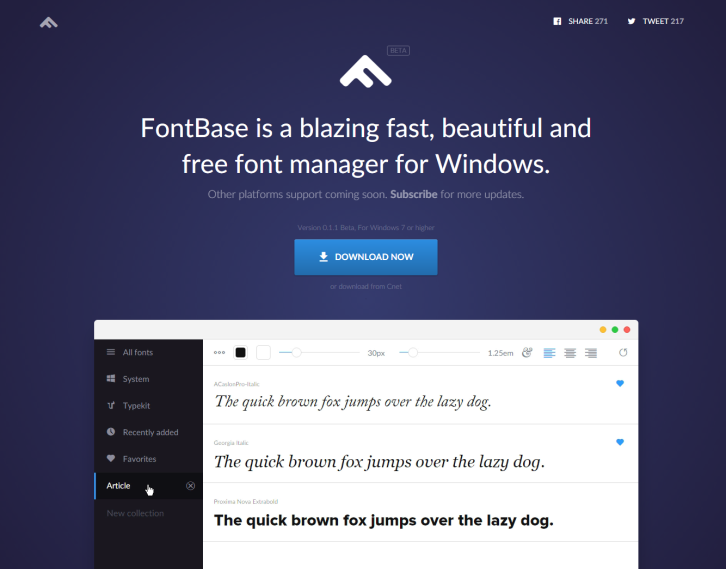
FontBase is a blazing fast, beautiful and free font manager for Windows. There is a number of predefined collections, such as recently added fonts (really useful), Typekit fonts and favorites. You can also create as many collections as you like by yourself. Simply change the color, background, font size, line height and align of your fonts. Apply styles to the whole collection or just to individually selected fonts.
Tired of scrolling up and down when you need to compare two fonts? In FontBase, you can simply pin a font to top and easily compare it to any other font in your collection. They also support a broad number of OpenType features. That includes ligatures, tabular figures, super and subscript, swashes, old style figures and some more. You can be sure, you’ll always use the latest version of FontBase, because guess what? Automatic updates! No need to re-download. Ever.
Requirements: –
Demo: http://fontba.se/
License: License Free
Today’s Blueprint is a Simple Multi-Level Menu with delayed item animations and an optional breadcrumb navigation and back button. The idea is to animate each menu item once a level is changed. The animation starts with the item clicked and the delays are propagated through the neighbors. The animation delays follow the same logic for the incoming items of the new level of the multi-level menu. As optional elements we have a breadcrumb navigation and a back button (not shown in our demo). Deeper levels are referenced with a data attribute. They have added some example media queries for a mobile menu version with a menu toggle.

Requirements: –
Demo: http://tympanus.net/Blueprints/MultiLevelMenu/
License: License Free
In today’s world, startups have become global which means a potential employee’s location no longer means not being able to hire the best IT staff. Remote teams have become common practice in this generation of technologically advanced workforce. It’s a new day and age and all businesses are turning more and more to using remote teams for their IT departments and utilizing the numerous online tools available that make this possible.
With tools like Jira, GitHub and Skype it allows for a more organized approach to the process of software development. The first step for new starting new IT projects is to find the best talent for the most optimal cost affective bang for your buck. There is another great online tool that will make hiring developers a whole lot easier. It’s called Tests4Geeks. Tests4Geeks is an IT Skill Assessment sight.

Startups are not simply looking to hire the best developers, but are always in search ways of to prevent wasting valuable time. There is nothing more frustrating than to spend an hour or more interviewing a candidate, only to realize during the process it was a complete waste of time. Of course face to face real time interviews are still the best way to vet potential candidates, but wouldn’t it be great to know before you take the time to do so that the person you are interviewing indeed has the skills you are looking for? With Tests4Geeks companies can now test potential interviewees BEFORE you take time out of your busy day to talk to them. Read the rest of this entry »
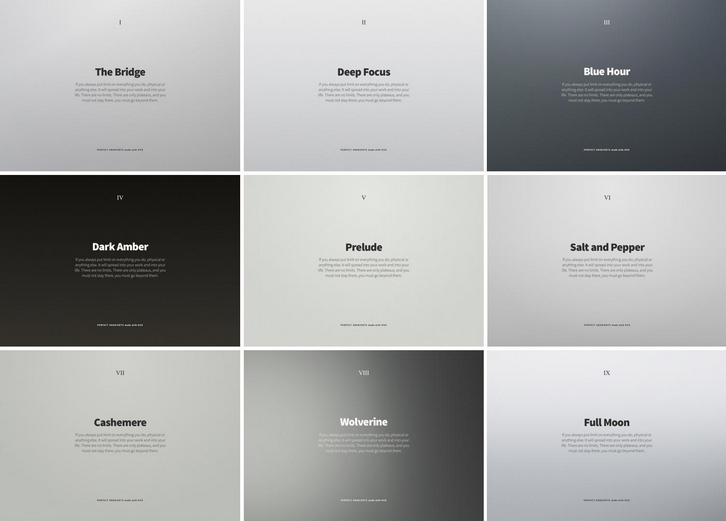
Created by LA-based designer, Vladimir Kudinov, Hue: Free Promo Backdrops and Gradients is a collection of 49 backdrops and gradients that lend atmosphere to layouts and product shots. The collection is photo-realistic, blending seamlessly with product photographs; and reminiscent of Scandinavian design, with cool greys and warm pastels dominating. The atmospheric Wolverine, the stylish Golden Leaf, and the calm Milky Way are particular favourites.
Designed for use in Sketch, the files are supplied as a .sketch file; however 2800px by 2000px PNG files are also provided for each gradient, so Photoshop and Affinity Photo devotees will find them equally usable. The Hue collection is free for both personal and commercial use.
Requirements: –
Demo: https://www.behance.net/gallery/30067997/Hue…
License: License Free







