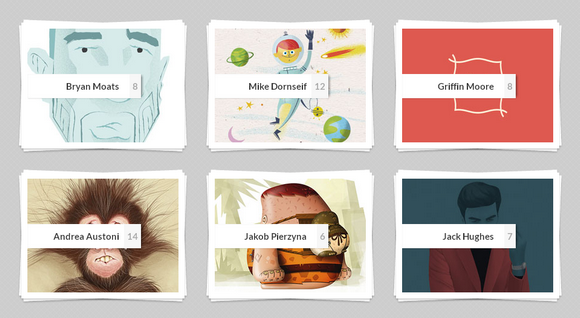
Adaptive Thumbnail Pile Effect with Automatic Grouping is an experimental jQuery plugin that will group thumbnails by a shared data-attribute into a pile. When clicking on the pile, the thumbnails that belong to that pile will be spread into a grid using CSS transitions.
This allows the automatic grouping of thumbnails using a pile effect. The thumbnails will group according to their shared data-pile attribute and once clicked, the pile will disperse and its thumbnails fly to their positions. The thumbnails can be slightly rotated or positioned with a delay.
And best of all, the grid itself is adaptive, meaning that if there is not enough horizontal space considering the width and the gutter of the items, the column count will decrease and the grid will re-order.
Requirements: jQuery Framework
Demo: http://tympanus.net/Development/Stapel/
License: License Free
Creating a truly responsive image gallery can be a very tricky and difficult thing. There are so many factors to consider like the layout and the features, and so many choices to make when it comes to delivering a good viewing experience for every device.
Gamma Gallery is an attempt to create an image gallery that uses a similar responsive images approach to the proposed picture element. Focused on providing suitable image sizes for both, the fluid grid thumbnails and the full image view, the selection of images also depends on container dimensions and not solely on the window size.

Requirements: jQuery Framework
Download Link: http://tympanus.net/Development/GammaGallery/
License: MIT License
Tiny Circleslider is a circular slider / carousel. That was built to provide web developers with a cool but subtle alternative to all those standard carousels. Tiny Circleslider can blend in on any wepage. It was built using the javascript jQuery library.
It supports iPhone, iPad and Android as well. A interval can be set to slide automaticaly every given milliseconds. You can fire a callback after every move. It is easy customizable and lightweight with only 130 lines of code. The mimified size is only 4 KB.

Requirements: jQuery Framework
Demo: http://baijs.nl/tinycircleslider/
License: MIT, GPL License
TiltShift.js is a jQuery plugin that uses the CSS3 image filters to replicate the tilt-shift effect. This is a proof of concept and currently only works in Chrome & Safari 6.
You can define the focus point, the blur radius, the amount of area that is in focus, the amount of area between complete focus and complete blur, and the direction of the effect. TiltShift.js is released under GPL License.

Requirements: jQuery framework
Demo: http://www.noeltock.com/tilt-shift-css3-jquery-plugin/
License: GPL License
Cover Flow is an animated, three dimensional graphical user interface integrated within iTunes, the Macintosh Finder, and other Apple Inc. products for visually flipping through snapshots of documents, website bookmarks, album artwork, or photographs.
Cover Flow is browsed using the on-screen scrollbar, mouse wheel, gestures, or by selecting a file from a list, which flips through the pages to bring the associated image into view. Here we have CoverScroll jQuery plugin, which is a CSS3 variant of the Apple’s CoverFlow design pattern. It’s very handy if you would like to showcase some pictures in this way.

Requirements: jQuery Framework
Demo: http://slobodan.99k.org/plugins/coverscroll.html
License: License Free
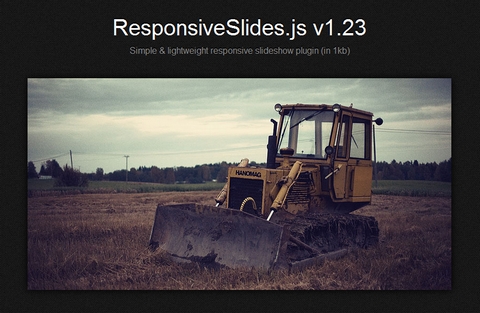
ResponsiveSlides.js is a tiny jQuery plugin that creates a responsive slideshow using images inside <ul>. It works with wide range of browsers including all IE versions from IE6 and up. It also adds css max-width support for IE6 and other browsers that don’t natively support it. Only dependency is jQuery (1.4 and up supported) and that all the images are same size.
Biggest difference to other responsive slideshow plugins is the file size (985 bytes minified and gzipped) + that this one doesn’t try to do everything. ResponsiveSlides.js has basically only two different modes: Either it just automatically fades the images, or operates as a responsive image container with pagination and/or navigation to fade between slides.
Requirements: jQuery Framework
Demo: http://responsive-slides.viljamis.com/
License: MIT License
Camera Slideshow is an open source jQuery slideshow with many effects, transitions, easy to customize, using canvas and mobile ready. You can download it and use it for free, you can also include it in your projects and sell it as part of a bigger work.
Camera slideshow requires jQuery 1.4+ and other jQuery plugins are necessary if you want to use some functionalities: jQuery Easing and a customized version of jQuery Mobile to use it on mobile devices. These plugins are included in the zip file you can download.

Requirements: jQuery Framework
Demo: http://www.pixedelic.com/plugins/camera/
License: MIT License
Adipoli is a simple jQuery plugin used to bring stylish image hover effects. There are over 20 transition effects (popout, sliceDown, sliceUp, fold, boxRain, boxRainGrow and etc…) you can choose from. You can also select the start effects, like transparent, normal, overlay and grayscale. It is released under MIT License.

Requirements: jQuery Framework
Demo: http://jobyj.in/adipoli/
License: MIT License
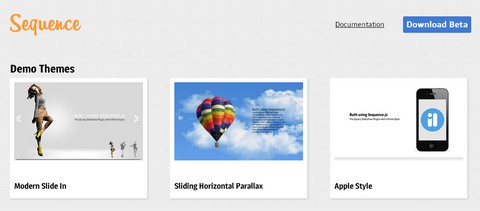
Sequence is the jQuery slider plugin with infinite style. It provides the complete functionality for a website slider without forcing you to use a set theme. In fact, Sequence has no in-built theme, leaving you complete creative control to build a unique slider using only CSS3.
It supports all modern browsers, and gracefully degrades in older browsers. And it supports touch devices and swiping too. You can check out the Modern Slide In, Sliding Horizontal Parallax and Apple Style demo.
Requirements: jQuery Framework
Demo: http://www.sequencejs.com/
License: BSD, MIT License
Glisse.js is a simple, responsive and fully customizable jQuery photo viewer. You’ll like the transitions between two pictures entirely assumed by CSS3. It scales to the viewport and is iPad and iPhone ready.
It supports Keyboard navigation and fully customizable via CSS. There are total 7 different transition effects for you to choose from. However, please note that Glisse.js uses a lot of new CSS3 features like keyframes. It’s definitely not a good idea to uses it on a general public websites.

Requirements: CSS3 Support and jQuery Framework
Demo: http://glisse.victorcoulon.fr/
License: MIT License







