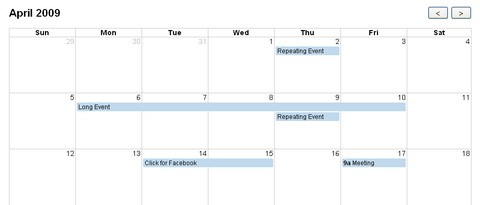
FullCalendar is a jQuery plugin that provides a full-sized, drag & drop calendar. It uses AJAX to fetch events on-the-fly for each month and is easily configured to use your own feed format (an extension is provided for Google Calendar). It is visually customizable and exposes hooks for user-triggered events (like clicking or dragging an event).
FullCalendar is great for displaying events, but it isn’t a complete solution for event content-management. Beyond dragging an event to a different day, you cannot change an event’s name, time-of-day, or other associated data. It is up to you to add this functionality through FullCalendar’s event hooks.
Requirements: jQuery and jQuery UI Framework
Demo: http://arshaw.com/fullcalendar/
License: MIT, GPL License
One of the most common requests from clients when it comes to WordPress personalization, is to add a basic event calendar to their website. Finding a good place to position a big table like a calendar within your WordPress template is always a taught work. In addition, the <table> tag itself is often quite difficult to style in a good way.
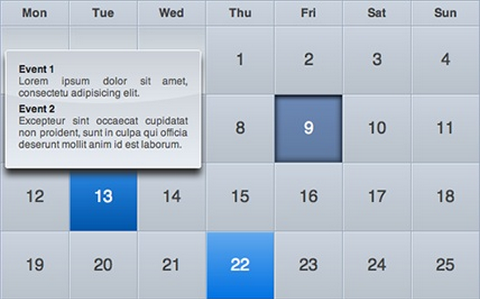
Therefore, Stefano Verna came up with astonishing iCal-like calendars with jQuery. All the magic takes place with some ninja CSS. In addition to the plain calendar structure, You can see a lightweight Coda-like effect for events description popup as well.
Requirements: jQuery Framework
Demo: http://www.stefanoverna.com/wp-content/tutorials/ical_like_calendar/
License: License Free
Jamie was looking around many of the tutorial sites there are hardly any Calendar systems. Therefore, he has developed a Calendar System using MySQL and Script.aculo.us. There are 3 main parts, the Javascript, the HTML and the PHP script. You can change the date with the form and it will update the calendar without having to reload the entire page, AJAX style.
Setting up the Calendar System is easy. Simply copy the entire calendar into whatever directory you want. Create your database and import the “databaseSQL.sql” file into it, this will create the default data for running it. And then, alter the “databaseConnection.php” file to show your connection details.That should be it.

Requirements: Prototype, Script.aculo.us Framework, PHP, MySQL
Demo: http://nodstrum.com/wp-content/plugins…
License: License Free
Date Picker jQuery Plugin allows users select a date or a range selection of dates easily. It hasa lot of options and easy to fit in your web application. It supports multiple calendars in the component. We can mark dates as special, weekends, special days. More importantly, we can easy to customize the look by changing CSS.
Implementation of DatePicker jQuery Plugin is easy. You just need to attach the Javascript and CSS files to your document. Edit CSS file and fix the paths to images and change colors to fit your site theme, and then select the elements in a jQuery way and call the plugin.

Requirements: –
Demo: http://www.eyecon.ro/datepicker/
License: License Free
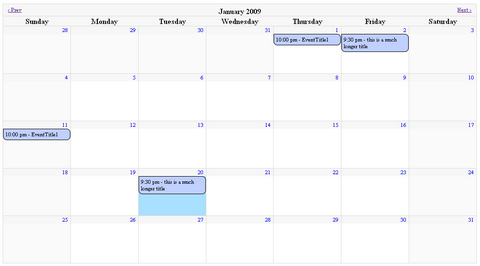
jMonthCalendar is a full month calendar that supports events. You simply initialize the calendar with options and an events array and it can handle the rest. It is compatible with jQuery 1.3.0.
jMonthCalendar has extension points that allow the developer to interact with the calendar when the display is about to change months, after the display has changed months and when the event bubbles are clicked on. By default the events would each have a URL supplied that would link to a details page.
Requirements: jQuery Framework 1.3.0
Demo: http://www.bytecyclist.com/SourceCode/jMonthCalendar/1.0.0/Index.html
License: License Free
Filling a time field in a form is relatively annoying. There is a bunch of JavaScript “time” pickers, but they seem to always stick to the same approach, most of them sucks in term of user interaction and usability .
Above all Haineault thinks a time picker widget should not alter the way users input data, if they want to use the field as a plain text field and enter “8:00” manually they should be able to. But there is still room for innovation, so he has determined a set of goals and tried to design his own widget around it:
- It should be unobtrusive
- It should degrade gracefuly
- It should require maximum 2 clicks
- It should allow intuitive keyboard navigation
- It should be touch-friendly (think iphone, tablet pc, etc..)
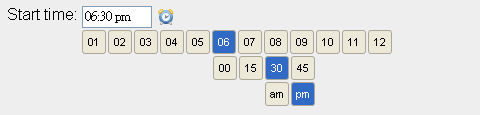
I love the idea and how it works. You can check the demo here. However, this project is experimental and in its very early stage, so there is probably still a handful of bugs to fix. Please feel free to give him some feedback.
Requirements: jQuery Framework
Demo: http://haineault.com/media/examples/jquery-utils/demo/ui-timepickr.html
License: MIT License
ClockLink provides fashionable yet free online clocks made from Flash that can be easily embedded in your web page or in your blog. All you need to do is simply paste the tag on your web page. You can choose a time zone for your clock so it will show the correct time, and they also provide a variety of selection, including Analog Clocks, Digital Clocks, Count Down Clocks, Count Up Clocks, World Clocks, and many more. Decorate your website or blog with ClockLink’s clocks now.

Requirements:-
Demo: http://www.clocklink.com
License: License Free
The Vista-like Ajax Calendar (vlaCalendar) version 2 is a unobtrusive web version of the slick and profound Windows Vista taskbar calendar, by using the mootools javascript framework, AJAX, XHTML, CSS and PHP.
This Vista-like Ajax Calendar script is licensed under the Creative Commons Attribution- NonCommercial 3.0 License. You can use these files however you want, but don’t redistribute without the proper credits and do not use this for commercial purposes.

Requirements: Mootools Framework
Demo: http://dev.base86.com/scripts/vista-like_ajax_calendar_version_2.html
License: Creative Commons 3.0 License
jQuery Interactive Date Range Picker is a modified version of jQuery UI’s Datepicker. This version is optimized for quickly selecting a date from a list of preset dates/ranges, and they added smooth transitions when additional options are revealed. The modifications include:
- shortcut links to preset date ranges, for example, “Past 30 days” or “Current YTD,”
- links to “All dates before…” and “All dates after…” to simplify selecting a range of values where the data set is very large or the high or low end value is an unknown
- only showing the number of calendars needed for choosing a particular range
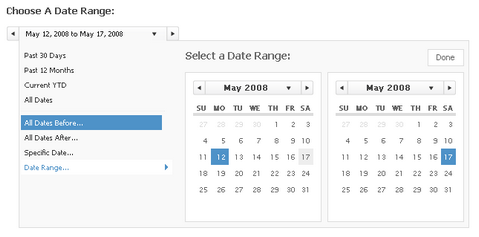
The interactive date range picker shown is not coded for ease of modification, but is free to reuse and modify with a proper attribution to Filament Group. You can visit the demo page and view the source code to see how it works.
Requirements: –
Demo: http://www.filamentgroup.com/examples/datepicker/
License: GPL and Creative Commons 3.0 License
Sliding Date-Picker enables you to pick dates with a simple slider bar. By dragging the bar over the time-line, the dates change instantly. Besides this, when the user decides to manually change the dates, the bar is automatically adjusted to the corresponding dates. Sliding Date-Picker is based on Prototype/Scriptaculous, but now combined with the DateJs library as well. It has been tested it in Firefox 2.x and IE6+ and it is licensed under the GPL license.

Requirements: Firefox 2.x and IE6+
Demo: http://www.ajaxorized.com/dateslider/slider.html
License: GPL License







