Moment.js is a lightweight javascript date library for parsing, manipulating, and formatting dates. It was designed to work in both the browser and in NodeJS. All code will work in both environments. All unit tests are run in both environments.
Instead of modifying the native Date.prototype, Moment.js creates a wrapper for the Dateobject. To get this wrapper object, simply call moment()with one of the supported input types. Moment.js is freely distributable under the terms of the MIT license.

Requirements: Javascript Framework
Demo: http://momentjs.com/
License: MIT License
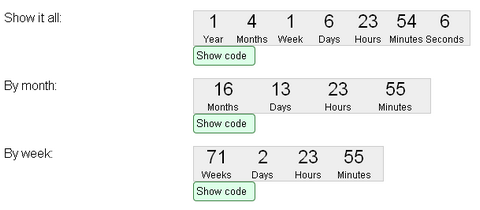
jQuery Countdown is a jQuery plugin that sets a div or span to show a countdown to a given time. The countdown functionality can easily be added to a division with appropriate default settings, although you do need to set the target time.
You can also use images instead of text. It’s possible to count up instead of down. You can stop or pause (lap time) the countdown and resume. It supports Callbacks per tick and/or on expiry. And best of all, it supports over 40 localisations.
Requirements: jQuery Framework
Demo: http://keith-wood.name/countdown.html
License: GPL , MIT License
jQuery Timelinr is a simple plugin helps you to give more life to the boring timelines. It supports horizontal and vertical layouts, and you can specify parameters for most attributes: speed, transparency, auto-play and etc… You can also customize the style with CSS easily.

Requirements: jQuery Framework
Demo: http://www.csslab.cl/ejemplos/timelinr/latest/horizontal.html
License: License Free
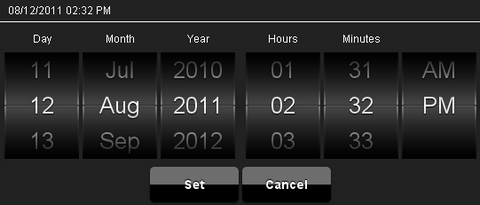
Mobiscroll is a wheel scroller/Date and Time picker jQuery plugin for touch devices (Android phones, iPhone, iPad, Galaxy Tab). The control can easily be customized to support any custom values and can even be used as an intuitive alternative to the native select control (dropdown list).
The control is themable. You can easily change the appearance of if in CSS. It also comes with pre-defined, nice looking color schemes. It has been tested on iOS4, Android 2.2, Android 2.3, Chrome, Safari, Firefox, IE9.
Requirements: jQuery Framework
Demo: http://code.google.com/p/mobiscroll/
License: MIT License
glDatePicker is a simple, customizable, lightweight date picker calendar plugin for jQuery weighing in 4KB compressed (11KB uncompressed).
It includes features like forward and backward navigation, current date highlight, restricting selection of dates, individual styles per date picker, and show currently selected date.

Requirements: jQuery Framework
Demo: http://code.gautamlad.com/glDatePicker/
License: License Free
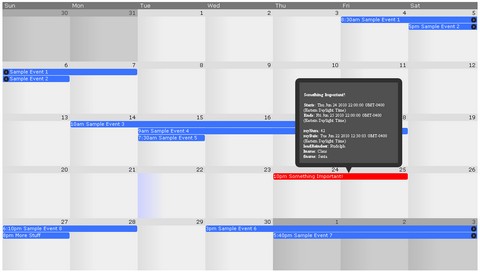
jQuery Frontier Calendar is a full month calendar jQuery plugin that looks like Google Calendar. All UI elements such as next-month & previous-month buttons, add event form, edit event form, tooltips, etc, are not part of the calendar plugin. These are to be created by you so you can control how they look. Use the API hooks in your form elements to control the calendar.
When there are too many agenda items to fit within a day cell a “more” link appears. Clicking this link gives you a jquery modal dialog which displays all the agenda items that fall on that day. You may change the background image via the CSS file.
Requirements: jQuery Framework
Demo: http://code.google.com/p/jquery-frontier-calendar/
License: MIT License
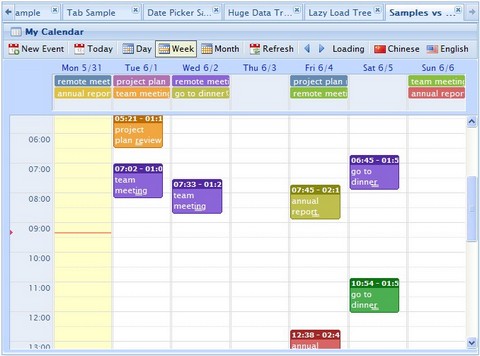
wdCalendar is a jquery based google calendar clone. It cover most google calendar features. User can choose to have a daily view, weekly view or monthly view. User can easily create, update or remove events by drag & drop. It is very simple to to integrate wdCalendar with a database.
wdCalendar is free (open source LGPL license), easy to use, and with great functionalities. You can check out the demo, and download it here.
Requirements: jQuery Framework
Demo: http://www.web-delicious.com/jquery-plugins-demo…
License: LGPL License
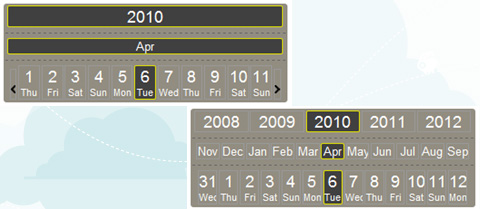
CalendarPicker is a free ultra-light calendar/date-picker jQuery plugin. It looks different from all the others, supports multiple languages, and allows fast movement across months and years. This approach might not suitable for every context, but I am sure someone will find it useful.
CalendarPicker enables mouse wheel to change dates; it is enabled on years, months and days bars. Calendar picker is released under MIT license.
Requirements: jQuery Framework
Demo: http://bugsvoice.com/applications/bugsVoice/site/test…
License: MIT License
jsDatePick is a javascript date picker that uses DOM techniques to generate its HTML code. Read the parameters and working examples below, and within minutes, you can have a popup date picking solution on your website.
The user launches the calendar by entering the input field, and then chooses a date, automatically returning the selected date to the field. jsDatePick has a range of parameters for extending or limiting default functionality.

Requirements: –
Demo: http://javascriptcalendar.org/javascript-date-picker.php
License: GPL License
The two Clocks are pure HTML using JavaScript and CSS rotation. There are no Adobe Flash files or <canvas> going on, just regular <div> and <img> tags. The way it works is by taking those images in an { overflow: hidden } <div> and rotating them, via JavaScript, using the proposed CSS transform property.
However, this isn’t going to work in any currently available version of Internet Explorer or many older browsers. It only works in Google Chrome, Safari and Firefox 3.5+ browsers support the CSS transform property.

Requirements: Browsers support CSS transform property
Demo: http://joncom.be/code/css-clocks/
License: License Free







