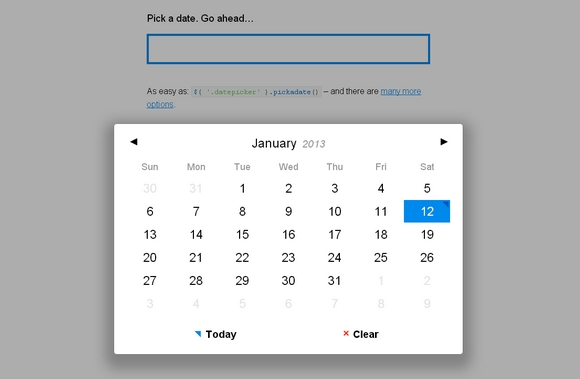
Pickadate.js is a fully responsive and lightweight jQuery dateinput picker. It looks pretty neat and simple. It is easy to use. And alos, you can have different themes for it as well.
It has been tested on IE7+, Chrome, Firefox, Safari, Opera, iOS Safari, Android browser. The pickadate.js script supports all modern browsers and IE 9+. To support IE 7+ and other old browsers, include pickadate.legacy.js instead. It is released under MIT License.
Requirements: jQuery Framework
Download Link: http://amsul.github.com/pickadate.js/
License: MIT License
Codrops has shared a flexible calendar concept with us. Calendars can be a very tricky thing when it comes to their layout and responsiveness. This is an experiment for trying out some grid layouts that can be applied to calendars.
They have created A Flexible Calendar jQuery Plugin for the calendar itself and you can see some examples of how to use it in the demos. The aim is to provide a suitable layout for both, small and big screens and keeping the calendar structure fluid when possible. On large screens we want to show a grid-based layout while on smaller screens, they made it simply stack the days of the month.

Requirements: jQuery Framework
Demo: http://tympanus.net/codrops/2012/11/27/calendario-a-flexible-calendar…
License: License Free
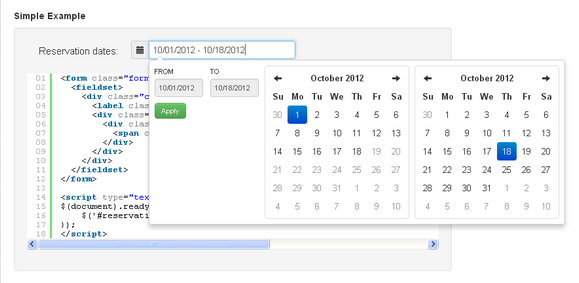
Date Range Picker for Twitter Bootstrap is a dropdown menu to choose date ranges for reports. It matches the existing dropdown and button styles of Bootstrap. The date range picker relies on jQuery, Datejs for parsing strings into dates and defining custom ranges, and the Twitter Bootstrap CSS.
For basic use cases like collecting event or reservation dates, you can attach it to a text input to pop up two clickable calendars to choose dates from. For more advanced use cases, you can attach a date range picker to any element, pre-define your own date ranges for the user to choose from, and set a custom callback function to receive the chosen dates.
Requirements: jQuery, Datejs, Twitter Bootstrap
Demo: http://www.dangrossman.info/2012/08/20/a-date-range-picker…
License: Apache License 2.0
Twitter Bootstrap is getting very popular recently. Stefan Petre has developed two really useful plugins for Bootstrap in order to enhance the experience. They are Colorpicker for Bootstrap and Datepicker for Bootstrap.
Colorpicker for Bootstrap can let you add color picker to text field or to any other element. It can be used as a component on Bootstrap. It supports multiple formats: hex, rgb, rgba, hsl, hsla.
Datepicker for Bootstrap can let you add datepicker picker to field or to any other element. It supports formats: dd, d, mm, m, yyyy, yy, with separators: -, /, .

Requirements: Bootstrap Framework
Demo: http://www.eyecon.ro/bootstrap-colorpicker/
Demo: http://www.eyecon.ro/bootstrap-datepicker/
License: Apache 2.0 License
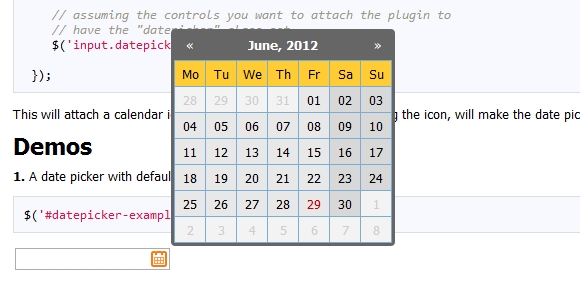
Zebra Datepicker is a small, compact and highly configurable datepicker jQuery plugin, meant to enrich forms by adding the datepicker functionality to them. This jQuery plugin will automatically add a calendar icon to the indicated input fields which, when clicked, will open the attached datepicker.
Users can easily jump between months and years due to the datepicker’s intuitive interface. The selected date will be entered in the input field using the date format of choice, configurable in the datepicker’s options. It is distributed under the LGPL.
Requirements: –
Demo: http://stefangabos.ro/jquery/zebra-datepicker/
License: LGPL License
Countdowns can be a great way to build up anticipation when launching a new website or web application, it gives users a clear indication of how long they need to wait before they can get access to your site.
jQuery Countdown is a handy and pretty jquery countdown plugin for you. You can easily customize the format, images, width and height. And it’s only 1.7 KB. Best of all, it’s released under Apache License 2.0 which is free for download.

Requirements: jQuery Framework
Demo: http://jquery-countdown.googlecode.com/svn/trunk/index.html
License: Apache License 2.0
XDate is a thin wrapper around JavaScript’s native Date object that provides enhanced functionality for parsing, formatting, and manipulating dates. It implements the same methods as the native Date, so it should seem very familiar.
Also, it is non-destructive to the DOM, so it can safely be included in third party libraries without fear of side effects. It is released under MIT and GPL License.

Requirements: JavaScript Framework
Demo: http://arshaw.com/xdate/
License: MIT, GPL License
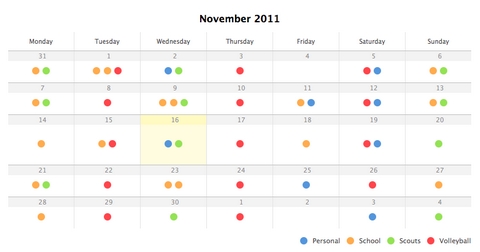
Jef Vlamings had an idea to build a calendar app called LiveCal, which was supposed to become a platform where you could share calendars. The whole idea was that calendars would become something you subscribe to. Due to the complexity of the idea and the lack of knowledge, the project never really took off.
However, he made a CSS3 calendar with some jQuery animation while he was working on the project. And then he has shared a nice tutorial on How to Create A Clean Calendar in CSS3 & jQuery.
Requirements: jQuery Framework and CSS3
Demo: http://www.jepija.com//blog/projects/CSS3-calendar/
License: License Free
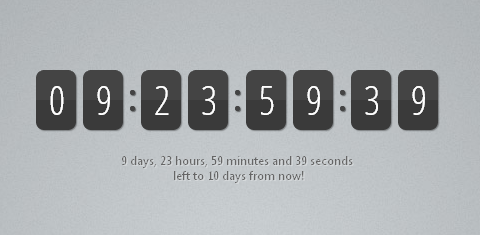
When building a coming soon or event page, you find yourself in search for a good way to display the remaining time. A countdown gives the feel of urgency, and combined with an email field will yield more signups for your newsletter.
Tutorialzine has shared a tutorial on Making a jQuery Countdown Timer. It will show the remaining days, hours, minutes and seconds to your event, as well as an animated updates on every second.
Requirements: jQuery Framework
Demo: http://demo.tutorialzine.com/2011/12/countdown-jquery/
License: License Free
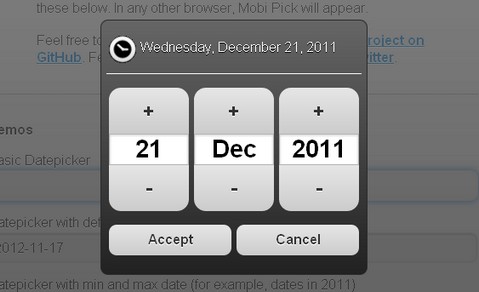
Mobi Pick is an Android-style datepicker widget for jQuery Mobile. It uses the date library XDate and allows progressive enhancement for date input fields using Modernizr. It is free for download and released under MIT license.
If Mobi Pick does not suit your porject, you can also take a look at other datepicker and calendar components we have mentioned before.
Requirements: jQuery Mobile
Demo: http://mobipick.sustainablepace.net/
License: MIT License







