

Open Source Resources for Web Application Developers

Shopify - Online Store Builder
Follow Us on Social Sites
Subscribe RSS Subscribe Newsletter Like us on Facebook Follow us on Twitter Follow us on Google+
  • Home
  • News
  • Plugins
  • Design
  • Others
  • Books
  • About
25 Dec

How to Correct Legacy Document Problems with Fonts

  • Information
  • Leave a Comment

Modern browsers like Internet Explorer 10 and 9 introduced sub-pixel font positioning as part of its hardware-accelerated rendering of HTML5 content. That was an important step into the future as it enabled zoom-independent text metrics—an important characteristic when touch gestures like pinch-zoom are part of the browsing experience on Windows 8 touch-enabled devices. This article shows how easy it is to help your fonts look better across many browsers by declaring Standards Mode.

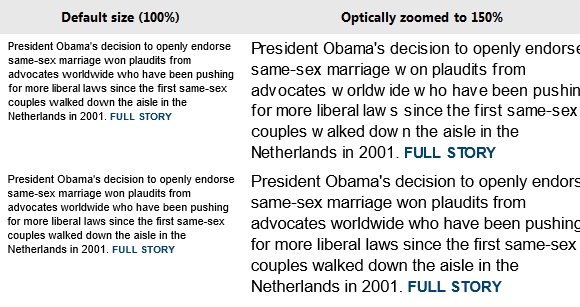
Zoom Example: Legacy vs. Standards Modes

Below are side-by-side comparisons showing text from a popular news site in 8 and 10 document modes at 100% and 150%. Note the especially poor letter spacing between some letters in the 150% 8 mode example (upper right).
optical-zooming

Move to Standards Today

The best fix for this behavior is to move your pages Standards Mode. Compat Inspector is a valuable tool to help you migrate to IE9 or IE10 mode. Compat Inspector identifies potential issues and offers steps you can take to resolve them. In general, the HTML, CSS, and JavaScript markup and code you use with other browsers will work great in IE10 once any browser detection is replaced with feature detection and vendor-specific CSS prefixes are updated to include -ms- or unprefixed versions. Modernizr is a JavaScript library that can help with these issues.

Specifying Sub-pixel Metrics in Legacy Modes

If moving to standards-based markup is out-of-scope for your site at this time, you may enable sub-pixel text metrics in legacy document modes using an HTTP header or tag. Based on our testing, most sites will work fine with natural text metrics.

The format of the HTTP header is:

X-UA-TextLayoutMetrics: Natural

The syntax of the tag is:

<meta http-equiv="X-UA-TextLayoutMetrics" content="natural" />

Support for this HTTP header and tag are new in the final release version of IE10 on Windows 8.

Be Ready for IE10

Fonts aren’t the only reason to move towards Standards. There are also other factors like 30% better performance. We hope these changes help you moved your site from legacy document mode site to IE9’s default standards mode today and be ready for IE10 tomorrow. Visitors to your site using IE10 on Windows 8 will definitely thank you.

About the Author

Ted Johnson is a Program Manager Lead in the Internet Explorer team focusing on Web Graphics

Share
Tweet
Sponsors
subscribe to our newsletter - weekly free resouces for web developers
follow us on social sites - rss, facebook, google+, Twitter
Subscribe RSS Like us on Facebook Follow us on Twitter Follow us on Google+
Related Resources
How to Adapt Your Site to Different Window Sizes

How to Adapt Your Site to Different Window Sizes

Windows Internet Explorer 8 for Web Developers

Windows Internet Explorer 8 for Web Developers

Code Standards & Front-end Development Best Practices

Code Standards & Front-end Development Best Practices

A Signature Pad for Your HTML Forms

A Signature Pad for Your HTML Forms

Create a Web App Admin User Interface in Photoshop

Create a Web App Admin User Interface in Photoshop

Add Conversations to Any Site with Moot Forums

Add Conversations to Any Site with Moot Forums

Comments

Open Source Resources for You

What we need is a list of the top quality resources, so that we can spend more time on our web development. WebAppers only picks the top quality web development resources for you.

© Copyright 2012 WebAppers | About | Archives | Privacy Policy | Advertise | Contact

Sponsors
Advertise Here
Search
By Keywords
30 Days / All Time
  • 1
  • 2
  • 3
  • 4
  • 5
  • 6
  • 7
  • 8
  • 9
  • 10
  • Professional Business Cards Made By Designers
  • Best Free Chrome Extensions for Web Developers
  • All of the Best Free WordPress Themes You Need
  • How to Create a Web App Admin User Interface
  • Nice List of Open Source Fish Eye Menu
  • Best Web Admin Templates
  • 25 Useful Blogs for Web Design & Development
  • Simple Javascript Progress Bar with CSS
  • 10 Useful & Quality Design Resources
  • Free Web Application Icons
  • How to Create High-Performance Code
  • Easy to Use, Drag & Drop Bootstrap Interface Builder
  • Tiny Responsive jQuery Slider without Fancy Effects
  • How to Create Realtime Multi-player Games in HTML5
  • Create an Amazon-like Navigation Menu with jQuery
  • A True Responsive jQuery Lightbox Plugin for Free
  • How to Use Web Workers for Image Manipulation
  • Pretty Neat jQuery Mobile Theme Based on Flat UI
  • How to Make FullScreen Page Transitions with CSS
  • Super Smooth CSS Transitions for jQuery
Sponsors
Plugins
  • Advertisement15
  • Calendar47
  • Capture19
  • Charts55
  • Chat22
  • Demo Tour16
  • Gallery121
  • Maps30
  • Menu86
  • Polls9
  • Popup49
  • Tooltips42
  • Upload33
  • Video18
Desgin
  • Brushes11
  • Buttons25
  • Color Schemes24
  • Fonts47
  • Forms112
  • Icons108
  • Patterns24
  • PS Tutorials15
  • Stock Photos21
  • Tables25
Others
  • Announcement103
  • Best Collections6
  • Code54
  • eCommerce24
  • Framework215
  • Hosting13
  • Information239
  • Inspiration32
  • Legal Documents10
  • Reviews8
  • Security13
  • Social28
  • Sound16
  • Stats39
  • Tools293
  • Webmail14
Licesnes
  • BSD License67
  • CC License122
  • GPL License224
  • LGPL License40
  • License Free739
  • MIT License408
Sponsors
Advertise Here
Partners
NetDNA


