

Open Source Resources for Web Application Developers

Shopify - Online Store Builder
Follow Us on Social Sites
Subscribe RSS Subscribe Newsletter Like us on Facebook Follow us on Twitter Follow us on Google+
  • Home
  • News
  • Plugins
  • Design
  • Others
  • Books
  • About
10 May

jConfirmAction: A jQuery Plugin for Confirmation Box

  • GPL License, Popup
  • Leave a Comment

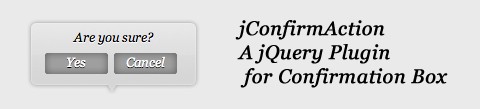
jConfirmAction is a jQuery plugin that aims to replace a plain confirmation box with a cute one. This plugin will help you to create a flying bubble confirmation box upside your link. Basically this plugin will create a DIV element that contains confirmation box after your clicked element, then it will appear with fading in and dissappear with fading out.

To create that one you just need to include jConfirmation plugin to your page, create a link, specify a class name, ask jConfirmAction to create a confirmation box and that’s it you have a cute confirmation box.
confirmation-box

Requirements: jQuery Framework
Demo:
http://webstuffshare.com/demo/jConfirmAction/
License: GPL License

Share
Tweet
Sponsors
subscribe to our newsletter - weekly free resouces for web developers
follow us on social sites - rss, facebook, google+, Twitter
Subscribe RSS Like us on Facebook Follow us on Twitter Follow us on Google+
Related Resources
Seek Attention jQuery Plugin

Seek Attention jQuery Plugin

Easy Image or Content Slider for jQuery

Easy Image or Content Slider for jQuery

Increase the Size of Click Targets And Get More Conversions

Increase the Size of Click Targets And Get More Conversions

Create Alert, Confirmation Messages with Noty jQuery Plugin

Create Alert, Confirmation Messages with Noty jQuery Plugin

TelePro Free Website Privacy Policy, Terms and Conditions

TelePro Free Website Privacy Policy, Terms and Conditions

Contained Sticky Scroll jQuery Plugin

Contained Sticky Scroll jQuery Plugin

Comments
  • http://xpressabhi.com abhishek

    What is the benefit of jQuery here ,you can do this using simple javascript.

  • maertsch

    I like it. I’ve added Parameters for the FadeIn and FadeOut animation to control everything better. i thought is was kind of slow with 300ms.

    But is very usefull.
    Why jQuery? why NOT jQuery!

  • http://1click.at Michael Pehl

    Thanks for sharing :)

  • plasmo

    @abhiskeh
    “you can do this using simple javascript”
    yes but some people want a different solution
    in programming there’s always many ways to do one thing because not everyone likes doing it a particular way

    and the benefit is that you can add in multiple buttons for the dialog instead of just the default javascript prompt “ok” “cancel”

  • Rob

    @abhiskeh
    Because of people like you who settle for the default (ugly) solutions, the web and software looks like hell. You should never settle for the simple things, look at Apple, it’s all about user experience.

Open Source Resources for You

What we need is a list of the top quality resources, so that we can spend more time on our web development. WebAppers only picks the top quality web development resources for you.

© Copyright 2012 WebAppers | About | Archives | Privacy Policy | Advertise | Contact

Sponsors
Advertise Here
Search
By Keywords
30 Days / All Time
  • 1
  • 2
  • 3
  • 4
  • 5
  • 6
  • 7
  • 8
  • 9
  • 10
  • Professional Business Cards Made By Designers
  • Best Free Chrome Extensions for Web Developers
  • All of the Best Free WordPress Themes You Need
  • How to Create a Web App Admin User Interface
  • Nice List of Open Source Fish Eye Menu
  • Best Web Admin Templates
  • 25 Useful Blogs for Web Design & Development
  • Simple Javascript Progress Bar with CSS
  • 10 Useful & Quality Design Resources
  • Free Web Application Icons
  • How to Create High-Performance Code
  • Tiny Responsive jQuery Slider without Fancy Effects
  • How to Create Realtime Multi-player Games in HTML5
  • A True Responsive jQuery Lightbox Plugin for Free
  • Create an Amazon-like Navigation Menu with jQuery
  • Super Smooth CSS Transitions for jQuery
  • Pretty Neat jQuery Mobile Theme Based on Flat UI
  • How to Use Web Workers for Image Manipulation
  • How to Make FullScreen Page Transitions with CSS
  • Ghost: A Revolutionary Open Source Blogging Platform
Sponsors
Plugins
  • Advertisement15
  • Calendar47
  • Capture19
  • Charts55
  • Chat22
  • Demo Tour16
  • Gallery121
  • Maps30
  • Menu87
  • Polls9
  • Popup49
  • Tooltips42
  • Upload33
  • Video18
Desgin
  • Brushes11
  • Buttons25
  • Color Schemes25
  • Fonts47
  • Forms112
  • Icons108
  • Patterns24
  • PS Tutorials15
  • Stock Photos21
  • Tables25
Others
  • Announcement103
  • Best Collections6
  • Code55
  • eCommerce24
  • Framework215
  • Hosting13
  • Information240
  • Inspiration32
  • Legal Documents10
  • Reviews8
  • Security13
  • Social28
  • Sound16
  • Stats39
  • Tools293
  • Webmail14
Licesnes
  • BSD License67
  • CC License123
  • GPL License224
  • LGPL License40
  • License Free739
  • MIT License411
Sponsors
Advertise Here
Partners
MaxCDN



