

Open Source Resources for Web Application Developers

Shopify - Online Store Builder
Follow Us on Social Sites
Subscribe RSS Subscribe Newsletter Like us on Facebook Follow us on Twitter Follow us on Google+
  • Home
  • News
  • Plugins
  • Design
  • Others
  • Books
  • About
17 Apr

Helps Web Designers Find Lighter & Darker Colors

  • Color Schemes
  • Leave a Comment

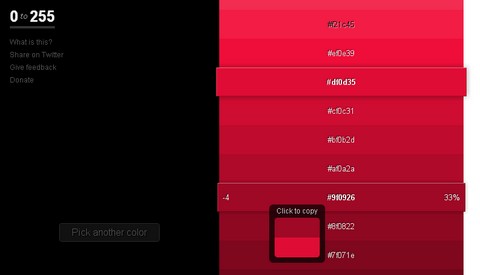
0to255 is a simple tool that helps web designers find lighter and darker colors based on any color. 0to255 cures your color manipulation woes. It’s fun, simple, and a huge time-saver.

Simply pick the color that you want to start with and 0to255 gives you a range of colors from black to white using an interval optimized for web design. Then, just click the variation you want to use and the hex code is automatically copied to your clipboard.
color-picker

Source: http://0to255.com/

Share
Tweet
Sponsors
subscribe to our newsletter - weekly free resouces for web developers
follow us on social sites - rss, facebook, google+, Twitter
Subscribe RSS Like us on Facebook Follow us on Twitter Follow us on Google+
Related Resources
Generate Consistent Color Palette with Colllor

Generate Consistent Color Palette with Colllor

Extract Colors from Web Pages and Photos with ColorSuckr

Extract Colors from Web Pages and Photos with ColorSuckr

CloudApp – Rapid File Sharing Excels with Its Simplicity

CloudApp – Rapid File Sharing Excels with Its Simplicity

Colors Come to Life in 3D with ColoRotate

Colors Come to Life in 3D with ColoRotate

Color Wizard – Color Scheme Generator

Color Wizard – Color Scheme Generator

A Guide to Choosing Colors for Your Brand from Cymbolism

A Guide to Choosing Colors for Your Brand from Cymbolism

Comments
  • http://wesam.ly Wesam Alalem

    Handy tool, thank you ;)

  • http://www.subscript.ca Scott MacDonald

    It is kind of cool, I especially like the interface, however personally I don’t see any realistic use for it, especially if you already have a graphics program open (I know I for one almost always have photoshop open alongside while designing and coding up the front end).

    The colour picker essentially does the exact same thing, just more in depth.

  • http://google.com gusto

    woooooooooooooooooooooooooooooow !! excellent!!!

  • Melvin Hillsman

    Personally, I like it. Your efforts are greatly appreciated I’m sure by many. Mr. MacDonald, I’ve heard it said by Dale Carnegie that sometimes it’s best to keep your opinion to yourself, especially when no one is asking. I am sure the creator of this app did not personally email you for your opinion. Some folks do not have Photoshop or may like to just have this as a quick reference. Photoshop does not give you the visual aesthetics that this app has when choosing colors. Because the colors “pop” I believe a designer can better get an understanding of which colors they would like to use. I believe that anyone who takes time to create such an app should be commended and I for one am able to do that as opposed to offering my “two cents”…

  • http://www.damianherrington.co.uk Damian Herrington

    I love this tool, not only does it provide a quick and easier service to find a colour when I don’t have Photoshop open but the interface is lovely.

  • http://shaunchapmanblog.com/ Shaun Chapman

    Thanks for the kind words everyone. I really appreciate it.

  • Roger Huston

    I have photoshop open all the time and I have been looking for a tool like this for A LONG time. I like the equal stops for each color which will make blended gradients much easier.

    Thanks,

    Roger

  • Francisco Blanchart

    This will be in my toolkit forever. A real time saver. Thanks so much, Shaun.

Open Source Resources for You

What we need is a list of the top quality resources, so that we can spend more time on our web development. WebAppers only picks the top quality web development resources for you.

© Copyright 2012 WebAppers | About | Archives | Privacy Policy | Advertise | Contact

Sponsors
Advertise Here
Search
By Keywords
30 Days / All Time
  • 1
  • 2
  • 3
  • 4
  • 5
  • 6
  • 7
  • 8
  • 9
  • 10
  • Professional Business Cards Made By Designers
  • Best Free Chrome Extensions for Web Developers
  • All of the Best Free WordPress Themes You Need
  • How to Create a Web App Admin User Interface
  • Nice List of Open Source Fish Eye Menu
  • Best Web Admin Templates
  • 25 Useful Blogs for Web Design & Development
  • Simple Javascript Progress Bar with CSS
  • 10 Useful & Quality Design Resources
  • Free Web Application Icons
  • How to Create High-Performance Code
  • Easy to Use, Drag & Drop Bootstrap Interface Builder
  • Tiny Responsive jQuery Slider without Fancy Effects
  • How to Create Realtime Multi-player Games in HTML5
  • Create an Amazon-like Navigation Menu with jQuery
  • A True Responsive jQuery Lightbox Plugin for Free
  • How to Use Web Workers for Image Manipulation
  • Pretty Neat jQuery Mobile Theme Based on Flat UI
  • How to Make FullScreen Page Transitions with CSS
  • Super Smooth CSS Transitions for jQuery
Sponsors
Plugins
  • Advertisement15
  • Calendar47
  • Capture19
  • Charts55
  • Chat22
  • Demo Tour16
  • Gallery121
  • Maps30
  • Menu86
  • Polls9
  • Popup49
  • Tooltips42
  • Upload33
  • Video18
Desgin
  • Brushes11
  • Buttons25
  • Color Schemes24
  • Fonts47
  • Forms112
  • Icons108
  • Patterns24
  • PS Tutorials15
  • Stock Photos21
  • Tables25
Others
  • Announcement103
  • Best Collections6
  • Code54
  • eCommerce24
  • Framework215
  • Hosting13
  • Information239
  • Inspiration32
  • Legal Documents10
  • Reviews8
  • Security13
  • Social28
  • Sound16
  • Stats39
  • Tools293
  • Webmail14
Licesnes
  • BSD License67
  • CC License122
  • GPL License224
  • LGPL License40
  • License Free739
  • MIT License408
Sponsors
Advertise Here
Partners
NetDNA



