

dhtmlxVault (DHTML extensions File Upload) helps you to implement a modern and feature-rich file uploading part of your web application. So much wanted, the Progress bar will inform your customer during long-time operation about the ongoing process. Different file types are displayed with corresponding icons (you may add more file types when required). Built with AJAX technology, the control allows files to be uploaded seamlessly without reloading the entire webpage.
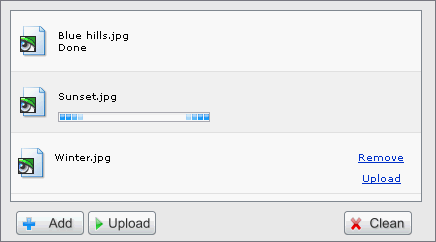
Requirements: Internet Explorer 6+, Mozilla 1.4+, FireFox 0.9+
Demo: http://dhtmlx.com/docs/products/dhtmlxVault/
License: GPL License


The download link(v.1.1 Standart Edition ) does not work. It says file not found.
@Kiran
I have reported the broken link. Hope they will resolve the problem as soon as possible.
@Kiran
I have received an email from dhtmlxVault mentioned that they have fixed the link already.
Thanks for your quick response…..I hope this is a free version and i can use it…correct?
@ Kiran
Yes, I think that is a free version.
The application is good. but what if the user wants to delete and uploaded file. I think this application does not have this feature right know.
I want even that feature also.Can you help me in moving forward in this issue.
@ Kiran
It is just a file upload component, which is not a file management component. So I understand this feature is not included.
Ok…also is there a autocomplete textbox ( like http://www.google.com/webhp?complete=1&hl=en) in this website.I cannot find it.
Where can i find this… i need it.Please help me.
I am from India, where are you from?
Anyways Thanks,
Kiran
@Kiran
http://www.webappers.com/2007/06/08/ajax-auto-suggest-auto-complete-textfield/
You can contact me directly via the contact form.
Hi,
Can i get the source code for the above file upload utility so that i can customize that utility for deleting the documents which i have uploaded?
Thanks,
Kiran
@Kiran
You have to contact them directly I am afraid
Hi,
Can you please tell me to whom i have to contact.
Please provide their email.
Thanks
Kiran
Please visit
http://dhtmlx.com/docs/contact.shtml
Well I guess it doesn’t work as well as it should – when I select a file and click “upload” the site “freezes” and after a few seconds I get a message “file uploaded”. I used Firefox for this one.
The progress bar doesn’t work. When i upload a file, it just uploads like a normal php uploader, then when it is done, the progress bar goes from 0 to 100 then says upload complete.
Excellent control, very easy to use!
If it does not work for you, check your php version, or try another handler – like Perl or Java. Server-side handler is very important, as it is pur JavaScript control – no flash, nothing else but JS.
RSS feed for comments on this post · TrackBack URI



